
Blender 2.82 Alpha Cycles GPU Render Comparison with different tile sizes (4K)

Prof. Michael Klein writes:
I found some time to update some research of 2018 with the latest Blender 2.82 Alpha from today.
(A lot of) Blender artists maybe still using 2.79 and they are used to set higher tiles for faster GPU rendering. Usually by using the Auto Tile Size addon. This is still necessary in 2.79b for optimized GPU rendering.
But in the 2.80 official release and the 2.81 Beta / 2.82 Alpha daily builds there are significant improvements to support optimized hybrid rendering with CPU and GPU. The dev team has been working on multiple CPU/GPU support for single tiles with the goal that tiling doesn’t matter anymore. This means you can use 16×16 for any case. This makes sense of course.
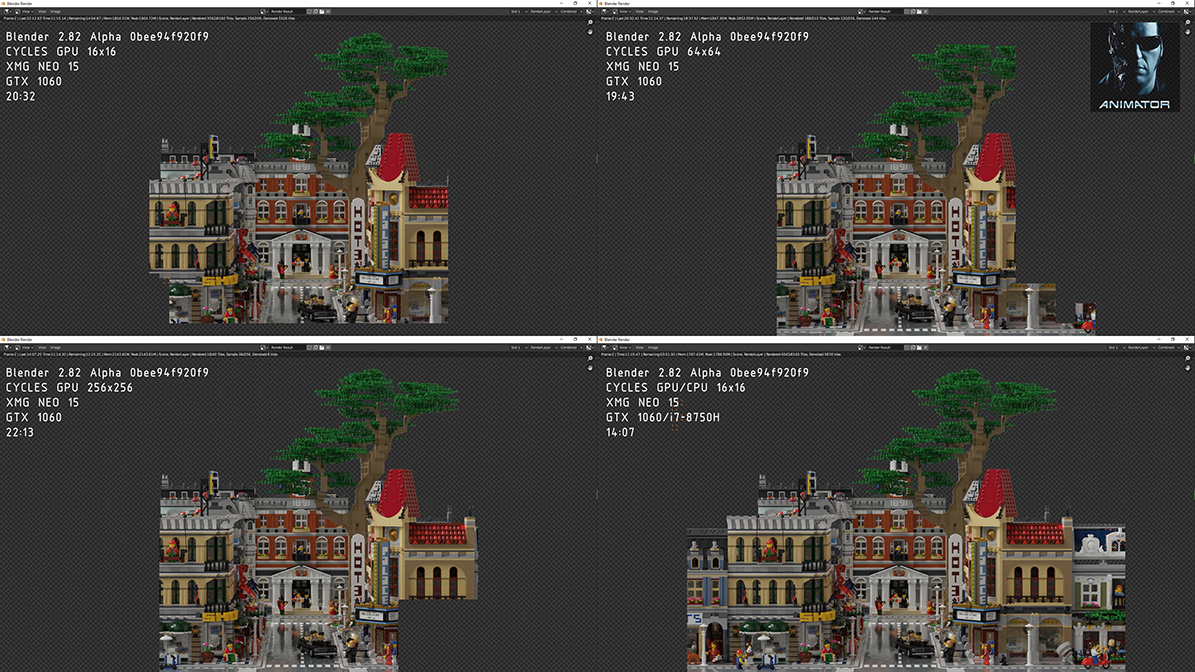
I revisited my 2018 comparison I created with Mecabricks a LEGO® scene with 25,999 LEGO parts and 40,825,145 faces using the principled shader with SSS and textures like scratches and fingerprints. Loading and rendering the scene in 2.82 Alpha works without issues like intended. I never experienced a software that extreme downward and upward compatible.
The comparison shows that rendering at 64×64 is the fastest GPU only method in this specific scene. 16×16 is faster than 256×256.
Schenker XMG NEO 16 – 32GB RAM – GTX 1060 6GB – i7-8750H
Blender 2.82 Alpha 0bee94f920f9 19.11.05
Path Tracing Samples: 256 + Internal Denoiser
20m 32s @ 16×16
19m 43s @ 64×64
22m 13s @ 256×256
14m 07s @ 16×16 GPU+CPU (Hybrid)The video has been accelerated to 1,100%.

Thanks for the test!, good to know that they are making huge improvements in cycles.
and what are the time for 64×64 as GPU + CPU (Hybrid)
Thanks for asking. It was 12 min 03 sec. Nearly 2 mins faster.
32×32 is 11 min 58 sec.
Interesting, but as always it depends a lot on what you are rendering. When the hybrid GPU / CPU came up I found out for me before that, fastest rendering on CPU was at 16×16, and GPU at 256×256 (faster than auto tile size as well). Then with the hybrid rendering I switched to 32×32, because it even faster than 16×16 (and 256×256 became incredibly slow).
Now after I saw your new test in 2.82 and made just a short test render from a car. But my results differ a little, it seems the rule here is: the smaller the tiles, the shorter the render time.
2:45.30 @ 256×256
1:58.62 @ 240×180 (auto tile size)
0:33.98 @ 64×64
0:29.30 @ 32×32
0:28.31 @ 16×16
Of course, the time varaition in the smalerl tiles is rather marginal, but as all people in tutorials for optimizing render times say: these minimal differences may become crucial when it comes to long animations etc.
My spelling looks like I’ve been typing with my nose :eyeroll:
Though Nvidia cards got improvements. AMD GPU’s via OpenCL got performance regresssion in 2.81. Wonder if it’s the same for 2.82.
https://blenderartists.org/t/very-slow-gpu-rendering-in-cycles-opencl-blender-2-81/1186239/24
Hi, Herr Professor !
I made a comparison test and of course, having not the same hardware config or the same scene, I got different results. GTX-970 (CPU +GPU) 1280 x 720 Textures, smoke.
Verts 504,890 Faces 768,170 Tris 995,608 Objects 112 Mem 1.41Gb v2.82 Cycles + Internal Denoising
256 x 256 01:15.47
128 x 128 00:41.55
64 x 64 00:31.14
32 x 32 00:33.49
16 x 16 00:47.71
8 x 8 01:23.58
So you can teach your students to run tests themselves to find the best choice