Making of “Singlehaus”

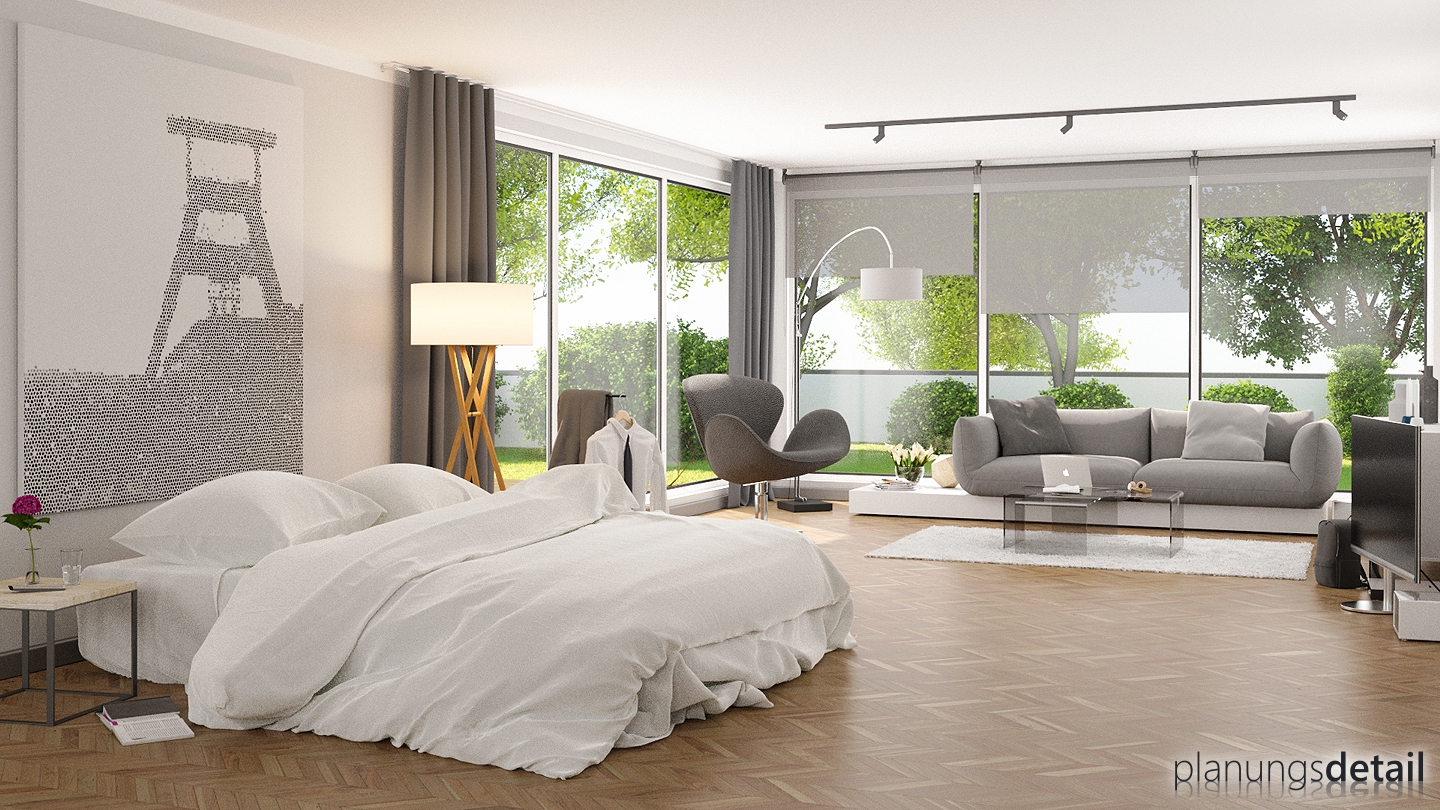
A very nice interior render with a look behind the scenes.
Lars Fischer writes:
3D-Interior Rendering of the Singlehouse. You find the Render-, Scene-, Worldsettings and more on my Hompepage. Happy Blending. Lars



A very nice interior render with a look behind the scenes.
Lars Fischer writes:
3D-Interior Rendering of the Singlehouse. You find the Render-, Scene-, Worldsettings and more on my Hompepage. Happy Blending. Lars



K for the making of. Useful for novices.
Though if it’s not a 5-10 mins preview raw render, it proves again that cycles dislikes interiors.
The people I work for would discarded it in less than 10 seconds. :P
Ye ye, I know… I’m a noob and cycles is awesome for everything.
No further replies to fanboys I promise so just read the previous line and give your mind a rest,.
Cycles w a s never realy optimised for indoor renders. But for consistent renders for animations. Some indoor improvements where made wit light portals . And of course the metropolis branch witch is still in development. Tell us your best free render engine and let’s compare. Or are you a autodesk/maya/rhino fan boy?
Maybe it looks like a preview render, but that’s not only Blender’s fault. I looked at the render settings on the homepage, and I would definitely change some things to get a less noisy render. The sun is not set to “Multiple Importance” and I guess the background’s neither (can’t see it, by default it’s off and he didn’t show that he turned it on), the “Clamp Indirect” value is much too high and the “Bounces” values are higher than needed. So maybe it could have looked less “preview” even though rendered in Cycles.
I think you are very quick to criticize unfairly TBH and took the time to havelook at some of the other images at the link Lars’s provided and was impressed.
The image above is OK. For the size of practice that Lars works with the client is probably very happy with the result. I’ll bet the client didn’t say “Hey, great design but the image is a bit too noisy for my tastes”. The whole idea is too inform the client, not win a forum competition.
Just in case you think I am a Blender fan boy, I am traditionally trained artist/draftsman (I drew visuals with Rotring pens originally in 1970/80’s and they looked noisy too with all the stippling!) and have used Maxwell,Mental Ray, Vray etc. Hell you name it, I have used it. Even airbrush and Frisk film. I am – sadly – far to the wrong side of 50 years old too!
Cycles is fine if you know how to use it and how to compensate for it’s shortcomings. The same can be said for any of the commercial render engines. You could have said the same about using a drawing board back in the day also…
Would genuinely and sincerely love to see some of the work of “the people I work for” Peter.
Sorry, reply should have been to original comment by Peter.
@PROSTOP Well first take into account a few things, 1000 samples, lightbounces 12/12, refractive caustics, ambiente oclusion, hardware…. etc…
Second, very interested in knowing about those “less 10 seconds”…
You have information about hardware, and render engines these people use?
Could have optimized further on noise
1. Filter glossy 0.5
2. Compositor with despeckle
3. Remove clamp direct. It makes the scene pale for me.
4. Use light portals
Bedsheets was especially noisy.
Realism wise
1. Windows does not seem to reflect. Should solidify it then reflection comes out. Proper glass node setup too with transparent node and light rays
2. The wooden floor needs normal map. Did not see normal map setup. (Displacement does not seem to work that well). Specular map will be useful.
3. Ceiling tracks seems weird. Need more shadow there perhaps.
Mood setting
1. Choose a better mood such as sunrise or sunset. Sun rays pouring in with internal lights are nicer.
2. Switch off the light for your daytime. Weird.
Blenderguru have much more such advise.
Good picture with a little more improvement.
Thanks for the criticism and Tips. I will render the image again without noise.
Lars
Well, for me you won’t need to render it again without noise, I think it’s okay *g* My tips for less noise were only suggestions because Prostop comment sounds like Cycles wasn’t capable of producing interior renderings with acceptable noise, so I thought I’d just show that with adjusted settings you’re image might have been much less noisy even though it was a Cycles interior scene.
@TK1214.
Agree on indirect clamp. Usually 5 is enough.
For multiple importance, think HDRI works.
For normal sun, I produced more noise with multiple importance setup.
@Lars,
You have a good picture.
Do re-render it to make it a great picture.
Rendering and compositing is an art and needs time.