Tutorial: Introducing the New Blender Energy Drink!

Energy drink advertisements are slick, sexy and fun! I wondered what Blender would look like if it took on the same approach :P Made with Blender and Gimp.

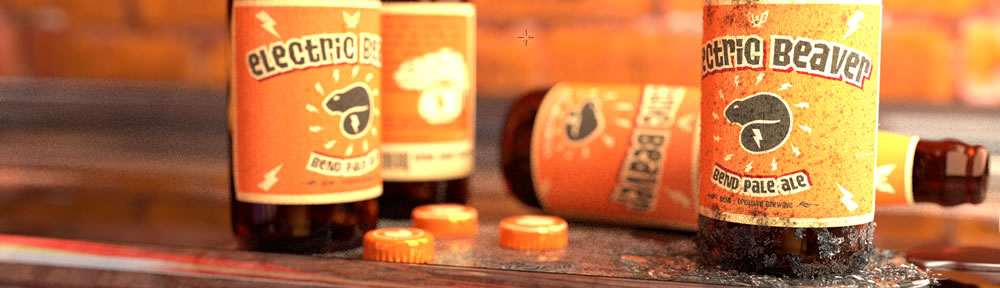

Energy drink advertisements are slick, sexy and fun! I wondered what Blender would look like if it took on the same approach :P Made with Blender and Gimp.


Nice tutorial. The result looks really professional.
Alas, consumptionism… Save the poor rainforests! The climate is changing and all we can do is to drink “energy drinks”?
Sad that the artist in order to eat his daily food rations must engage in commercials production…
Ah, again sorry for double post, but the career path of Redbyte looks impressive! What should average blenderuser do to achieve such acclaim (and frequent work featuring) on blendernation?
Am I doing something wrong or is it indeed not possible to save the Vimeo movies to disk ?
I am using UMTS and cannot download all the time because of the speed and monthly volume limit.
@neostorm Energy drink isn’t made of rainforests.
Problem?
@filipc
You must log in to Vimeo to download the video.
@Sneg, but aluminium cans in which the drinks are packed and sold are the cause of rainforests destruction!
Read this: http://news.mongabay.com/2009/0731-alcoa_amazon.html
Nice clear and clean..but i think the same or best result can be done only with GIMP or any photo processing tool !!!
@filipc
Wait until the whole video is loaded (don’t close the browser or the tab).
If you use linux, just look on your /tmp directory.
Don’t know where is on a Windows or Mac system, but i suspect that maybe you can find it on your user tmp directory.
Look for a big file, with a strange name and no extension.
That was really good.
Use Realplayer to download videos from the web.
Here is the link:
http://i.realone.com/product/help/RealPlayer-2011/en/Content/Recording_Download-Record_Web.htm
Nice tutorial. Here’s an animation I did a few years ago using soda cans. All done in Blender. http://www.youtube.com/watch?v=85lEwSfWHNI
@Palac
Type about:cache into your browser’s URL bar and you should find it there.
If i needed to use this technique, (and who would’nt, you’ve done a great job.), my (admitedly anal and inexperienced) DOP would kill me for leaving a non visible light in a visible (ie within the cameras field of view) position. I would’nt mention it but the requirement to animate the camera would leave me needing to apply either an arguably ugly lens flare or ask the question of what the light settings would need to be if the light was behind and to the side of the camera? Would i use two lights to replace the problem light or should i stop complaining and appreciate its uses as a believable still?
Great tutorial.
FYI Andrew – in Gimp it is possible to see the background while scaling (re: 26:32) – just use the opacity slider under “Preview: image” in the lower part of the toolbox when the scaling tool is activated.
Also use the opacity slider in the layers dialog box, if what you need to see is in a lower layer.
Id buy it lol ..
@Robbie
Thanks for the tip! I wasn’t aware of that. I’ll definitely use that next time :)
Thanks everyone else for the positive feedback!
Use Orbit Downloader to grab videos using the Grab++ module.
Great Tut BTW.
I normally don’t watch long tutorials, but the picture of the can was so impressive! I had to watch the whole video and it was very good too! I’m thankful that you made this and I did learn a whole lot. So thanks again and keep up the good work.
Regards,
Markus
Look like a great final result!
I might have to dig out my ‘Durian Energy’ ( http://www.flickr.com/photos/-nw-/3848202240/ ) blend file and add some of those awesome looking water droplets!
This is such a great demonstration of the particle system. Great info about how to use gimp in post production too. Thanks.
Great tutorial, Andrew! And hang in there with getting down GIMP–it just takes a bit of getting used to. I also suggest checking out the “GIMPShop” version of GIMP to see how that one feels for you. Thanks!
@ neostorm:
We’re just hear to evaluate the Blender usage of this Blender tutorial. No actual Earth was harmed in the making of that tutorial–it’s all digital, man. Andrew didn’t even promote the consumption of energy drinks or the consumption of aluminum for cans–he just showed us how to do something cool in Blender!
That was cantastic! In all seriousness, the things you do inspire many people. Thank you for the opportunity to let us watch.
@Brian L.: Ok, I know;/
Although I do not share the opinion of author -(how “cool” are the commercials of energy drinks), and dislike that kind of advertisements,
I must admit that his skills in using Blender are high.
Nice water droplets on the can surface.
(@Admin: cheers!)
Great tutorial. Smart tricks!
Another flood? Where are you based? I just got back from being stuck up at Bribie Island for a week (not that I’m complaining about being stuck there)
Ekhem… there is even link between floods and deforestation:
http://rainforests.mongabay.com/0902.htm
great tutorial, thx! Learned a lot
are you a god ?
and if not, where does that leave me ?
best tutorial ever !
What a great tutorial. Has convinced me to spend more time learning what all those weird texture settings are. Not so convinced about GIMP – I still find it a pig to use compared with Adobe Photoshop or Corel equivalents.
Definitely. Everything boils down to ethics of marketing. To sum up my comments I can only recommend a book about how good marketing design can be put to use in this way. It is not enough to be visually excellent, but what message is sent to the viewers: i recommend to read some books on ethics of marketing…
I learned a lot. :)
@Robbie Losee
Thanks for the tip, I too was annoyed by the resize preview opacity problem, now it is fixed.
GIMP is so powerful once you’ve set it up correctly.
why when i try the particle (water) is not stick at the bottle?? it looks like a squirt of water than the dew :))
btw, i used blender 2.49b winXP…
thanks before…..
Great work, Andrew.
Nice to see 2 hobbies in 1: Blender and Energy drinks!
I’ve used your result pic as background image on my desktop!
@neostorm:
Fortunately most of us still live and work in a free-market, capitalist system. In fact, you should thank God for that. Especially since such a system provides use with such luxury, affluence, and wealth. Such a system has raised the standard of living for most world-wide. If it weren’t for “consumerism”, I wouldn’t have a job and wouldn’t have the money to do things like eating a meal.
There is nothing ethically wrong with creating commercial art to advertise and promote any product. (Unless you are purposely trying to deceive people.) A freelancer, with enough motivation and skill, can earn a living doing what he/she loves. That is a blessing, not a curse.
As for your environmental paranoia, no one cares. I assure you, the planet will nether fall apart, burn up, freeze solid, or whatever dooms-day scenario that you environmental whack-jobs concoct. If you’re that damn worried about the rainforrest, (which I though hasn’t been in vogue since the 80’s) go raise some money, buy some acreage, and reforest the Amazon or where ever. Don’t pester us. This isn’t the forum for such nonsense.
I like this how do you make it so the hotkeys are showing when u record? What are you recording with?
@theYiffer :
Maybe the one saying nonsense is you.
I will try to answer but English is not my language (my language is French).
I recognize in you (if you are serious) a traditional capitalist, materialist and big consumer. Lets face it, 20% of humanity consumes 80% of the world’s resources.
Most of the peoples are still pour. The only people that really profits of this system is you, and a few millions of other peoples.
You are saying that everything, absolutely EVERYTHING that says that humans are disturbing the balance of this planet, is false.
So that means that humans can do anything, destroy anything, the world won’t even change a bit ?!
How can you say that ?
You are judging superficially tons of affirmations, most of them even based on scientific constatations.
You would accept that if millions of atomic bombs explode all over the planet, it would destroy all it surface, maybe not all life, but humans for sure.
OK, nobody would do that. But its plausible. Humans can destroy Earth.
They are lots of examples all over the world of the destabilization of ecosystems.
We cannot live without our only planet. We cannot say we are independent for it.