

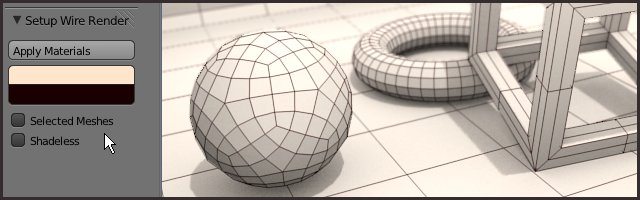
This Python script will help you make clay and wire renders.
liero writes:
A script to setup and apply materials for a wire render... It will replace your own with a clay and a wire materials, as seen here and here.
You can apply settings to all visible or just selected MESHES. Anyway, it's very easy to use.
- works in BI on meshes only
- by default it will run over all visible objects, but you can restrict to a selection
- script looks for materials by name: rename or make single user to get different wire colors
- 'mat_wire' has a z-offset option than can be used to fine tune wires display
- enable ambient occlusion or 'shadeless' option to do a fast render without setting up lights
- if it fails in default mode try selecting objects and enabling 'selected meshes'
Links

26 Comments
oh my ! Finally, thanks liero !
many thanks, I was waiting for this for a long time !
Thanks for that !
In the future, another way which don't use z offset could be better, but this add-on is great.
Thanks again !
Yay! I have been waiting for something like this!
Very Useful. Thanks!
I was just thinking about this feature yesterday. Thanks!
Gracias Liero!! buen aporte!
this should be included in trunk! I've been waiting for this forever.
Very cool! Love this :)
this is really cool script.
thankyou!
Since this is a very commonly used rendering style... wouldn't it be useful to have it as a basic render option? I. e. a "render as clay" or "render as wireframe" button, that leaves your scene as is.
This should be in the trunk!
Really cool and really smart script. Thanks for that :-)
Could you add the links to the pics here in the quote that the original message has? (when it says "as seen here and here"
Thanks a lot, Liero!
Thank you !!!! :D
Grande Liero!
definitely must be in the trunk
I notice you attach your custom properties to Blender’s WindowManager class. I don’t think you should do that; attach them to your own class instead. See my TreadTiler code for an example:
https://github.com/ldo/treadtiler
Nice addon but how to bake wire render for using as UV map, or increase thickness for rendering in higher resolution?
really really usefull, I havent watched yet what you did to "upgrade" the old way but this is faster, I like it ! thanks
im a noob and want to use this script but dont know how to get it in blender :P any help
user preferences -> addons -> install from file button at bottom
Then make sure it's ticked on
This has been very useful, Thanks.
Thanx a lot! Very helpful.
Thanks for this!
Surprised this isn't in trunk by now