
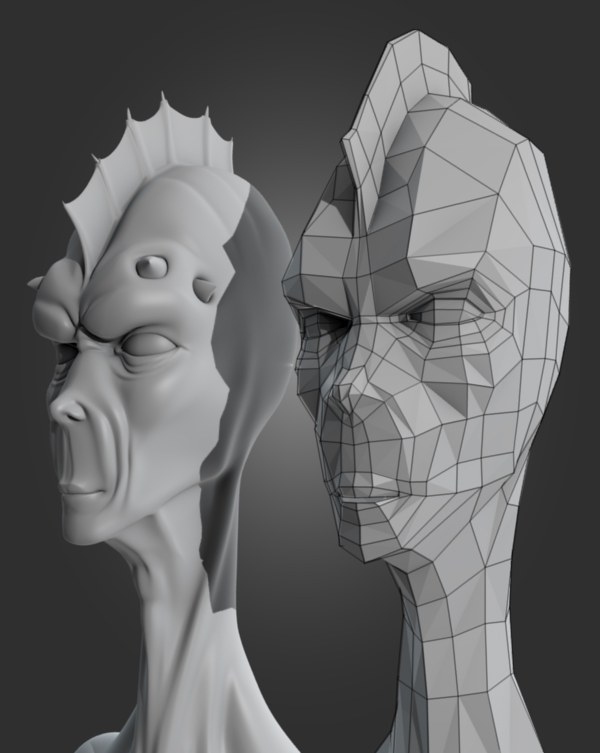
 Jonathan Williamson creates great videotutorials - they're always easy to follow and listen to (I always find a good voice and good pace are always paramount for a good videotutorial). Today, he explains the retopology tool in detail.
Jonathan writes:
The retopology tools in Blender allow you to take a high-resolution model and very quickly create a low-poly version of that model. You can then use this new low-poly mesh to easily generate a normal map, displacement map, or anything else you may need from the high-poly version.
This tutorial introduces you to the basics of retopo in Blender, including how to use the extrude feature, the paint tool, and some of the quirks of retopo in general. Retopologizing a model.
Link


6 Comments
I have already played around with retopo a bit, but there's a lot of little things that the video points out which made it worth watching.
Personally, I often find it a bit boring to watch repetitive stuff being done just for the sake of covering a complete model in a tutorial lesson, hence I wished for a time lapse here and there, but that's just me.
Another thing is calling the result 'game ready' - with such a number of non-planar quads, especially those near the cheekbone in this example, there in-game rendering may give some unecpexted results, as you usually cannot control over on which diagonal the graphics engine/api 'bends' your quads. Imho, triangulizing (sp?) non-planar quads is still a must for being game ready.
I'm not sure though if it's better to already consider this while retopo'ing...
thx :D
quote BOZO.
they are good tutorials, but they are always pimping out ones you have to buy . . . i dont like that part.
Thanks again for a great video tutorial. You do a great job of teaching these often misunderstood techniques. A lot of work goes into making these and it is very generous of you to give some of your work out for free. I hope you continue to make both tutorials for sale and for free. You definately deserve the money for your work.
Heaven forbid someone earns a living off something they do well. Williamson shares a lot of tips for free. He does a good job presenting and knows his subject. He can pimp his higher quality merchandise all he likes, and hopefully folks have enough sense to buy some of his stuff -- if for no other reason than to reward his generosity.