

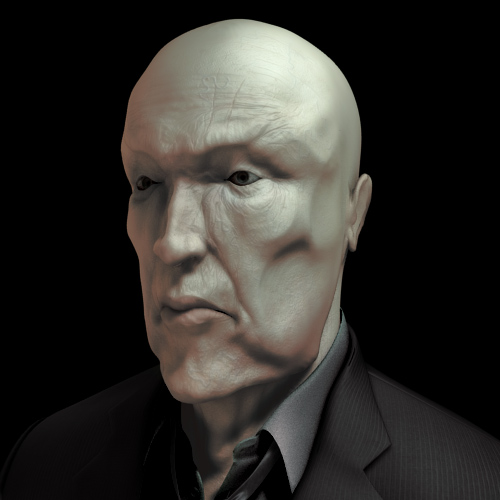
 Continuing the saga of Matt posts, we have an excellent technique from him on creating fake subsurface scattering (SSS).
It seems different SSS techniques are popping up all over the place. I'm sure you all remember Mike Pan's technique we talked about recently. While Mike's method may produce more accurate results, Matt's method is a bit simpler to setup and produce. And you'll even get to use the new baking features found in 2.43.
The concept is that you take the lighting information of your scene and bake it to a map. Then you blur the resulting map and apply it to your model. The map provides the light for the model and the blur simulates that beloved scattering effect.
Matt says of the technique:
I came across an article yesterday which referenced a presentation at SIGGRAPH 2004 by ATI, talking about a quick method for faking subsurface scattering in skin and had to give it a try in Blender. It's by no means accurate, but it's very fast and easy to set up now in Blender. The technique is apparently what they used on the Matrix: Revolutions 'superpunch' shot, it's basically using UV information for finding pixel locations on the surface, by rendering a baked image of the lighting and blurring it.
Matt provides a clear detailed explanation of the technique on his website. Make sure to check it out. Find out more about what Subsurface scattering is at Wikipedia.
12 Comments
Matt, thanks for sharing this!
.::PiPi::.
We should have a permanent link to his blog on the top of this site. Hehe...
;)
//Mathias
Great work, thanks for sharing.
A simple extension to this method is to blur the RGB channels separate, for skin R should have a wider blur radius to get the red bleeding into the shadows.
The results look nothing like SSS. It seems to resemble more of a soft lighting look, but the models still appear as solid as rock (non-translucent rock) in the examples. Show me something that's backlit.
Actually I think it looks like SSS. Most seem to only envision the heavily backlit object with very noticeable scattering. In many cases all you'll see in normal lighting is a slight translucency. Check out this image: http://upload.wikimedia.org/wikipedia/en/thumb/5/57/Crysisface3d.jpg/180px-Crysisface3d.jpg, while you might not notice the SSS it is there. Matt could have create slightly better models and textures to illustrate the effect, but as it is...it is FAKE SSS so its not perfect.
I think with the correct tweaks, this could result in the most accurate fake SSS we've seen.... maybe.
This looks very interesting - I'll try it on some of my models. Thanks for sharing.
Thorsten
i feel kinda dumb, but how do i “give it a new image texture and do a Bake Render Meshes → Full Render, to get a baked image of that lighting information�
yes i know i posted this question on his site, but this awsome site gets more replys faster :) i believe that was step [1] or [2]
@tikki
http://www.blender.org/development/release-logs/blender-243/render-baking/
Is anyone using this technique in the BGE?
Hey, Great website basically a heads up that I was getting instantly sent straight to the homepage if I viewed this internal web page; It looked like a web browser hi-jack or something, I'm not too absolutely certain but imagined you might be informed about it. Take care