• Home
  • Art
    • Behind the Scenes
    • Images
    • Video
    • Games
    • Models & Rigs
    • Headers
    • Repositories
  • Development
    • Blender Development
    • Add-ons
    • Python Scripts
  • Education
    • Books
    • Tutorials
    • Videotutorials
    • Training Videos
  • Community
    • Conferences
    • Contests
    • People
  • Contribute
    • Contact
    • Submit News
    • Submit Header Graphic
    • Supporting BlenderNation
  • Home
  • Art
    • Behind the Scenes
    • Images
    • Video
    • Games
    • Models & Rigs
    • Headers
    • Repositories
  • Development
    • Blender Development
    • Add-ons
    • Python Scripts
  • Education
    • Books
    • Tutorials
    • Videotutorials
    • Training Videos
  • Community
    • Conferences
    • Contests
    • People
  • Contribute
    • Contact
    • Submit News
    • Submit Header Graphic
    • Supporting BlenderNation
The Secret Miracle
BlenderNation
The Secret Miracle
Add-ons

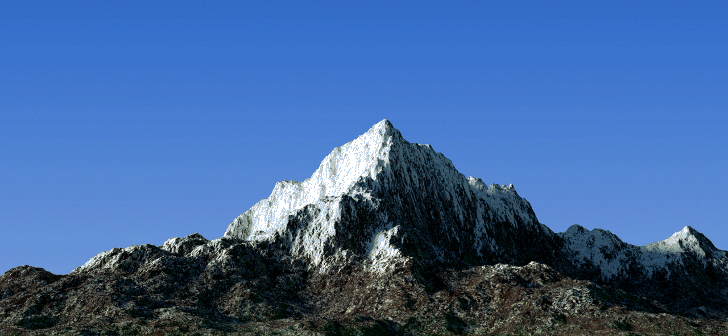
Terrain Generator Shader PRO

Viktor Sazonov · November 19, 2016

Viktor Sazonov’s Terrain Generator Shader PRO uses Blender 2.78’s microdisplacements to generate convincing landscapes.

Link

  • Gumroad: Terrain Generator Shader PRO – $5

Author Viktor Sazonov
Advertisement
Ads help pay for running BlenderNation. Please consider adding us to your allow list.

7 responses

  1. Viktor Sazonov
    19 November 2016 at 13:35

    Hello everybody. I was forced to remove the product on Sellfy because there was a problem with paypal. This product is available on Gumroad. I apologize for any inconvenience.

    Reply
    1. Bart
      19 November 2016 at 14:05

      Thanks for the update, I have removed that link.

      Reply
  2. Michael
    19 November 2016 at 16:08

    Umm..How does it work? Downloaded it, and don’t know how to use it. Any manuals handy?

    Reply
    1. Viktor Sazonov
      19 November 2016 at 18:17

      For this material you need a blender 2.78
      This blend. file is configured and ready to use.

      If you created a new plane or append to a new project, you need to:

      1. activate the experimental mode in the render tab;
      2. in the material tab in the settings menu activate the Both;
      3. in the modifier tab, add a modifier Subdivision Surface and check box Adaptive.
      4. and press Rendered Viewport or Render.

      Reply
      1. and4more
        13 May 2017 at 19:41

        In my case I couldn’t see the deformation of the plane in the rendered viewport, even if I do the necessary settings. The result only could be seen in the rendered picture.

        Reply
  3. Vilém Duha
    20 November 2016 at 09:21

    Welcome to the nineties☺. the fact that somebody names this stuff with pro at the end☺and why this gets here as so much bad stuff? Only because the person tries to sell it.

    Reply
    1. IlyaK
      20 November 2016 at 19:13

      +1

      Reply

Leave a reply Cancel

Your email address will not be published. Required fields are marked *

Featured posts

  • Best of Blender Artists: 2026-30
  • Best of Blender Artists: 2026-29
  • Best of Blender Artists: 2026-28
  • Overgrown: a Feature Film Project by Blender Studio
  • Blender 5.2 LTS: Physics Just Got Insane!

Support BlenderNation

Keep independent Blender coverage alive

BlenderNation is run by a small passionate team. Your support makes continued independent coverage possible.

Support on Patreon →
Related articles
Add-ons

Render Control – Remote Blender Addon

Community Reporter · July 7, 2026
Add-ons

Free Download: Blend Project Packer

Community Reporter · July 3, 2026
Add-ons

Stop Wasting Days Rendering in Blender

Community Reporter · June 2, 2026

About BlenderNation

BlenderNation collects the best free and paid resources for the Blender 3D community.

Support BlenderNation

Become a supporter Advertise

Contact

Contact us Submit news

Follow us

LinkedIn Mastodon
© 2026 BlenderNation — Part of the vrotvrot.com network
View full size ↗