Creating Static Shadows for the Blender Game Engine

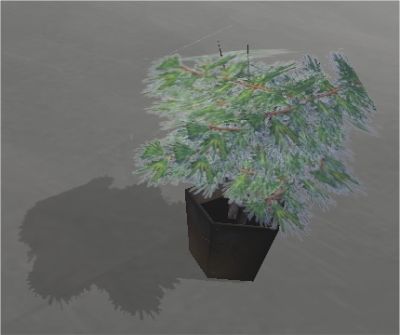 Are you looking for a way to add extra realism to your interactive Blender projects? Andrew West describes a way to create accurate static shadows by processing a screenshot.
- Align your viewport with the viewpoint of the lightsource, take a screenshot.
- Use an image manipulation program to convert the screenshot into a transparent grey bitmap.
- Apply this new image as a UV texture to a plane and properly place it in your scene.
This method requires quite a lot of work and it will not work for animated characters or lightsources, but for simple walkthrough projects it should work just fine. It may just be that bit of extra zing that you need for your project.
For the full tutorial, visit Andrew’s website.



OMG!
this is how to FAKE static shadows!!!
The game engine dose not support static shadows!
THIS ARTICLE IS A HOAX!!!
A hoax? Not at all.. as you say it’s a way to fake shadows. If you’ve ever done a large 3d project you’ll know that you always reach a point where you need to start faking ;-) In the end it’s the result that counts!
Cheers,
Bart
@ pOOF: The first paragraph of the tutorial says it is a way to fake them….chill out. =)
Nice tutorial!
could you not merely
a) isolate your object in the scene (no lightsource at all, or background)
b) place camera in location of desired lightsource
c) render rgba
d) use resulting image, possibly altering it to make it lighter/translucent if desired.
all within blender? (new image tools do allow for altering images in this manner don’t they?, i haven’t checked yet but i was under the impression they were)
not the tutorial I am worried about , it is the headline here.
BTW this is a poor way of doing it anyways. Great tutorial, and verry inovative, I have had to use the same method with the halflife and unreal 1 game engines
alpha masked textures really suck GPU power.you should take the floortexture,copy it, and paint your shadow on it.
save the alpha masking for moving objects
The “Big” Projects I have worked on did not need faking , Crystalspace,Ogre, Irlicht, and 3Dgame studio do support REALTIME static shadows.
p00f,
Charlie ‘snailrose’ is adding OGRE graphics rendering to the Blender Game Engine, so we will get real-time static (and dynamics) shadows. Until then, it’s good to fake.
Why don’t we try to code in dynamic and static shadows ourselves, instead of getting support of some other 3D engine?
Tynach,
Good question. By collaborating with OGRE graphics rendering, we can benefit from their development. The Blender Game Engine lacks developers, and my focus is entirely on improving Bullet rigid body dynamics in all aspects. The benefit of OGRE graphics engine is that is allows to just replace the rendering part. This is convenient, so we can still use the parts that we want to keep. Charlie worked on the recent BGE GLSL graphics improvements, but we decided to focus on OGRE, which gives much more features and support in the long term. OGRE has an active community, which is more healty for the BGE.
@Tynach:
OGRE is a rendering engine only – but the reason for wanting it is mostly because it then would become one less thing to code and maintain and it would not only bring the blender game engine’s rendering capabilities up to par with other commercial engines in the short term but would also benifit in the long term too since OGRE is developed actively and new features would then become available for use within blender with little additional coding cost – saving time and effort! (and lets just face it, blender’s GE coders are rather a small bunch at present and aren’t likley to increase in number anytime soon – in fact, the alternative to intergrating OGRE was dropping the GE altogether; so it’s pretty good news as far as GE development goes)
ah – sorry erwin, didn’t notice you posting there…
This method outlined in the tutorial produces an incorrect result. (the shadow is not properly stretched) What you could do is render from an ortho camera (Orthografic button on camera tab turned on) aimed at a ground plane (rot 0,0,0). The “Scale” on camera tab controls camera size. Set the object’s shader’s OnlyCast button on (under Links and Pipeline tab). Then set the ground plane’s material to “only shadow” under the Shaders tab. Finally, hit render. The render will be black but the alpha channel will contain a correctly shaped shadow.
Hmmmm……. you say that blender has few game engine coders…..
I may be interested in helping, do you have any room for someone who knows a bit of python?
I love python, although I haven’t really touched it for about 1 or 2 months, but I’m willing to learn.
Does anyone know, how to make shadowmaps in blender??? Like in Quake .)
I’ve been using RayBaker, but still it’s not exactly what i need =|
This is a good trick to have at your disposal.
Way to flip out over nothing p00f…*GOSH*…
“p00f”, tell me when you have a better way of doing this please.
At any level, “p00f”, shadows are always faked, it’s not like they’re real. You should take a look outside in the real world sometime.
It could be me, but it should possible to do this faster with the new renderlayers. Just render a shadow pass save it as a targa (or another 32 bit format) and off you go.
Joost
For creating such shadows I use a python script that can bake to textures. This way you can have the realistic shadows of the render it self be used as textures for your scene. It’s also possible to give a maximum size for the textures to be baked. It’s just saving a copy of your game scene and make it nice in the render and bake the stuff.
Besides that it bakes shadows, it even bakes the shaders from blender to a texture, and that’s really awesome.
Another *VERY* realistic approach is… to render your scene with…..(drumroll) radiosity…. and replace the meshes
so ALL the static shadows are ‘baked’ into the scene..
of course, you have to set up a correct lighting with planes with emit>0 instead of shadowlamps, but the result is way better than the sharp-cut, UVed shadows from a spotlight.
(see last years presentation at BC from Ric cardo C ovino)
so did i. Oldest feature butr still with impresssing results…
/rubicon/
What I hear about radiosity is that it’s a primative form of Global Illumination… I just havn’t figured out how to make it work in the Game engine. haven’t found any tutorial or anything.
Great tutorial :) Thanks!