
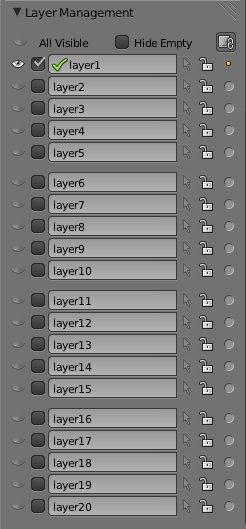
 Alfonso Annarumma is working on an add-on to more effeciently manage the layers in your Blender scene.
You're blocking ads, which pay for BlenderNation. Read about other ways to support us.

About the Author

Bart Veldhuizen
I have a LONG history with Blender - I wrote some of the earliest Blender tutorials, worked for Not a Number and helped run the crowdfunding campaign that open sourced Blender (the first one on the internet!). I founded BlenderNation in 2006 and have been editing it every single day since then ;-) I also run the Blender Artists forum and I'm Head of Community at Sketchfab.
43 Comments
Trunk Trunk Trunk!!
This appears to be really useful. Good work Alfonso!
I have been wishing for this forever!!! Thanks, and hope it will get integrated to Blender trunk soon
This is really useful addon and should be integrated to blender.
Thanks a lot.
+trunk
Not very useful...
What we need is UNLIMITED numer of layers with free names
and options for view, render, mask etc
And we need user defined "groups of layers" (like Renderlayers)
i agree !!!
Hi, I am the creator of the script.
Yes, you are right, but for unlimited layer I can't do more, I'm not a coder.
The option that you ask I can do something, can you do me more detail?
QUOTE: "The option that you ask I can do something, can you do me more detail?"
You can set in Layers Panel some things:
http://cgcookie.com/blender/files/2011/11/nova.part03.12.png
What you do is a tool for first matrix called "Visible Layer"
But blender do this wrong: it is not possible to setup visible layers for EACH renderlayer separate.
Instead blender set global scene setup (viewport). I don't think you can fix that per PY-Script
Another idea is to add next matrix: scene layers and mask layers to your tool
More ideas from GSoC:
http://wiki.blender.org/index.php/Dev:Ref/GoogleSummerOfCode/2012/Wishlist
Improve layer manager *****
-user defined layer names and colours *****
-more than 20 layers (unlimted) *****
-editable via outliner *****
-group layers (and subgroups) *****
In fact Blender need a rewrite of Layer-Feature in C(++) and Python
But wait... my new idea can solve this:
Create virtual layer system !!!
How should it work?
1) Instead of using Blender's 20 basic layers, you define your own,
separate layer system with unlimited number of layers.
2) You use layer 1-18 normaly like in blender and your tool (or you DO NOT TOUCH this layers anymore)
You use layer 19 to hide objects (layer 19 is always disabled)
You use layer 20 to make objects visible (layer 20 always enabled)
So a object is always in layer 19 or 20, but never in both (you can use this for "checksum" thing)!
3) Your job is now to make a script that manage unlimited layers
if you hide a layer, this objects should move to layer 19
if you show a layer, this objects should move to layer 20
Every object must have a data with layer informations for your system.
I know here are some problems with render layers
So your script should run before, between (if you use many renderlayers) and after rendering (to update view)
It is very hard to fix that all with python only...
But you can think about this - it is a idea for advanced layers with some compatibility (layer 1-18)
Complex, I have to think on it.
That's hacky and should just be done with c++ in blender's internal code but it might just be crazy enough to work.
Unlimited layers, really, how many times in your projects did you use more than let's say 20? Besides you mix the purpose of render layers and normal layers, I guess they cannot be morphed into one menu.
I guess that sticking layer menager to the "N" panel is a mistake, it's already too claustrophobic. Moreover I believe that adding support for folders and designing better interface for Outliner would be more than enough. This script just doubles options that are already somewhere in Blender.
QUOTE: "Unlimited layers, really, how many times in your projects did you use more than let's say 20?"
Nearly every project with 1000+ meshes
20 layers are not enought and i must "compress" everything to not very logic layer groups
So i have no extra light layer and add lamps to all layers to save one layer
This is true. I very often find myself in need of 30-40 layers, only to have to compress it to 20.
Of course we've never used more than 20, we don't have the ability too. I'd like to see photoshop/gimp style layers replace both regular AND render layers. I start by created a layer, add some objects, create another if need be. I think one of the most constricting things about the way it works now is in renderlayers while you can create an unlimited number of them (I assume) they can only be combinations of current layers.
I think layers and groups should be implemented as it is done in Modo by Luxology. I have been using these both tools (Blender and Modo) for few years and I get the impession that some things in Modo have been done based on Blender functionality. But some Modo elements are really well thought and Blender should implement some of these solutions.
that's great ! i was looking yeasterday about the layer manager for 2.63 !!! good surprise !!!
Something I´ve never understand is how Blender has been gaining extremely complicated features while a decent layer management has been untouched.
I wonder how the Mango crew is managing the incredible number of objects for the movie without loosing control.
What Flow4 says in his comment is quite true, but for the moment the script Alfonso has created is more than welcome! (and we can finally use names for the layers!)
Ciao Alfonso. Thank you very much for the script, it is already very useful.
I didn't figure what the purpose of the small dot on the right in the options is ("Marge selected objects in this layer")
Sorry, merge is for move object. But I'm working on a new version of this functionality.
Hey, this looks really nice. I am been little scared for using the blender's layer system, because it is so weird, but i think that this kind of system would really make it more effective. :)
Haven't I grabbed the whole idea of this script yet? At glance it looks interesting however isn't it redundant? Don't we have such a layer Panel in the 3D header?
Unless we are talking of bone's Layers?
Does it do the same Job that the ones displaying on header? Hide-un hide....Shift click to add or remove hidden layers etc etc...it is quite easy from the original Trunk. Don't see the point of this .....
The first idea was to have simply a name next the layer button (to activate/deactivate it). All other option are extra, ask me from the user.
If we could name the layers, it would be a cool feature.
Good work !
You already can rename the layers.
This will be wonderful, I'll be able to keep track of where things are in what layer, now! :D
...and I was just reorganizing some layers last night. : )
I like that we can have names, a lot.
Will the names appear in "hover" mode (via mouse...in the viewport window)?
So nice to see this one making a come back. I also Am forth the unlimited quantity of layers in scene and bone.Something like gimp or mayas way to add layers would be great.
so what exactly does this do? the link speaks about all the changes, but not its purpose...
Anfeo, it looks really usable! Thanks for your work!
AWESOME!!!! WAAAAANT!!!
Just what I was looking for...I was experimenting with multiple passes (AO/Specular/Bump/Diffuse) to see how they blended together using layers in GIMP.
Thank you, thank you, thank you, thank you!
I often make big scenes and I always have to write layer names and content on paper sheets... so, this addon is very useful ! Thank you !
Tank all for the support, I've correct some bug:
http://blender-addon.blogspot.it/2012/05/layer-manager-08-for-blender-263a_20.html
Great addon, thanx!
TRUNK asap pleeeeeeeeeeeeeeeeeeeease! :)
Superb, really helps me organize and clarify my project
Nice addon! Would it be possible to add the layer name in the tooltip that comes with the layer selection boxes (The one that says "Visible layers - Shift click..."))
This may well be a SILLY idea, but -
Why not use a variant of an 'Empty', as a 'Layer' object.
The Layer object would have all the abilities of an Empty with the exception of being able to manipulate ( resize, rotate, move ) the child objects parented to it, instead you would have the ability to change the 'View', 'Select' & 'Render' of the Layers children by selecting the same options for the Layer in the Outliner window.
By selecting/deselecting the View, Select or Render options in the Outliner, the operation would also be carried out recursively on the children of the Layer object.
Adding/removing an object to/from a Layer can be done via Parenting, the same action that is done through out Blender.
If such an Object is possible then it would allow recursive nesting of both Layers & Objects and the only limit on the number of Layers would be the computers memory & the patience of the artist in using them. It would also allow the CURRENT Layer Manager to act more as a 'Workspace Manager' a job which it would in my opinion be perfect.
I would try to implement this myself, would my programming/scripting skills are none existent.
hi everybody, did anybody get a look at the .matlib library addon,we finaly have an onboard material library.woho. and not to mention the new distructablity editor, all nice and shinny in the physics tab. not to mention Veg.Gen. artoki house prim. and city builder, Creaprim. all available in the extentions page. pretty exciting stuff. PS. can anybody tell me if the jet propultion script is available, if so where can i get it. i'd love to test it out. Happy Blending :)))))
How I wish this were working with today's Blender! : (
Better yet, how I wish it was already part of Blender!
DPC
DRPEPPERCAN, I believe it is in Blender in the addons config. I found it and enabled it. And that's with a copy of Blender straight out of the box, as it were.
Thanks Jim. Yeah, I found someone's comment only from last year, so I figured I should try it in case it still works. And it does! :)
DPC