

 Well, let's face the truth, Blender's layer feature isn't what makes us choose it for our projects ;-)
Almost Maya, the less architect-friendly 3d package, managed to have a nice layer manager in its last versions.
Finally this is going to change thanks to another Python script project: Layer Manager by FourMadMen.
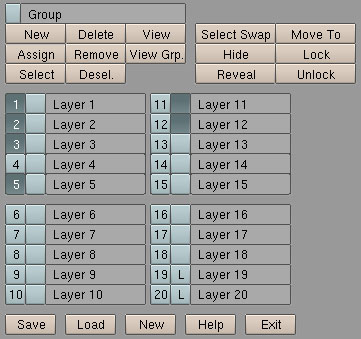 This script introduces some new functionalities and improve the existing ones through a clean and neat interface, what's better it handles keyboard shortcuts too!
Here's a list of its features:
- Basic Layer locking system
- Moving selected objects to selected layers
- Autoload most recent layer file if it exists
- Layer Groups
- Hide/Reveal Layers (in the script GUI)
- Set layer visiblility from script GUI. LMB to select (Additive). CTRL+LMB make only target layer visible.
- Saving and Loading of layer Information (persistence)
- Set layer names
One of those nice little tools that can make the difference when dealing with massive scenes where You can forget what objects are in which layer, or for us OpenSource'd architects-wanna-be working at our last post-modernist building pre-viz.
If you like this script or want to suggest new features give some feedback to the author on Elysiun.
Definitively one of those "Best choice" things here on BlenderNation.
10 Comments
So good, naming layers was a big wish. No more searching through layers.
Locking is also good. Maybe background layer support?
Special wireframe colors for different layers?
Keep up the good work :)
"Special wireframe colors for different layers" cannot be done right through scripting, it needs to be implemented in the Blender 3D View C code. Just don't stop to hope ;-)
too bad blender resets python view when you hit ctrl-z (undo)..
makes these kind of toolbox scripts a bit tedious to use..
.b
Hello, I was made a patch a year ago to enable layer naming a coloring layer to learn programmation, the patch was rejected but if you want to have a look, you can find it at http://projects.blender.org/tracker/index.php?func=detail&aid=2459&group_id=9&atid=127
The first time I heard about layers in animation was when I opened the Flash 2D Application.
They have a nice layer system. You can open as many layers you want (although I think 20 is enough to be organized). Suppose you just need 2 layers in your project, you do not need to show 20 layers in the Menu as Blender 3d default works. The best in Flash layers is the way they manage the status of the layers. They have some little bottons beside each layer where you can just click to chose if the layer is locked, visible etc ... If a developer analised the Flash layer system i think he could extract many ideas to Blender 3D become better in this tool.
I think it sounds a good idea improve the Blender 3D layers layout to something like Flash layers structure, but I do not know if it is totaly applicable.
Thanks,
WOW! I never realised what I was missing until I installed this script :) Very impressed with its features.
Only thing is it gets a bit in the way as it has to be in a window (unless I'm stupid and there is a way), plus you have to keep switching to the script panel to see it.
I think if there was a small button beside the existing layers and when you clicked it it opened, like the strands menu or the game settings in the format bit.
Though I know it isn't possible unless it was coded into Blender.
Well if enough people put it into the blender wish list. Perhaps the development team will take a more serious look at it. I for one hate using the layers in part because it's not as helpful as it could be. Like in GIMP for example the layers feature is well done and easy to use. I know it would have to be something like a pop up menu or drop down...but I think a pop up would be easier to work with especially if there was a handy Keyboard shortcut.
If the layer info could be included in the outline that would be enough for me.
Naming layers in the outline, would also be useful, as well as color coding.
exactly Anton and PamTango, but people prefers to cry about candy and munchy stuff.
Layermanager is "fundamental" as the Outliner, outliner was never asked - except by me :) - but once used, nobody goes on without.
Timo: Not just Flash has a great LM, look at earlier version of Maya, simple and efficient.
Well, i don't know this script, thanks for it!
Why LM
cheers
LG: Again a refused patch? :) anyway, i've never seen this patch before, damn it useful
Disclaimer: Look at LG's Boundingbox patch, for those of us having a sucking gfx card.