Modeling Cloth Addon Available for Experimentation

Rich Colburn writes:
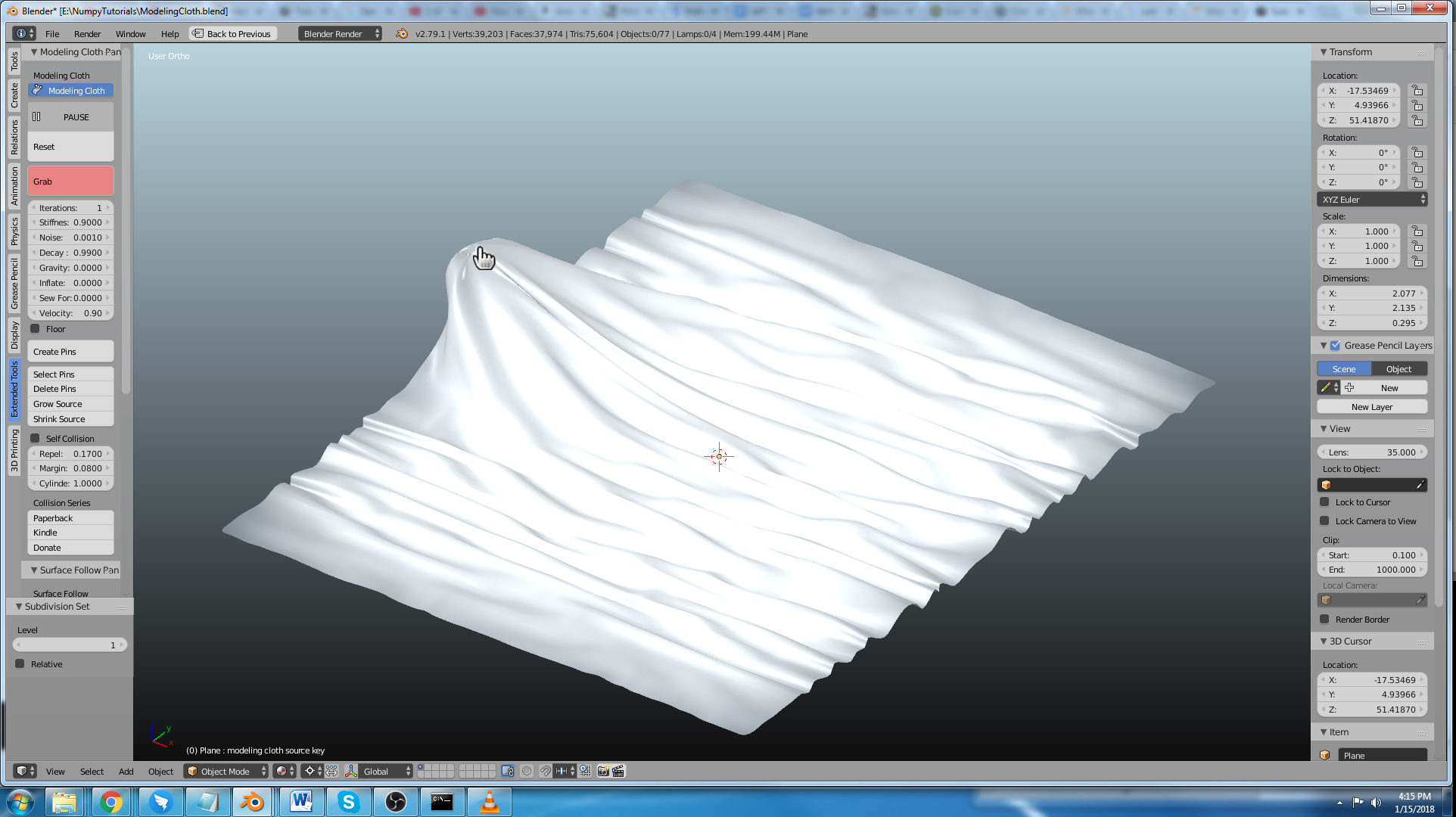
The modeling cloth addon is available. It’s very experimental but it’s a lot of fun to play with.
I made a demo video of the current feature set.


Rich Colburn writes:
The modeling cloth addon is available. It’s very experimental but it’s a lot of fun to play with.
I made a demo video of the current feature set.

That’s fantastic!
That is incredible! This feature set is very similar to something like Marvelous designer.. Thanks so much for sharing. I’m sure I’ll be able to use this a lot.
People, let’s make a donation for this man – i made it yesterday. This script is game changer – i reported few bugs, but at this moment it’s ready to play for experiments:) Really good as a start to bigger project :)
Amazing work, Rich! Thanks for sharing. I can see lots of potential for using this in my work.
It seems amazing! Is it GPU accelerated or at least fully multi threaded?
People keep asking about collisions. I do have a simple self-collision working (it’s not great) and you can use it with the vertex weight pin to make parts of the mesh solid. I’ll set aside some time for fully developing collisions. I currently don’t account for object transforms so apply location, rotation and scale to your objects.
It isn’t multi-threaded, it’s just really lean and I’m using Numpy which is very fast. There is a lot of room for performance boost still.
I’m interested in feature requests!
about those collisions, The self-collision system you have right now is already pretty good. do you have plans to get the cloth to collide with other objects? this would make it incredibly useful for say, draping cloth over other models etc.
amazing addon.
Ah, I was wondering when this little baby would hit BlenderNation. Was gonna report it today. Good looking out. :)
This is outstanding , it’s basically an unwritten role that we all should have you in our donation list , the timing of this is also crazy you’re basically a Godsent , I’ve recently had a clothing related Idea and I’ve been trying to figure out a way to make it happen , and since you have done this , I have a question for you hoping you can help me find the answer ,
Is it possible to export a clothing item from this/blender into a website ? as a 3d model , like sketchfab , except it’s also interactively jiggly when people move the dresses and clothes around and navigate . I have found that with certain Java Physics Engines you can simulate cloth in real time online, but I’m hoping there’s a way that doesn’t require much coding knowledge .
That looks amazing, Thank you for sharing with the community.
Bug-free and with fixes this could replace Soft Body + Cloth modifiers. It may even be made a supported feature. I’m impressed. Ladies and gentlemen, the table is made.
@LukasZ haha I see what you did there. well played sir. :D
I’m putting together a list of feature requests and bug reports. Feel free to email them to me. [email protected]
Also, if anyone is good with numpy and wants to get in on the development let me know. If you don’t know numpy there’s always this tutorial series… https://www.youtube.com/watch?v=rE6XhUjPX_k&list=PLgJKmspCQMIivIdce4P_v4uqCh0f93tax
I’ll try to add another video today.
Rich – as i promised at blenderartists – next month, next donation:) I love Your script man, just love :) I so excited that You are have a plan how to find solution for object collisions:)
Well this is the best addon I’ve seen in months. Congratulations! This will help so many people.
I have a question. How about cloth collision with scene objects?
I’m going to work on that next. I’ve been thinking about it and planning it for quite a while now. I’ll keep posting updates on youtube and such.
rest in peace 3ds max users
I lost a few brain cells by reading this comment
It looks quite helpful to me! Thanks a lot for taking the time to make it. I put my hands on it right away and I let you know how it works to me.
soooo nice! Finally Cloth will look great in Blender. I thnk, this is a huge step.
Wonderful work! I’m willing to pay or donate at least $30 for such add-on! This is wonderful man, thank you!
Keep developing and we will try to pay about it :)
I fixed the grab tool so it won’t be affected by the scale or rotation of the object. I also fixed the pin tool (it was still trying to find windows specific stuff)
I’m putting together a feature request list.
So far I have:
1. External object collisions
2. Wind effects
3. A button to automatically update the code from the github site
5. An adjustable area for the grab tool
6. Bend springs
7. Self collision improvements.
If anyone would like to add to the feature request list or if any developer would like to work on an item. Please let me know. [email protected]
do the guys in blender.org know about this? This wonderful addon should be spread to others so this project would gain more support and donation.
play button not showing in my scene why>??
My play button is not showing either.
I also dont see the play butoon on top of the reset and grab buttons :(
It’s changed a lot since the video. Use “continuous update” for running it all the time. “Animation update” for running when blender animation is running.
Can not wait for the collisions
Collisions are working. Self collisions are still a little wonky but collisions with animated or static objects work pretty well.
how to bake this addon and how to export alembic export this
If you just want to apply the final shape of the mesh, there is a button at the top of the modeling cloth panel that says “Apply to Mesh.” It just applies the cloth shape key to the mesh data.
Just discovered this addon. Yay! However, I can’t tick the little button that will activate it. I installed the zip, but I can’t activate it. Am stuck, am stupid, am in need of help. Here’s a screenshot of the issue I’m encountering: http://i.imgur.com/Bbv5uuB.jpg
I should mention that I’m using Blender 2.76, and the reason for that is because version 2.76 is the only version that Sims 4 Studio will work with (I make stuff for the Sims 3 and 4). Could this be why I can’t activate the addon? I’m not enough of a technical-genius-nerd to understand what’s happening here, unfortunately.
Rich – thank you so much for this add on!
I’m sorry to be bothersome, but the grab tool doesn’t work for me, and I’m convinced its user error.
I am using blender 2.8 and using the above linked version, but the Grab tool doesn’t work for me. do you have any ideas why that could be?
Thank you so much for any help you can provide!
Hi Jodi,
Someone just reported a bug in the latest build of Blender 2.8
I haven’t checked the build yet so it might just be an update issue.
Another thing to try is switching to orthographic view. There is a bit of a bug in perspective view with the grab tool.
Try pins and try orthographic mode.
Please link any error messages you see.
Thank you!
Hi Rich – thank you so much for your quick reply. I’ll try your suggestions and let you any errors I receive.
Glad I’m able to help support this. Thank you for your hard work!