

“For You”, a Grease Pencil test

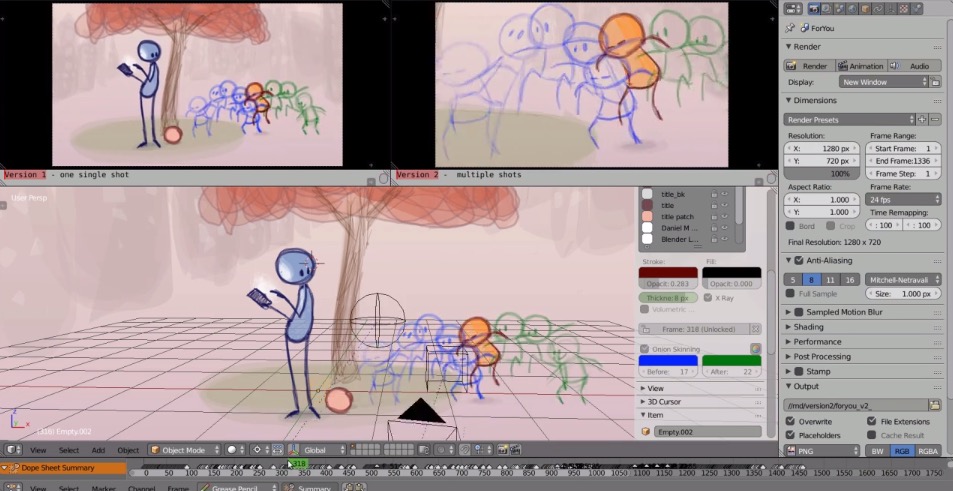
Pepeland’s Daniel M Lara tried the new Grease Pencil tools for Blender 2.73 and created this wonderful short video. .Blend file is included.
You can download the Blend file:
- You NEED download an updated version of Blender from here: builder.blender.org/download/
- The blend file.
If you don’t use a updated version of Blender you can not play with the new Grease Pencil features.
The Grease Pencil tools appear in T(key) viewport panel under Grease Pencil tab
Pie menus for quick-access to tools: A set of experimental pie menus has been included for quick access to many
tools and settings. It is not necessary to use these to get things done, but they have been designed to help make certain common tasks easier.
- Pressing D and W = The main pie menu. Reveals tools in a context sensitive and spatially stable manner.
- Pressing D and Q = “Quick Settings” pie. This allows quick access to the active layer’s settings. Notably, colours, thickness, and turning
onion skinning on/off.
Having fun!
Daniel


Awesome!
I think it is cute. I loved it.
I’m getting “Page Not Found! 404” from (the blend file) & (more info here)
Yes me too! error!
yes, the link is a mad merge of two links.
http://www.blendernation.com/2014/12/09/for-you-a-grease-pencil-test/
git.blender.org/gitweb/gitweb.cgi/blender.git/commit/14b951747f6a93a8e87a25f5001d9e3afc6528b1
EDIT: i just saw, all links are merged in that mad way…
brilliant! Nice work Pepe!
about the link, its bad written having both of the sites, just click
http://daniel3d.com/pepeland/misc/3dstuff/blender/GreasePencil/ForYou.blend
:) thnx
Note that these latest developer builds appear to break grease-pencil related plugins (such as Bsurfaces…)
Link fixed, sorry about that! It didn’t include ‘http://’, which makes it relevant and creates all sorts of fun :-/
Great animation! It’s a perfect demonstration of the new Grease Pencil tools which, until now, I had only had a vague sense of what they truly were going to allow.
Kinda sad that the kid gets rejected of personal attention with active play in turn for a mere electronic device. lol
But still, a great animation, a solid demonstration of new tools.
Who develop the new grease pencil tools? I’m not sure if it was the Foundation or someone from Pepeland.
Joshua Leung (Aligorith) was the developer. He’s got a blog that’s well worth following: http://aligorith.blogspot.com/
Amazing use of the grease pencil!
One of the best upcoming Blender features! I really liked the animation, i tested the build and its working perfectly also its easy for use, but if you dont know the shortcuts d+q and d+w, it will be imposible to do by a lack of interface menus.
Great work! I´m looking forward to 2.73!!
Tutorial, pleeaase!
Awesome work, both developing and showcasing!