

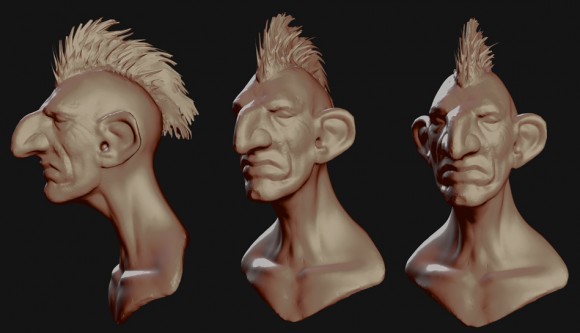
A timelapse by Max Maurel
Max (aka Blackschmoll ) writes:
I made a sculpting timelapse video. I wanted to test out the new Dyntopo tools from N. Bishop( thanks to him ) for the sculpt mode.
A timelapse by Max Maurel
Max (aka Blackschmoll ) writes:
I made a sculpting timelapse video. I wanted to test out the new Dyntopo tools from N. Bishop( thanks to him ) for the sculpt mode.
32 Comments
Finally, better sculpting in Blender. The sculpting industry was pretty boring before sculptris came along, and then got its concept integrated into zbrush. With Bsurfaces and this blender will be a pretty pro sculpting tool again.
I don't see it's so cool as you says and it's IMHO. BTW - it can be a problem when he'll start to do retopo on this sculpted head... I'm talking about the sculpted hair.
It's cool because you can quickly make believable shapes with dyntopo. Of course you don't get to have a final product when the first sculpt is done.
You're right about retopo though. If I would retopo this model, I mouldn't care for the Hair. I made sculpt hair to have a first idea of what my final model would look like.
I agree with you about the hair, but then, I think for this demo he wanted to do everything in sculpt mode, and not bother using the particle system or another option for the hair.
Oh, sorry! I misunderstood 1st Renzowolf phrase in translation )) Of course the Dynamic Sculpting in Blender allow crazy awesome things!!! And I'm praying on it like many others :)
Oh, yeah, like a sketch it looks more than fine!
ZBrush's dynamic topology is not all it's cracked up to be. It lacks real time subdivision and it's not very dynamic. (no localization) It's a bit closer to Mr Bishop's Remesh modifier.
it looks great, but I cant seem to find the information on how to use it. Any links?
If you are using Win64 OS, go to the following link, It works on my Win 7 (64bit) platform:http://blenderartists.org/forum/showthread.php?257749-The-Dynamic-Topology-Branch-is-here!/page31
Thanks reading now :)
Ok For anyone who wants to try it have a look here http://www.foreverblender.com/2012/06/news-dynamic-topology-toggle-option.html
The link doesnt seem to be working now. I guess we must have flooded the guys site. sorry.
WHoa whoa WHOA!!! Where was I when Dyntopo hit!? This is amazing! I was just chatting with a friend about how Blender can do sculpting "If you know how to use it" and BAM .. this makes is way better ... WAY better! I'm excited!
Also, nice sculpt!
I've been testing dynotopo and i'm loving it! Masking alone was a great improvement, but this is awesome! Now we only need polypaint and we're done!
it's verry interesting, Thanks Blackschmoll for this demo timelaspe ..
I shearch for one build : ubuntu 64 Bits If anyone compile it :-).
++
I can barely keep up with the advances in 3D graphics. Blender advances so fast!
Will this end up in Trunk or die in branch purgatory? Because if it gets finished along with sculpt masks, that's a huge bump for Blender sculpting!
Sculpt masks are already in trunk, just not in a release yet.
Hey Nicholas, glad to see you here ! Thank you for your magic tool !
Hey, Chad! Strange to see such questions pointed to people like Nicholas Bishop here :) As I remember (and all we know) Remesh and Skin modifiers were included in Trunk not so long time ago... And of course Mask is already there - just download builds from graphicall.org
I must not have phrased the question clearly enough - I wasn't asking about masking ending up in trunk, just pointing it out as a critical sculpting feature.
Gotcha. To better answer your question: I intend to get this branch in trunk, but it may take a while. There's a lot of stuff yet todo before I'd consider it (a) feature complete, (b) stable and (c) clean & maintainable.
Blendernation or better yet the creator of videos like this should always post WHAT BUILD THEY USED
Or you could just ask : http://graphicall.org/962 :)
Give me a break, you don't think thats the kind of information 99% of the people reading an article about a new feature/branch would want to know?
Sorry thought you were from Blendernation rather than the artist. Still, wouldn't kill ya to put that info in the youtube description. Great work though.
That's ok. I also put it in the video comments ;)
Yes, fantastic new tool set , I wish it had the wireframe on just to see what exactly going on . Looking forward to it.
Nicholas, thank you! :)
You're a talented artist, Max, and thanks, shame to me I did not even knew of Dyntopo.
A very very minor obs: the timelapse could be a lot more interesting with keypresses appearing on screen (would be a real tutorial, then).
Uhm, I fear I have to install an Ubuntu partition in the near future.
Hey thanks :) I could have shown the keypresses your right. But I don't know If you would see them correctly since the video have been accelerated 5 times
I'd love to see a BF DVD showing sculpt workflows using these new features :D
Looks like Remu Aaltonen.