

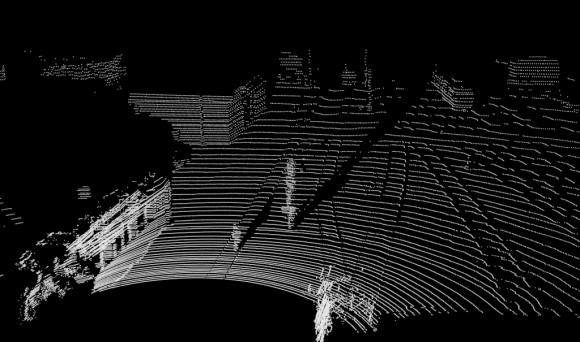
A new approach leads to better visualisation of pointcloud data.
mgschwan writes:
This small tutorial shows an easy way to visualize pointclouds in blender without using a Halo texture.
It utilizes the fact that the wireframe material draws edges even if they have zero length.
This may be useful for scientific visualizations that are not satisfied with the currently available methods to visualize pointclouds. Especially if they have to be combined with other objects.
Link

7 Comments
Great! Just yesterday I was trying to figure out if I could "strand render" vector objects in Blender, and this made me realize that Edge material +extrude 0,001 works for that as well (not technically the same as "zero length", but hey)
Excellent. I have been looking for a way to view point cloud data in Blender. This will be a huge help in my archaeology studies.
Another way is to enable "wireframe" render for the object, check "only render", and openGL-render from the viewport. It's hard to escape the orange point color (changing the Theme color doesn't do it in my build), but that's easy to change afterwards. And render times are of course crazy fast.
how do you set up the camera?
cause in viewport you don't see the pointcloud objet in object mode only in edit mode!
and what about using the scripts to add edges i guess on the points
mind you this probably increase the render time also if qty points is very large !
interesting way to see a point cloud in any case!
thanks
Just want to point out, that I have written a small .pcd parser in python to load pcd files in blender. I don't know if this is all up to date, since I have done this several months ago. The script is in contrib: https://svn.blender.org/svnroot/bf-extensions/contrib/py/scripts/addons/io_points_pcd/
I am glad you find it useful. Once i realized how to do it, i had one of those "ahh shit, why didn't i try this earlier" moments since all my visualizations were based on Halo textures or changing the viewport settings that i could take useful screenshots.
@fb47db2051778c7c9528817193d742cc:disqus Well i am pretty sure that rendering N halos is considerably slower than rendering 2*N Points. I've tested it on a scene with 55000 vertices and got ~5 seconds render time with halos and 1.32 seconds using 110000 vertices but the wireframe texture.
I encountered the same problem, not beeing able to see the point cloud. You can circumvent that if you don't extrude the points in place but move the doubled vertices a tiny bit in any direction. I guess it's a problem with the viewport rendering.
@86fdfe3fe1c7d9eee3afd1755fb4898c:disqus I've already stumbled upon your code but since all our code exports to PLY files we did not need it yet. But your script is a great way to get data from PCL to Blender.
Hey guys, what's the most points you've ever tried to render in a file?