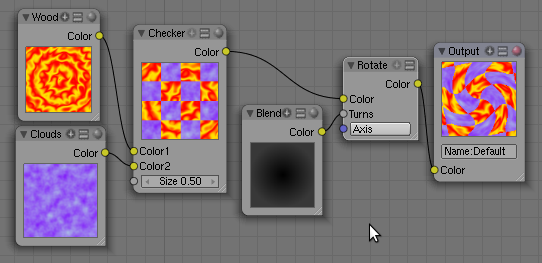
 The texture node system is a project to integrate a node-based texture generator into Blender.
Rob wrote:
Hi, your readers might be interested to know that texture nodes have been committed to SVN and will be in the next release.
It's a new node type that lets you create your own procedural textures. Supported features include animation, infinite resolution, and multiple output channels.
Links
- TextureNode manual (work in progress)
- BlenderDev/TextureNodes page
- Completely, utterly, totally insane application of TextureNodes (which led to a few cries of disbelief in the BlenderFoundation chat channel earlier today ;-)

33 Comments
Holy cow! This makes nodes even more useful than they already are :O
Wow, those screens looks awesome. Look forward to testing them out ;)
btw: the last link leads to a 200x120 px picture, not a full-sized one.
@Artisten: link updated, sorry about that!
I've followed the development of this feature since it was first mentioned some time ago. I can't say how thankful I am to finally see this in SVN :D
Many thanks to the developers!
Martin
PS: That fractal setup really IS a bit insane - insanely cool, but still insane. :D
Awesome! I can't wait!
Ahh, trying to compile just now but getting some weird errors (win32). Will try later, this is most intriguing!
Can't wait for the full release! With the texture nodes Blender moves up a notch. The setup for the fractal is insanely awesome!
you mean the fractal isn't a mockup? o.O omg...
This is... really REALLY awesome!
I can't wait to play around with it!
I wonder though... how will this tie in with the node based materials we now have in the GLSL preview modes...
Will there be options somewhere that will allow you to pick the resolution that these procedural textures are displayed at in a realtime preview?
F-YEAH f-YAH baby F-YEAHHHHHHHH!!!
*runs around in the buff*
yeah !i dont know how i could use this, but coooll!!!
Great news everybody! - as professor Farnsworth uses to say.
)))
I am so glad this made it in SVN. Nice work devs!
texture nodes great will they also be able to import a sgv tile? that would be uber cool.
probably spelled svg, for standard vector graphic. (misspelled due to dislexy :P)
I've been wanting this forever! Finally!
Yup. Now that's procedural power for us!
YEAAA!!! About time! I've been waiting for this ever since I found out what a node was! Now I can hardly believe this wonderful day has come!
But why are the texture nodes separated from the materials? It would be nice to create diffuse, bumps, specs and all at once!
I'm filled with so much anticipation for blender, that if I dwell on node based shading and texturing system any longer, my head may burn with raging excitement. seriously...
This is great.
I would still like to see action nodes for animation.
Nodes are so flexible I would actually like to see nodes for practically anything you can do in Blender.
exactly! innactpro - that's exactly what ICE is as well as Flowgraphs in Cryengine 2
Nodes yeah boi!!
shallallallalla!!!
@ ysvry:
"probably spelled svg, for standard vector graphic. (misspelled due to dislexy :P)"
It's svg for Scalable Vector Graphics. A vector's nature makes it easily scalable to any size whereas rasterized graphics get pixilated more and more the further you scale it beyond it's original resolution, hence the Scalable in svg.
That looks awsome,
It is a great addition to the current texturing, that is a bit of a mistery to me to be honest.
congratulations and ceep it up.
One more great tool in the box ! I don't use often material nodes, but I think that this will be change with texture nodes.
Good work ! Thank you !
Awesome! I guess I better learn how to use nodes now;)
Excellent! Looking forward to testing it out.
This is awesome. I already played with it yesterday and it looks promising. In combination with the displacement modifier you can do similar things as with ANT, TerryNoise or Inner World (it's very similar to Inner World, in fact). However, there are not much nodes yet. Things like separate/combine colors and much more important a transformation node (translation, rotations, scaling) and some kind of falloff node (similar to a sphere blend but with linear, gauss, sin and other falloff functions with variable parameters) is missing to make it perfect. Such nodes should be trivial to implement. If I had time I would do it. (I do not have time before February.)
That looks amazing :D Will help a lot for sure :D great!
WOHOO!
hope to be generating composite passes of organic textures with this in the future :3
I wrote a patch that adds two small texture nodes: Coordinate and Distance.
See: https://projects.blender.org/tracker/index.php?func=detail&aid=17998&group_id=9&atid=127
Using this you can make a procedural texture that uses the x/y/z coordinates as parameter. I used it to make a nice cosine falloff for a terrain (see link above). You could also use it to make waves and similar things. However, there seems to be a bug with my code that shows under some circumstances. I can't figure why, because its VERY simple. Maybe someone here can figure it out? I described the bug in the link above.
Procedural textures!? Yippee! I'm really doing to have to get the latest build now.
And 5 years later...
How far was this developed? Is it still around?