
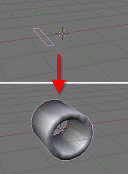
 A new modifier is in development for Blender by Campbell Barton, and it`s called Lathe. The objective of this new tool is to rotate an object to create something like a revolved surface.
It`s still in development, but a test build is available at graphicall.org. You can download the experimental build for windows here:
http://www.graphicall.org/builds/builds/showbuild.php?action=show&id=425
And information about the development here:
http://projects.blender.org/tracker/index.php?func=detail&aid=6838&group_id=9&atid=127
I`ve made a video to show how the Lathe modifier works, hope you like it.
[ev type="youtube" data="QYpRLSEwaXk"][/ev]
41 Comments
hey this looks really cool. I wonder if it could help with my jet I am modeling? :)
Fantastic!!!
Yesssssssssssssss..........!
hooray, i have wanted this modifier for a long time. i hope it gets integrated in 2.5 or sooner
Good Idea ! There are so many objects that we can create this way...
I am sure it will find its place in the next release.
Is it possible to control it via IPOs ?
Awesome stuffs... Blender is already good in modelling, but the more people add, the better Blender get...
:p I'd give it a 90% awesomeness (don't even know if it's english but heck)
Mmmmm... I must be doing something wrong: the modifier isnt visible in edit mode, wether the 3rd button is depressed or not. Why "only if enabled for display" on hover on this third button ?
Well, this might be a good step for those of us, who want to use blender as cad-application.. i hope it can be parametritized (oops) enough, so that future steps can easily be changed..
NICE, VERY NICE.... Same modifier as in 3dMAx...Love it...It could replace the spin tool... but faster and easier!!!... my congrats.... truly amazing
This is so much better than the old 'spin' tool.
I hope Spin/Screw/Spin Dup get deprecated with modifiers instead - it's so much nicer.
Sweet, the object controller is neat... maybe an option to subdivide the other side of the lathe would be useful too?
@Gwentiv press the Z key to go into wireframe mode. I had the same issue. But it is visible in wire.
um doesn't spin duplicate do the same thing
http://docs.huihoo.com/blender/user-guide-2.3/ch06s05.html
I sort of thought that the purpose for a lathe was interactive sculpting of an object; maybe the tool isn't quite named right:)... but anyway, it should make a a nice replacement for the aging spin/spin dup.
@selso
spin-duplicate is very similar to this, but it is not as flexible/dynamic as the lathe tool (you can change things afterwards etc.)
I hope it will be possible to set "empty-spaces" to create something like clock-markers with the lathe tool in future.
Nice! I've been needing this tool for a while... Can't wait until it is completed. ^_^
WOOT awesome tool
@ Sterling:
It's version 2.50 (speak: two point fifty), not 2.5 (two point five) ;)
Gwentiv:
You can animate the shape keys and IPO's, the lathe axis and pivot can be animated with an object.
Rave_Zero:
empty spaces could be interesting... The example you give Id suggest the array modifier but spaces could be used for other effects and not hard to add as will as space width.
Spin/Dup has the advantage it can operate on a selection and you can edit the resulting verts after. this is similar but bit the same since it operates on every edge.
I Didnt know max could do this so I had a look at 3ds max's modifier on youtube...
http://www.youtube.com/watch?v=IBnpO9wktls&mode=related&search=
Advantages of this one are..
* You can lathe a 3d mesh (from the video it looked like you could only lathe a 2d curve)
* You can set the axis with an object (Not just X/Y/Z - Min/Max/Center)
* You can animate the axis and pivot (by animating the pivot object)
Advantages of 3ds's are..
* Cap ends option (only easy with a 2d curve)
* You can set the material of each curve (It looks like that anyway)
Adding a lathe option to a curve object (like bevel) might be a better way to go about this, though that would mean you could not mix lathe+subsurf+armature etc which would be a pitty.
Example
http://members.optusnet.com.au/cjbarton/lathe1.png
http://members.optusnet.com.au/cjbarton/lathe2.png
Beautiful! Good work! What's next?
Whoever named this software "Blender" was a genius. Thats was so cool. :)
hehehehe,
so simple, but at same time... so brilliant!!! Really really nice work,
really nice! Good luck on this project! ;)
Thanks for this great tool!
definitely awesome! =D
Thanks for sharing
Great work on this one. On another website I suggested this could be the beginning of parametric object in blender. I dont know if this would be an easy change or not, but this would be a great one for blender.
This is cool. It reminds me of a tool in Ray Dream Designer, when I tried it way back when. It was interesting, but it took some getting used to. It looks like this might be a better implementation of that or a similar concept.
You are adding a rectangle by adding a 4 edged circle? Why not fix that first?
Oho, that is some sweet 3dsmax ripoff :-) If it gets implemented, I'll certainly use it istead of spindup. Thumbs up to Campbell.
@Joeri:
There is a plane primitive. Adding a 4 edged circle is just another way to do it.
So we have a spin modifier.... Won't it be better to merge this with the array modifier in some way?
I'm gonna get flamed for this but, TBH I don't really like the idea of modifier after modifier. In 3Dmax you had a gazzillion modifiers with only a teensie different functionality. You could "shop till you drop", and not have made a damn thing. More modifiers can also "kill" creativity. I really hope we don't go that way with blender.
Since you can already do this with the array modifier and some empties, wouldn't it be a better choice to add this functionality to the array modifier directly? And if you would do that, it might also work as a spin duplicate modifier at the same time.
All bases covered in a single modifier. would be cleaner I think.
Freakydude - thats an option,
The array tool that the modifier was based on, wrote in python and that supported skinning.
I intended the one in C to do that also, but artificer didnt get around to it.
Skinning in the array modifier could be nice all the same... 2 reasons NOT to make this a part of the array modifier are...
1) Not discoverable. Users probably wont find it, seems kind of hidden functionality.
2_ even though it would work, youd need to do some math to get a full revolution so as to rotate the empty 2deg for 180 slices for instances.
3) Array is already a fairly large C function, This would make it a lot bigger, of course they could be made into 2 functions accessible by the same UI. but again, if they are 2 tools, no reason to lump them into 1. merging into the array modifier could also loose some of the optimizations that are possible when its separate
We know the modifier UI will need to be Modified to cope with more.. dont worry..
btw, I have working implimentations for a slice modifier
http://members.optusnet.com.au/cjbarton/test__.png
http://members.optusnet.com.au/cjbarton/test_.png
as well as some more that are working but not finished 100%, wire modifier, blur, fakeAO and..
HQ Normals,
http://members.optusnet.com.au/cjbarton/normal_algo.gif
@Ideasman42:
Just a thought - but it might be more useful for animations if "no. of steps" was changed to "angle between steps" - that way (and if the "degrees" button was able to be IPO'd), we could do sorta 'autolathing' effects in animations. With the current controls sceme, we would have to do some complicated pyDrivers calculation and adjustment of "no. of steps" at the same time as increasing the degrees of rotation or the animation would look inconsistent since the mesh resolution gets worse when "degrees" is increased if the number of steps stays the same.
HQ normals looks quite useful btw...
-epat. ;)
Great! Can't wait to try
Just a quick note to your max's vs blender's lathe comparison
In 3ds MAX you CAN set the axis with an object, if you go down to the axis-sublevel you can rotate, move, align or even link the rotation-axis to anything in the scene. You can also also animate the rotation axis (everything is animatable in 3ds max, with a few exceptions).
It's not possible to add lathe to 3d objects do (only works with 2d shapes) =)
Keep it up
Freakydude: The advantage of having a specific modifier is that it's much simpler, quicker and easier to use. Most of the time, when you're just trying to get work done quickly, it's much nicer to draw the shape add the modifier, then boom- it's all set up with no fuss, no adding empties, no hunting for object names, no trying to accurately set up the right rotation.
One of the other advantages of things like the modifier stack or node trees, is that's it's not just monolithic big tools that try to do everything - you have smaller tools that you can assemble yourself in interesting ways.
And yes, Spin/SpinDup and friends are horrible old lumbering dinosaurs and should be cast into the tar pits when this modifier is in.
I am able to do all that with the basic revolve but having it parametric is amazing!!!
nice tut.
brilliant stuff , I hate spin duplicate and all that ,its too confusing a simple modifier is great
I like spin/spindup, I use it all the time when modeling mechanical things.... well pipeworks and all little nuts and bolts etc...
You make some good points Matt, but why are those tools lumbering dinosaurs? the alternative is stacking up piles of modifiers. if you don't want them you can apply and keep applying. are the modifiers, really interchangeable(i mean you can change the order and applying them without it distorting other modifiers such as edgesplit or subsurf or or, armature?
Picked this old thread link up from the recent post about Voumetrics (2008).
I wondered what happened to this modifier?
whatever happened to this? is it still in development? it would be a great addition to 2.5
You can go to edit mode and use spin with Degr 360 to get the same result... I think thats the reason why this modifier is gone.
The Modifier is now in Blender 2.5x (for people who find this page)
Finally, I've been waiting years for this. Good on the guy.