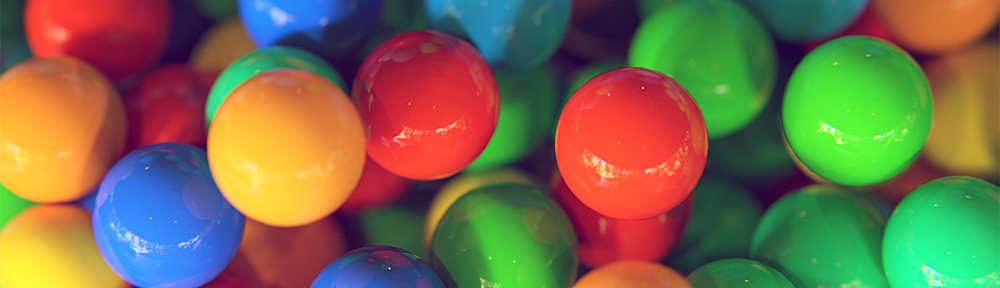
Looks great! I’d love to try the setup if you don’t mind sharing it?
If you subdivided some of the more in-focus gumballs to smooth the edges and maybe use Blender’s physics to settle them a bit you’d be well on your way to a photo-realistic render I reckon.
The HDR image was created by Greg Zaal, and the node setup was created by Ben Simonds. You can see more about it here http://davidzerba.wordpress.com/2013/11/23/gumballs/. And yeah, I forgot to make the foreground spheres more subdivided. I also did use Blender’s physics but I probably should have let the balls fully settle. Thanks for the input, and I’m glad you think it’ a nice image!
Looks great! There are some great tips on your site, you mind sharing a higher res pic of the nodes so I can see what’s going on in there? Would love to try the setup myself.
I just mixed a Diffuse shader with a Glossy shader using a Fresnel as the mix factor. To make the reflections white, just make sure the Glossy’s color is white, while the Diffuse is the color you want the ball. Also, the reflections will only be white if what it’s reflecting is actually white.




Looks great! I’d love to try the setup if you don’t mind sharing it?
If you subdivided some of the more in-focus gumballs to smooth the edges and maybe use Blender’s physics to settle them a bit you’d be well on your way to a photo-realistic render I reckon.
The HDR image was created by Greg Zaal, and the node setup was created by Ben Simonds. You can see more about it here http://davidzerba.wordpress.com/2013/11/23/gumballs/. And yeah, I forgot to make the foreground spheres more subdivided. I also did use Blender’s physics but I probably should have let the balls fully settle. Thanks for the input, and I’m glad you think it’ a nice image!
Looks great! There are some great tips on your site, you mind sharing a higher res pic of the nodes so I can see what’s going on in there? Would love to try the setup myself.
Ben
Thanks man!
Simple and beautiful
Thanks!
How did you get the reflections to appear white?
I just mixed a Diffuse shader with a Glossy shader using a Fresnel as the mix factor. To make the reflections white, just make sure the Glossy’s color is white, while the Diffuse is the color you want the ball. Also, the reflections will only be white if what it’s reflecting is actually white.