
Making a model look ‘aged’

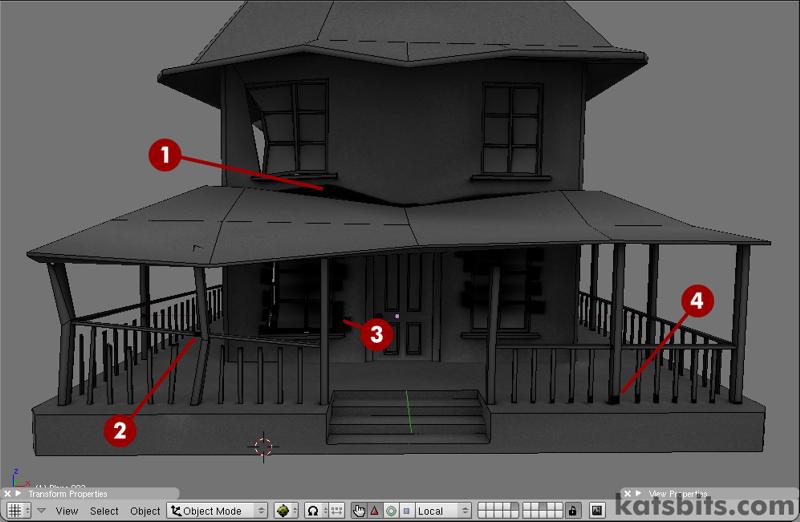 Katsbits.com use the sculpt tool to make a house look a LOT older.
‘Ageing’ a model is one of the more tricky aspects of 3D, making it looked ‘used’ in such a way that it appears natural and random, like its falling to bits under its own weight; normally this would mean some extensive work in edit mode, pushing and pulling groups of vertices which can often look a little forced or contrived. Fortunately, Blender 3D’s ‘sculpt’ tool comes in handy as an alternative way of doing just what’s needed.
Link



Interesting. Really gives the house allot more “life”. Good to get a basic idea about how 2 prepare a mesh.
interesting to know how many things you can do with sculpt tool
First time I see that glass stretch itself with time.
Excellenct tutorial. Thanks for posting this. So many older buildings have this quality of sagging under gravity over time. I will use this information a lot.
Thanks for the post bart. If anyone has questions just drop me a line or post a message on KatsBits forums.
Nice. I agree about the glass, tho. Still, you now know what to do with your own model. Very cool.
Loooks good. only problem I see is that windows don’t bend, and support beams don’t change length.
Because of the nature of what you’re doing and what you’re applying it to (a low poly model where direct vertex to vertex connections aren’t always possible or efficient), in using the sculpt tool like this, you can’t always predict what’s going to happen or where. So, a little bit of lateral and creative thinking goes a long way in this context; the tutorial *does* explain why this problem occurs and how to fix it.