
Add Wood Surface Detail Faster with 50 Decals, Brushes, and Displacement Designs

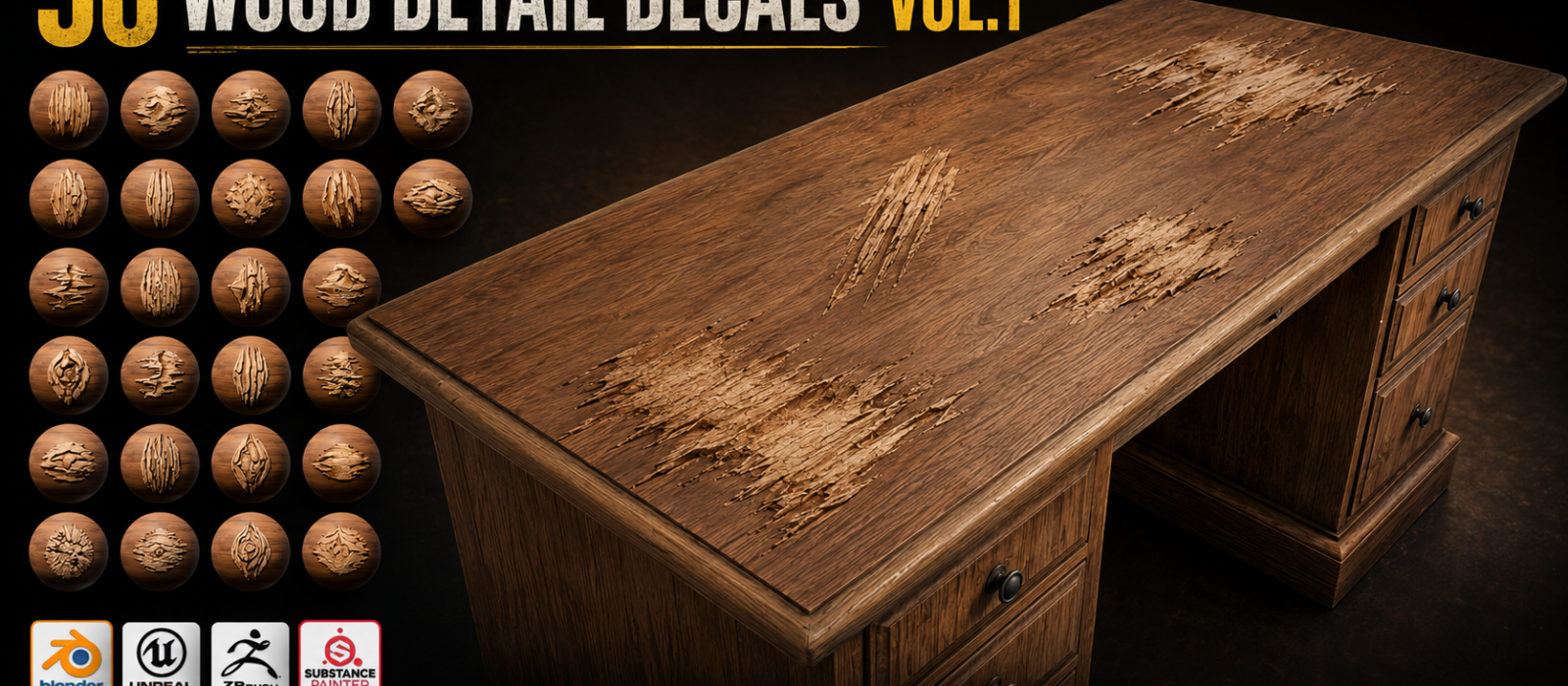
50 wood detail designs that can be used as decals, parallax surface details, real displacement, sculpt brushes, Substance Painter stencils.
Hey folks, Neil here from 3D Tudor.
Wooden assets are brilliant fun to build. Beams, planks, barrels, fences, bridges, cabin walls,
taverns, market stalls — they show up everywhere in fantasy, RPG, and stylized environments.
The tricky part usually comes after the main modelling is done. The shape might be working, the
material might be heading in the right direction, and the lighting might even be behaving itself for
once, but if the surface is still too clean, the whole asset can feel unfinished.
But if the surface is too clean, the whole asset can still feel unfinished.
A wooden beam without knots, splits, grain changes, plank seams, worn edges, bark detail, or
weathered marks can look like it has just been installed by a very enthusiastic fantasy
carpenter.
That is the problem this pack was built to help with.
WoodDetail Decal Pack Vol.1 is a wood surface detail library made for artists working in
Blender, Substance Painter, Unreal Engine 5, and ZBrush.
It includes 50 wood detail designs that can be used as decals, parallax surface details, real
displacement, sculpt brushes, Substance Painter stencils, Unreal Engine deferred decals, and
ZBrush alpha brushes.
The idea is to help with that final surface detail pass.
The stage where the asset already exists, but the wood needs to feel older, handled, damaged,
carved, split, weathered, or simply more believable.
One of the main ideas behind the pack is shot-distance flexibility.
Not every wood detail needs to be treated the same way.
A background fence does not need the same workflow as a close-up hero prop. A mid-shot
tavern wall does not need the same geometry cost as a cinematic render. A game environment
decal does not need to be rebuilt from scratch as a sculpted detail.
So the pack is built around four practical use-modes.
For quick environment dressing, you can use the designs as flat alpha-cut decals. This is the
fastest way to add extra visual information to wooden walls, beams, fences, stalls, doors,
planks, and larger background pieces without changing the mesh.
For mid-shot assets, the parallax material gives you shader-driven depth without adding extra
geometry. This is useful when a flat decal feels too simple, but full displacement would be
overkill.
For hero close-ups in Blender Cycles, the real displacement workflow gives the surface more
physical presence. This is the mode I would use when the camera is close enough for the
viewer to read the relief, edge detail, and surface breakup.
For sculpting workflows, the pack includes Blender sculpt brushes and ZBrush alpha brush
presets, so the detail can be stamped directly into the mesh before baking or final surfacing.
The same design library can also move across different parts of production.
- In Blender, the pack includes a master file, ready-made use-mode scenes, asset-marked
sculpt brushes, and Cycles displacement workflows. - In Substance Painter, the designs are set up as stencil tool presets for stencil-driven
paint strokes. - In Unreal Engine 5, the pack includes an Environment Preset project, a demo map, and
deferred decal actors. - In ZBrush, the designs are included as alpha brush presets.
You do not need to use every software lane.
The point is that the same wood detail set can travel with the asset depending on where you are
in the workflow.
This pack is aimed at stylized realism rather than photogrammetry.
It is not a 3D scan collection. The details are designed to read clearly at game and portfolio
distance, while still pairing well with hand-painted, stylized PBR, and fantasy environment
workflows.
I see it fitting well into fantasy villages, taverns, cabins, barrels, bridges, plank walls, fences,
market stalls, RPG environments, hero props, portfolio scenes, cinematic close-ups, and game-
ready asset detailing workflows.
The best time to use it is after the big things are already working.
- Get the silhouette right first.
- Block in the large shapes.
- Sort out the base material.
- Think about the lighting and camera distance.
Then use the wood details to add the surface story: a seam to break up a clean plank wall, a
knot to give a beam more character, a split running along an edge, some bark detail on exposed
timber, or a worn grain mark where the surface needs more direction. Used this way, the details
stay practical and purposeful instead of turning every small wooden mark into a full geometry
problem.
Flat decals are useful when the asset is further away. Parallax works well when you need a little
more depth. Real displacement is there for close-up Cycles renders. Sculpt brushes are useful
when the detail needs to become part of the mesh and possibly be baked into a game asset
later.
The showcased renderer is Cycles. EEVEE works for decal, parallax, and sculpt-brush use-
modes, while real displacement is intended for Cycles.
The WoodDetail Decal Pack Vol.1 is available on Gumroad.
You can watch the preview video here:
Until next time, happy modelling everyone!
Neil – 3D Tudor