Render Control – Remote Blender Addon

Monitor, preview, and control Blender renders from a phone or browser, from anywhere. A Blender add-on plus Android / web companion apps. Everything is handled on the server, so there’s no port forwarding, no VPN, and no static IP. Pair by scanning a code; everything is end-to-end encrypted.
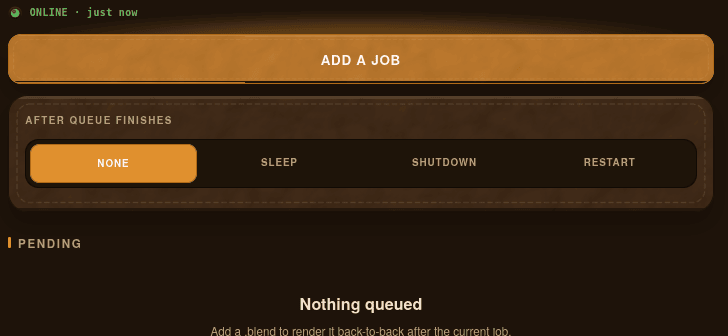
Render Control is purpose-built for one problem, where a long render holds your PC hostage and you babysit it. Typical remote desktop tools (Parsec, RustDesk, Chrome Remote Desktop) mirror the whole screen, need the interface open, and give no specific controls. Render Control instead streams exactly what you would need: progress (current frame, samples, ETA), a live preview of the frame as it renders so mistakes are caught early, and hardware stats (per-GPU utilization, VRAM, temperature, plus CPU and RAM, multi-GPU supported). It also accepts rendering commands, like starting or stopping a render, rendering a specific .blend file, queueing of multiple jobs back to back, downloading finished frames or the encoded video to the phone, and sleep, shut down, or restart the PC automatically when the queue finishes. Plus push notifications fire when a render completes or fails.
Setup takes about 60 seconds: drag the extension zip onto Blender (4.2+, Windows/macOS/Linux), install the Android APK or open the web app (works on iPhone and desktop), and scan the QR code Blender shows. The add-on makes outbound connections only, so there is nothing to open or forward on any router or firewall. it works from any Wi-Fi or cellular network unlike Flamenco. Pairing is end-to-end encrypted, so the relay passes ciphertext and cannot read renders, previews, or commands. Pairing codes expire and every device gets its own token.
Pricing is a $40 one-time (lifetime license, keeps the version it shipped with plus minor patches) or $34.99/year with every update included. 7-day money-back guarantee, no questions asked. A license key is required and is enforced server-side.