Node Annotator Add-on – Easily create good documentation of your node trees


Here’s one of those ideas that makes you say “why didn’t anyone think of that!”. The free Node Annotator add-on by Frank Firsching lets you document your node trees by adding sticky notes to them. Simple, but effective!
Description
A convenience edit field for the newly introduced Blender 4.2 property for the node group’s tool-tip. This property is usually found on the Group tab. The add-on paints a small info icon into the header of node groups, that have a description and thus a tooltip. This behavior can be turned off in the preferences.
Create annotation
This command creates a new yellow annotation box in the current node graph in the middle of the view. It also creates a new text block and associates it with the annotation. As a last step it opens a new window with the text editor to enter the annotation text.
Edit annotation
The edit annotation command opens a new window with the text editor to edit the selected annotation text.
Refactoring section
The refactoring section can be used to find usages of custom node groups within the graph.
Search type
A drop down box, that allows to specify which node groups to search within the currently edited node tree.
Replacement type
A similar drop down box, but this one specifies the type of the node group to use for replacing a found node.
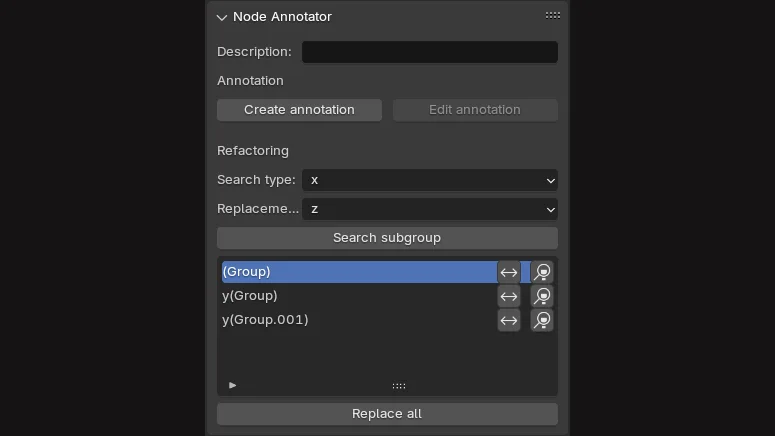
Search subgroup
Starts the search and lists the results in the list box below. Every entry has 2 buttons, one to replace the found node with the “Replacement type” and one to jump to that node.
Replace all
This button refactors all occurrences of the search type to the replacement type.
Link