
Blender features update — OptiX viewport denoising added to 2.83


Denoising is becoming more and more popular to speed up rendering times, especially since denoisers feature Artificial Intelligence / Machine Learning algorithms. Among the most popular AI / ML denoisers are Intel’s OIDN (Open Image DeNoise) and NVIDIA’s OptiX denoiser. For final rendering, both OIDN and OptiX have already been implemented in Blender, but in the latest Blender 2.83 alpha builds you’ve now got access to OptiX viewport denoising as well. Let’s take a look.
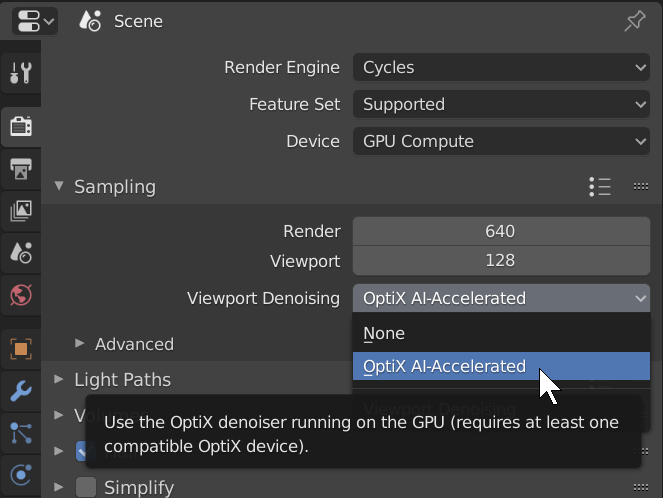
Intel’s OIDN denoiser is only accessible in the Blender Compositor, and to get the best results, activating and rendering some extra passes is recommended. Alternatively, you can activate the OptiX denoiser or the native Blender denoiser or OptiX in View Layer Properties ➔ Denoising.
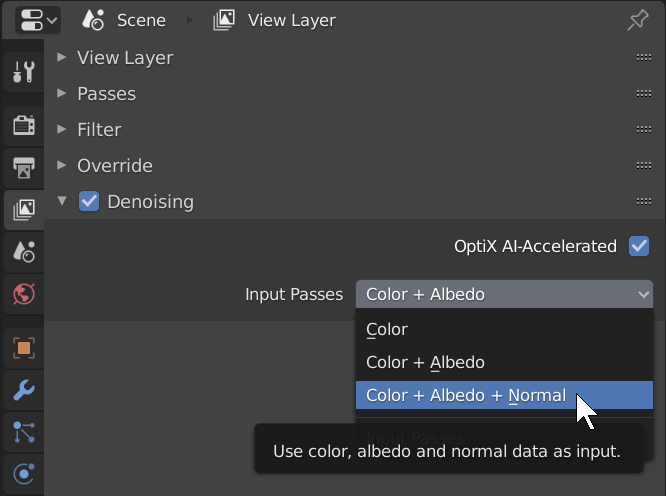
But all of this is for final rendering only, while the most recent denoising implementation in Blender affects the viewport as well. You can activate it in the Render Properties ➔ Sampling ➔ Viewport Denoising roll-out. Right now the only options are None and OptiX AI-Accelerated. If you’re wondering why this isn’t simply a checkbox, it’s because in the future the native Blender denoiser and probably also OIDN will be added to the viewport denoisers.
An OptiX-compatible GPU is required for the Optix viewport denoiser. The first time you start viewport rendering with the OptiX denoiser activated, the render kernels have to be loaded, which may take a while. But once it works, the results are pretty impressive. You only need a low amount of samples such as 16 to already achieve an acceptable result, which brings Cycles viewport rendering closer to Eevee.

As with every denoiser there’s some loss of detail, particularly in the textures, but it’s still a lot better than looking at tons of noise.
Also very nice is the ability to denoise your final rendering with a different denoiser. For example, you can use OptiX denoising for the viewport, but use the native Blender denoiser for your final rendering.
If you want to try the new OptiX viewport denoiser, download and install the latest Blender 2.83 alpha build (link below).
Keep an eye on BlenderNation for more coverage of exciting new Blender features!



Sweeet~
What Blendr REALLY needs is a denoiser that can take the previous frame into account … but that would mean that someone would have to invent the “previous frame” node.
That’d be great indeed. I’m sure that will follow sooner or later.
It’s only for RTX graphic cars ? It seems that it doesn’t work on my GTX1080ti
I believe OptiX works on all CUDA-compatible NVIDIA cards, but the speed of OptiX will depend on what type of GPU you have. RTX has an advantage.
You can read more about it in this Blender Artists thread:
https://blenderartists.org/t/optix-support-for-cycles-and-rtx-cards-is-now-avaible/1135119
I’ve got a GTX 1080 GPU and once I go to the OptiX tab in the Preferences, it welcomes me with “No compatible GPUs found for path tracing. Cycles will render on the CPU”.
Same here on GTX 1650.
Only works on RTX cards… it needs RTX hardware
I have the same issue, my configuration is ASUS POSEIDON GTX1080TI 11GB & GIGABYTE G5X1070 8GB
Did you install the latest NVIDIA drivers?
I think so. Maybe it’s because I’m on Linux and the Linux drivers don’t have it (yet)?
Actually I probably need to install OptiX separately (I’ve seen it in the repositories) – I’ll try it later today.
Nope. Won’t work even after installing optiX from NVidia’s website.
I’ve downloaded the most recent NVidia Studio Driver (for Windows 10 64-bit) which is 442.19 but OptiX is still unavailable. Tried both 2.82 and 2.83 alpha with no luck. What else do I download/install to enable OptiX?
In this video : https://www.youtube.com/watch?v=KHtxfV5_AQM
there is a link to a custom build where you can use the OptiX in any CUDA graphics card.
It only works on RTX graphics cards 2060 2070 and 2080. It specifically uses RTX hardware, so it’s not possible to work if that hardware is not present.
I made quick comparison render to see differences. In my opinion Intels denoiser gives better results (closer to high sample render) and Optix is faster (due to rtx hardware acceleration probably)
Default denoiser is both slower and worse in results (at least without tweaking)
https://imgur.com/a/cHVQ5ib
Denoiser is good just for plastic materials .in other cases reduce details!
Denoising with only a few rendering samples is good for fast impressions, but you shouldn’t expect results comparable to a final rendering.
The more samples you use, the less detail is reduced, so it can be handy to still run a denoiser (Intels denoiser node has best results) even over a 1000 sample final render, But always test and compare when using
@METIN SEVEN
When reading the release notes, I came across this: “To use this feature you need a NVIDIA RTX GPU and at least driver 441.87 (Windows) or 440.59 (Linux)”
https://wiki.blender.org/wiki/Reference/Release_Notes/2.82/Cycles#Denoising
Are you sure OptiX is not RTX exclusive?
I’m not sure at all about the compatibility. You might want to ask it here to be sure which cards are supported:
https://blenderartists.org/t/optix-support-for-cycles-and-rtx-cards-is-now-avaible/1135119
Thanks. I’ll look into it.
I’m no expert, but real-time AI denoising? It seems to me like only an RTX card could handle that.
That might be true. I suggest reading the above-posted discussion link to know more.
It IS only RTX exclusive, The point of this system is to take advantage of the RTX hardware to speed up AI Denoising, without that hardware there wouldn’t be much of a speed advantage.
For non RTX cards you are stuck with Intel’s denoiser (which is also ai based)
it’s not!
there are blender builds where optix also works with gtx cards. i don’t know why the official builds don’t enable this too.
with raytracing of course there won’t be much/any performance advantages over cuda though.
I also read somewhere that RTX is not an absolute requirement for OptiX, just a recommendation.