• Home
  • Art
    • Behind the Scenes
    • Images
    • Video
    • Games
    • Models & Rigs
    • Headers
    • Repositories
  • Development
    • Blender Development
    • Add-ons
    • Python Scripts
  • Education
    • Books
    • Tutorials
    • Videotutorials
    • Training Videos
  • Community
    • Conferences
    • Contests
    • People
  • Contribute
    • Contact
    • Submit News
    • Submit Header Graphic
    • Supporting BlenderNation
  • Home
  • Art
    • Behind the Scenes
    • Images
    • Video
    • Games
    • Models & Rigs
    • Headers
    • Repositories
  • Development
    • Blender Development
    • Add-ons
    • Python Scripts
  • Education
    • Books
    • Tutorials
    • Videotutorials
    • Training Videos
  • Community
    • Conferences
    • Contests
    • People
  • Contribute
    • Contact
    • Submit News
    • Submit Header Graphic
    • Supporting BlenderNation
BlenderKit 2019/02-3
Models & Rigs

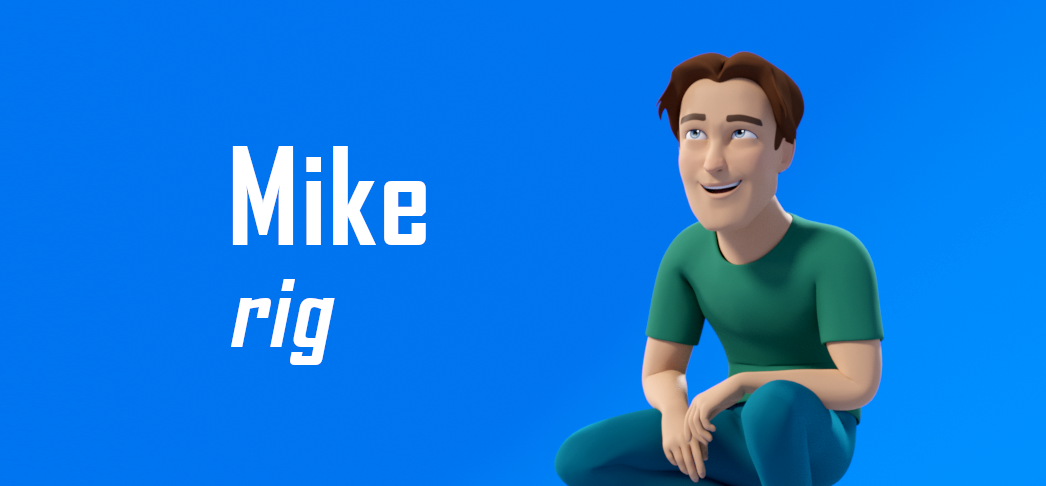
Free Download: Mike, Fully Rigged Character (CC-0)

Artell · February 13, 2019

lucky writes:

Try Mike, new and free rigged character! It can be used for any purposes, CC-Zero license).
Rigged with the Auto-Rig Pro addon.

Link

  • Download Mike Character

Author Artell
Digital artist, coder.
Advertisement
Ads help pay for running BlenderNation. Please consider adding us to your allow list.

12 responses

  1. looch
    14 February 2019 at 09:14

    for some reason the ring finger will move with a delay, like if there was a cyclic evaluation issue or so.
    and tell me what’s wrong with me but i’ve never managed to use your pickers, I select a controller in the picker and the controller that should be selected isnt, am i missing a step?

    Reply
    1. tk1214
      14 February 2019 at 10:13

      To use the pickers: did you install and enable both addons “proxy_picker.py” and “rig_tools.zip”? I forgot the “proxy_picker.py” at first, so I couldn’t use them as well.

      Reply
      1. Luciano A. Muñoz Sessarego
        14 February 2019 at 23:58

        did not know about those addons !

        Reply
        1. tk1214
          15 February 2019 at 08:06

          Well, they are in the “mike.zip” file you can download here and are mentioned in the “Welcome, here is Mike!” text window below the character after you open the blend file ;)

          Reply
    2. lucky
      14 February 2019 at 10:17

      It there’s a cyclic dependency, you must have opened the file in Blender 2.8.
      This Mike version and the associated addons are for Blender 2.79 only.
      However i’m going to add the Blender 2.8 version very soon (check back the download link tomorrow or later today).

      Reply
      1. Luciano A. Muñoz Sessarego
        14 February 2019 at 23:58

        yes you are right i opened in 2.8, great to know, thanks!

        Reply
  2. tk1214
    14 February 2019 at 10:11

    Cool rig, thanks a lot! I don’t seem to realize what the “Morph” settings in the upper left of the pickers do – nothing seems to happen really…

    Reply
    1. lucky
      14 February 2019 at 10:39

      The morph (shape keys) haven’t been created so far :)

      Reply
  3. Yolao
    14 February 2019 at 15:12

    Thanks for uploading this rig. Is there any way to make the mouth controls follow the outer mouth control?..

    For example now if i move the “c_lips_smiles.r” control, controls like “c_lips_top_01.r” , “c_lips_bot_01.r” etc. won`t follow the movement.

    Reply
  4. keither
    17 February 2019 at 12:38

    The rig seems awesome, but for some reason here is what shows up : https://cdn.discordapp.com/attachments/340832962729869312/546655840707280904/unknown.png
    any clue on what I can do ? Thanks !

    Reply
    1. lucky
      17 February 2019 at 16:28

      Hi, script execution must be turned on otherwise the rig breaks:
      http://lucky3d.fr/auto-rig-pro/doc/install.html#scripts-execution

      Reply
      1. keither
        22 February 2019 at 13:45

        Thank you so much !

        Reply

Leave a reply Cancel

Your email address will not be published. Required fields are marked *

Featured posts

  • Best of Blender Artists: 2026-27
  • Behind the Scenes: Somnus
  • Best of Blender Artists: 2026-26
  • Best of Blender Artists: 2026-24
  • Best of Blender Artists: 2026-23

Support BlenderNation

Keep independent Blender coverage alive

BlenderNation is run by a small passionate team. Your support makes continued independent coverage possible.

Support on Patreon →
Related articles
Models & Rigs

Stop Rebuilding Every Corridor: A Stylized Dungeon Kit for Blender

3D Tudor · April 4, 2026
3D rendered traffic lights and street signs, including one-way and pedestrian crossing signals, with detailed textures and high-quality design.
Models & Rigs

New-York City Traffic Light

PolyCrate · October 2, 2025
Four medieval characters in dynamic poses, including a knight in armor, a robed figure, and two fantasy characters with glowing effects, set against a green background. Blender logo at the bottom.
Models & Rigs

Free Download: Skeleton Rig

Bart · September 30, 2025

About BlenderNation

BlenderNation collects the best free and paid resources for the Blender 3D community.

Support BlenderNation

Become a supporter Advertise

Contact

Contact us Submit news

Follow us

LinkedIn Mastodon
© 2026 BlenderNation — Part of the vrotvrot.com network
View full size ↗