DynRemesh Released

Alberto Gonzalez writes:
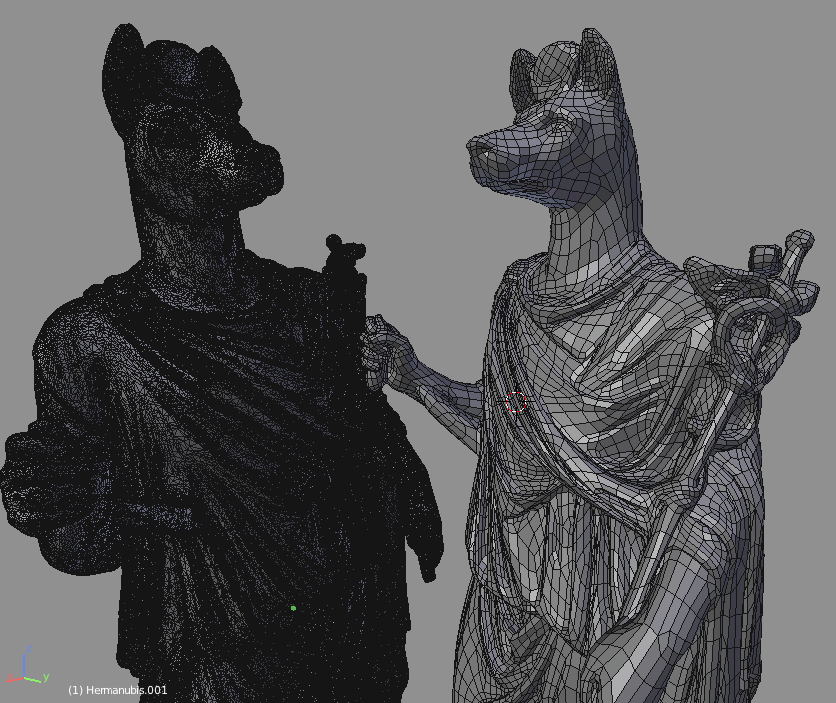
DynRemesh is a tool for instantly remeshing your dynamic topology sculpts & 3d scans with high number of tris.
Save some time by remeshing your dense topology in a click!



Alberto Gonzalez writes:
DynRemesh is a tool for instantly remeshing your dynamic topology sculpts & 3d scans with high number of tris.
Save some time by remeshing your dense topology in a click!


wonder if this is just using instant meshes in background?
What is the difference with the actual remesher modifier?
Also, con you define guides to force it to create loops?
Remesh modifier produces complete garbage topology, the difference is night and day..
If the cover picture was fine with this I’d say it definitely didn’t use instant meshes in the background since instant meshes resulting topology has very similar sized polygons while the picture shows some elongated polygons. That is one problem I have with instant meshes, it never does a good job spikes or models that include small cylindrically shaped parts.
Works pretty well so far. I just wish that it respected edge hardness more. Not sure if this can be fully automated. However, at the very least, being able to manually weight and “mark” hard edges would be nice.
So, kind of interesting, this is good, having a good remesh system that outperforms the remesh modifier is pretty great.
Do someone knows if we are going to be able to define main loops using grease pencil or something similar?
Also, how does it performs? it´s faster than the remesh modifier at high resolutions?
And finally, how does it handle interesecting geometry? so for example if you have a hand intersecting the belly of a character, will if remesh it discarding the intersecting part or will it respect it? or does it have an option to tell it what to do in those cases?
Cheers and thanks to everyone for those answers!!!!
Feel a bit cheated after purchase, but maybe I’m wrong in my assumption. It’s just a decimate modifier, convert tris to quads (alt j) and a subdivision surface. Pretty easy to do in Blender itself. It just puts the 3 steps into one. I achieved pretty much the same result doing it this way. The edgeflow is not great and has several poles.
0 subdivision with this is just the decimate modifier.
Useful if you don’t want to do the 3 steps I guess. Was expecting a better quadrangulation similar to zremesher or other.
The Author mentioned he’s improving the tool, so I’ll wait to see how the next update goes.
Better auto retopo with clean quads for Blender would be very welcome and something that several people have been wanting for a while. Would definitely be a welcome addition to the sculpting workflow.
Can anyone or the Author explain the benefits of this addon over “Instant meshes”??
https://www.youtube.com/watch?v=bXK3P0kSaJ8
https://www.blendernation.com/2018/06/14/instant-meshes-remeshing-add-on/