

5 Ways to Straighten Edges in Blender

An Phung writes:
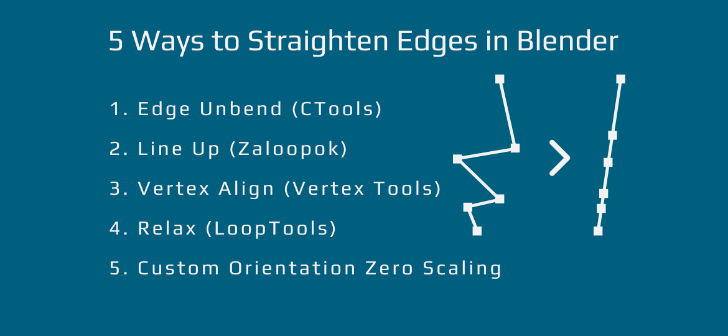
When I transitioned from 3ds Max to Blender a couple months ago, one of the first things I searched for was a Straighten tool, only to find out that there wasn’t (still isn’t) a dedicated operator for that. After a long time of asking in forums, groups; doing my own research, and a few happy accidents, I’ve found 5 ways to straighten edges in Blender.
- Edge Unbend – an operator in Align Tools in CTools by Chromoly.
- Line Up – from Zaloopok addon.
- Vertex Align – from Vertex Tools.
- Relax – from LoopTools (built-in).
- Zero Scaling on Custom Orientation – Manual way to straighten.
Thanks to the author of these add-ons for sharing them with us for free!
Notes:
- Sorry for the crap audio. I will get a better mic as I get more into making videos. Also, I’m pretty shy and English is my second language, but hopefully you can understand what I’m saying in the video.
- My Interface and hotkeys are probably vastly different from yours, but you should be able to find the operators with the Search Menu. I also highly recommend customizing your own interface and hotkeys. I’m thinking about making a video on how to customize the interface and hotkeys in Blender. Let me know if you would like to see that.
- This is not necessarily a “tutorial”. More like sharing with you the options available.
- If you have a different solution for straightening edges, please let me know.
* 1.25 speed is recommended. 1.5 is also ok.



The CTools Add-on link gives a 404 Error on GitHub for me.
Hello! Good exploration, An Phung ! My English is also not native, but I can understand everything clear. How did you get such interesting menu at the right top?
Thank you!
It was made using the Pie Menu Editor addon. It’s a paid addon, but totally worth it. Here’s the Blenderartists thread:
https://blenderartists.org/forum/showthread.php?392910-Addon-Pie-Menu-Editor-1-14-11
Thanks! :)
Best way is curve streatch in Mira tools
Thank you. I just tried it out. It works. But I have to hit Enter(or LMB), then RMB, to confirm. I’m adding Curve Stretch to the list in the video description.
The link for the first addon is broken… :(
Yes. I just noticed that. The owner of that repository must have taken everything down recently. I have uploaded it to Google Drive. Here’s the link:
https://drive.google.com/file/d/1OePppEPYWtkoZZg_GnaUOPLsTnlmLYVR/view?usp=sharing
Thank you!!
I’ve edited the download link for CTools/ Edge Unbend(Not on here, in the youtube video description). I’ve also added Curve Stretch to the list, and a brief explanation of how to use it for straightening in the description. Chromoly discontinued CTools a while a ago, I think; and the owner of the repository from which I got CTools from, also took everything down. Hopefully, in the future, Blender will have a dedicated Straighten Tool, or someone will write a new addon for that if the addons in this list stop working.
Addon “Loop Tools”, the button “Gstratch”
I did not finish, I’m sorry :)
Hey thank you for letting me know. GStretch works great. I must say it’s on par with Edge Unbend. I’ll add that to the list. Surprised nobody told me about it when I asked around a couple months ago.
An Phung, what key mouse recording add-on do you use? Lower left corner on your video.
It’s called Screencast Key Mod, from CTools.
Thank you
Here’s a method that you might can add: Align Selection To Grease Pencil Stroke
https://blenderartists.org/forum/showthread.php?332160-Addon-Align-Selection-to-Grease-Pencil
Draw a straight Grease Pencil line and you should get some useful results with this script.
It works with vertices, objects, paths, Bézier curves (except Aligned and Free type curves), and Edit Mode bones.
Honestly, I think the Grease Pencil is one of the most powerful tools in Blender.
I’m not too familiar with it, but I think in order to use it as a straightening tool, you would have to be able to draw a straight line from one vertex to another. From what I’ve seen from the video, this tool is more suitable for free form editing.
Awesome thank you!