• Home
  • Art
    • Behind the Scenes
    • Images
    • Video
    • Games
    • Models & Rigs
    • Headers
    • Repositories
  • Development
    • Blender Development
    • Add-ons
    • Python Scripts
  • Education
    • Books
    • Tutorials
    • Videotutorials
    • Training Videos
  • Community
    • Conferences
    • Contests
    • People
  • Contribute
    • Contact
    • Submit News
    • Submit Header Graphic
    • Supporting BlenderNation
  • Home
  • Art
    • Behind the Scenes
    • Images
    • Video
    • Games
    • Models & Rigs
    • Headers
    • Repositories
  • Development
    • Blender Development
    • Add-ons
    • Python Scripts
  • Education
    • Books
    • Tutorials
    • Videotutorials
    • Training Videos
  • Community
    • Conferences
    • Contests
    • People
  • Contribute
    • Contact
    • Submit News
    • Submit Header Graphic
    • Supporting BlenderNation
Chocolat Product Visualization
BlenderNation
Chocolat Product Visualization
Videotutorials

Use Blender as a Frequency Generator

cg-physics · October 12, 2017

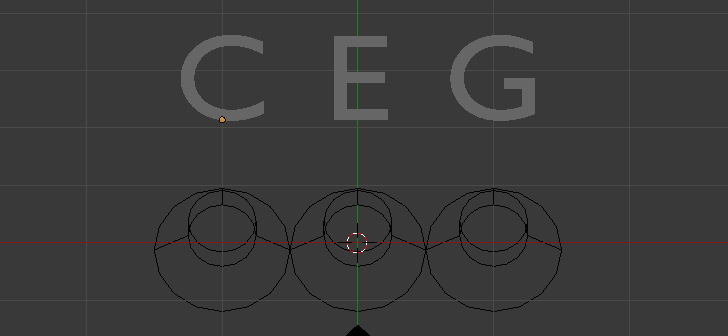
Here’s how to use a 1000Hz sound sample and modify it to generate any tone you want, based on this table of piano key frequencies.

Quick tip on how to use Blender as a frequency generator and create a Cmajor chord.

Author cg-physics
Advertisement
Ads help pay for running BlenderNation. Please consider adding us to your allow list.

9 responses

  1. Carsten Wartmann
    12 October 2017 at 13:24

    I made something like with the Blender Game Engine: http://blenderbuch.de/tmp/Klavier.blend

    Pitch works different than in Blender itself, Pitch 12 means here a complete octave.

    It is easy to change pitch with python, so one could do an interactive frequency gen :-)

    Reply
  2. Jimmy Gunawa
    14 October 2017 at 04:16

    That is neat technique. can be nice for quick pattern study. Currently I am using Sonic Pi and OSC with Blender to generate sounds.

    Reply
  3. Carsten Wartmann
    14 October 2017 at 11:19

    I did get crazy:

    http://blenderbuch.de/tmp/BlenderFReqGen.zip

    Unpack/Load in Blender

    Start with P then click on the cubes to switch on the tone. W with mouse over the cube to change waveform, Mouse Scroll to change frequency (use SHIft or Alt for finer/coarse adjust), cursor left/Rigt to change stereo channel.

    I use this to generate lissajous figures on my scope, to bad I could not find a way to change the phase. Volume control is not in at the moment, so,,,

    Have fun!

    Reply
    1. Francisco Ortiz
      14 October 2017 at 18:09

      Hey Carsten!

      Nice to see you around!

      Thank you so much for this file, it’s awesome. :)

      Reply
    2. Jimmy Gunawan
      15 October 2017 at 01:47

      Cheers for Blend file, currently modifying it to work with Animation Nodes and Sverchok nodes, and I am also playing around with BGE and Sonic Pi! BRB…

      Reply
  4. scientific
    14 October 2017 at 18:56

    Here is part 2. You can expand this method using drivers.

    https://youtu.be/0h3gqUJMWkk

    Reply
  5. Jimmy Gunawan
    15 October 2017 at 02:20

    Here is a mod using Sverchok add-on to generate PETAL SINE noise :)
    https://youtu.be/91_wQBxtKd8

    Reply
  6. Carsten Wartmann
    15 October 2017 at 11:20

    I think we should make a post to blenderartists. We just pointed out why blender is so great, finding at least three ways to use it in a way it was never inteded to be used I guess.

    Carsten

    Reply
    1. scientific
      16 October 2017 at 06:32

      of course, sounds great!

      Reply

Leave a reply Cancel

Your email address will not be published. Required fields are marked *

Featured posts

  • Best of Blender Artists: 2026-29
  • Best of Blender Artists: 2026-28
  • Overgrown: a Feature Film Project by Blender Studio
  • Blender 5.2 LTS: Physics Just Got Insane!
  • Best of Blender Artists: 2026-27

Support BlenderNation

Keep independent Blender coverage alive

BlenderNation is run by a small passionate team. Your support makes continued independent coverage possible.

Support on Patreon →
Related articles
Videotutorials

Free Download: Low-poly Rock Generator

Community Reporter · July 11, 2026
Videotutorials

Tearing Cloth with Geometry Nodes

Community Reporter · July 9, 2026
Videotutorials

Geometry Nodes for Beginners

Ryan King Art · July 8, 2026

About BlenderNation

BlenderNation collects the best free and paid resources for the Blender 3D community.

Support BlenderNation

Become a supporter Advertise

Contact

Contact us Submit news

Follow us

LinkedIn Mastodon
© 2026 BlenderNation — Part of the vrotvrot.com network
View full size ↗