
Add-on: Additional Texture Slots (Cycles)

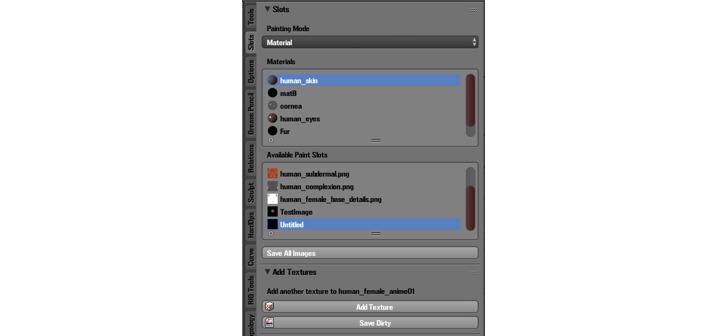
Here’s a useful and free tool to create some more slots for your textures.
Andrew writes:
I was playing with texture painting in Cycles, and was getting frustrated with how adding new textures took you out of the flow of actually painting. I created this addon to allow Cycles users to add new image textures to the active material without having jump to the UV Editor, the Node Editor, and then back to 3D view.
Found in the Slots menu while in Texture Paint mode, it only has two buttons; “Add Texture” and “Save (Dirty)”. The former will add a generated image to the active material. You can modify the image details (size, color space, etc.) in the UV editor properties panel. The “Save (Dirty)” button will either call “Save As..” if it hasn’t been previously saved, or will update the saved image on disk. Enjoy!

I have Blender 2.78a and the addon doesn’t show up after installing from file. Do I miss something?
If you unzip the file, and use “Install from file” on the .py file directly, it should install. Sorry for any confusion, I didn’t make it installable from .zip since it’s only 1 file.
I didn’t take the zip, the problem was I didn’t use the “raw” script like Comeinandburn wrote. Thanks!
@TK1214, try clicking on the .py file on github page which will take you to the next page, then select the “raw” tab, which opens the script on a page of it’s own. Then finally “save page as” to save the python file. It should only be about 4kb.
Thanks, that was the problem. Didn’t use the raw script. Doh!