

Review: LionRender

Today I’m going to be reviewing LionRender, the latest (and greatest?) renderfarm to rise on the Blender scene, it’s on of the cheapest farms out there, and it’s been growing ever since it’s launch last year. The man behind the farm, Alex Martin (yes we have the same last name, no we aren’t related), was kind enough to give me a free testing account so I could do an informed and accurate review.
LionRender is designed for Blender and uses a unique “invite only” signup system that makes it one of the cheapest render farms on the market today at $49 a month for totally unlimited rendering. Since it’s launch last year, it’s slowly grown to be serious competition for other farms. So let’s take a closer look at the features and pricing of LionRender to see how well it holds up. Here we go!
Ease of Use
When you first log on to the LionRender online app, you’re presented with a very minimal interface with three panels. A projects panel, listing all the projects you’ve uploaded. A settings panel listing the options for whatever project you have selected. And finally, a panel with the final rendered frames, with export for the various image and video formats. It’s quite a simple interface, which is nice to see, considering many farms have more convoluted interfaces.
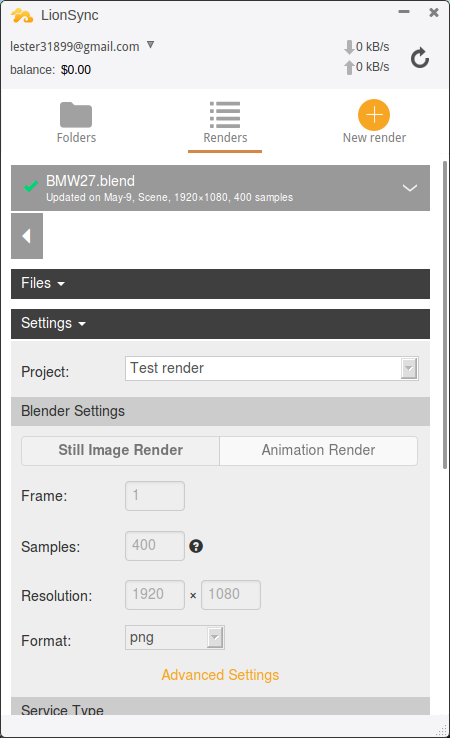
The desktop app has a similar interface, but more compact and acts more like a widget. It also has the ability to run in the background, so don’t need a window open all the time.
Overall, everything straightforward and as it should be. I didn’t find any quirks or oddities that bothered me while testing. That applies to both the online and desktop apps.

Features
LionRender includes all the major features you’d expect from a renderfarm, but also some things less common, such as LionSync, a desktop app that can sync your project folder to LionRender for rendering. Allowing you to quickly get renders without having to zip your project and upload it every time you change something. It’s a great convenience.
Other features include support for python scripts, various image and video output types (including EXR formats), CPU and GPU rendering, custom workflows, live rendering stats and estimations for time remaining and cost, and support for all major operating systems.
I should also mention the support system, there’s a live chat system that allows you to talk to someone at LionRender for any problems or questions you have, it’s convenient and saves you from opening your email (You still can if you want to) whenever you have a question.
One feature that’s lacking is the ability to render using external render engines such as V-ray for Blender, or Luxrender. While for many this isn’t a problem, it is still a downside to consider if you render using any external engines.
Speed
The speed of rendering in LionRender is based upon whether you use the Unlimited or On Demand services. Unlimited is less powerful and is generally 2-3x slower than On Demand based on the benchmarks I’ve seen. But it can vary quite a bit depending on the type of scene.
On Demand is also faster due to not having a queue, saving about 8 minutes per render. Which is quite a bit if you think about it, so if you plan on rendering an animation, it’s defiantly worth it to use the On demand service.
One thing that disappointed me somewhat was the Balancing system the Unlimited service uses. The more you render, the slower you’re render times become. This allows those who render less to have higher priority, but leaves the users who’ve already been rendering that month in the dust in terms of render speeds. For example, if you render a lot in the first few days of the month, you’ll have to endure much slower render times for the rest of the month. Maybe even at unusable speeds, depending on how much you render. So while you technically have unlimited rendering, you still have to watch how much you render.
In comparison to other farms, LionRender is slightly faster on average based on the limited benchmark data available. But as I said, the data is limited, so don’t quote me on that.
Value
LionRender offers both a subscription plan for $49 ($44 if annually) a month, or an on-demand service for $2.50 per machine hour. Both prices are on the lower end of the current market. In fact, they claim to be the cheapest for-profit render farm available, and will match any lower price you can find. It’s quite an appealing statement. So as far as the competition goes, they definitely have an edge. One of the things LionRender does to keep the pricing low is to allow signups on an invitation-only basis. Meaning, once you signup, you have to wait for LionRender to send you an invite before you can start using the farm. Allowing LionRender to buy equipment as needed. Instead of having thousands of dollars worth of equipment lying around unused.
But even if they are one of the cheapest in the industry, it still leaves the question of whether it’s worth paying $44-49 a month for a subscription. For the most part, I’ve never been a fan of subscription services, in many cases, it’s better to buy outright than to pay monthly to infinity. But for rapidly changing technologies such as rendering, a subscription model becomes more appealing. Because everyone knows the trouble of buying a new GPU, just to have a new one announced a few weeks later that does everything and more for half the price.


Conclusion
When I first began to look over LionRender, I figured it would be a decent budget render farm, but lacking the features and speed to really be a top of the line rendering solution. But after testing and using it, I’m fully convinced it has everything it needs to accommodate just about any rendering need. It’s hard to find anything negative to say, other than that some minor features are missing such as email alerts, pricing estimator. Also more advanced features for studios are missing, such as reserving render nodes. But I don’t think that’s the market of LionRender.
In the end, LionRender proves to be a great option for freelancers and small studios looking for an inexpensive, but powerful rendering solution.



I completely disagree!
According to the website it is supposed to be a good service, but I had a lot of prolblems.
I purchased an Unlimited Rendering account then I submitted a rendering job and it started working with good performances… but after some hours I found that my queue was empty and my credit was completely exhausted!
So I completely lost all my work.
Service is unavailable for two days!
Moreover, technical support is inadequate.
I am very disappointed about it… sorry!
Sounds like you had a bad experience. But I base my reviews on how products/services are supposed to work. I don’t take bugs or errors into account unless they are a large part of the experience for a large group of users. And the problem you ran into seems to be an isolated event.
IF YOU’RE PLANNING ON BUYING UNLIMITED, READ THIS FIRST:
Full disclosure: I get very picky when I see the word “unlimited”. I don’t mind if a couple of limits are mentioned before purchase, as long as I know about them before. Otherwise I consider it false advertising.
I signed up for an unlimited account for 1 month to try it out, as I was considering unlimited to free up my local renderfarm on some projects now and then. Don’t need huge speed, but being able to run something parralel every few months would be nice.
I was bitterly disappointed. It’s really far from being unlimited. Once you reach the equivalent of more or less $49 of on-demand renders in one month (and that was reached in a couple of days of testing!) the whole system slows to a crawl (BMW scene takes 25 minutes/frame rather than the advertised under 4 minutes!) and is pretty much useless.
Their website makes absolutely no mention of this limit, and it’s a pretty huge limit for something which is meant to be unlimited. While trying to work out how come my renders were going very slowly (did my scenes suddenly become very heavy? was something wrong?) Customer service was pretty cold saying “you got x amount of render time, you wouldn’t get as much for that price on another render farm”. Granted, but then I would have it at full speed and no limits on my render times/frame, and I won’t have been told it was effing unlimited.
Basically it’s a paid, slower test for the on-demand services, meaning the “unlimited” tag is pretty much bull excrement. I suppose the reviewer used it for testing purposes and didn’t reach the limits before reaching his conclusions, that’s why they get a 9. Otherwise in any vaguely real production situation it’s of no value whatsoever.
On the other hand, the on-demand system seems like it’s worth it. I will happily use it in future at times when I need a quick turnaround on a project- which is literally once every other year as I don’t usually work with hugely tight deadlines.
All that to say it’s a pity, because my usage there was exceptional, trying to push limits and test out how fast various scenes took, in the end they’ve lost a customer who would have happily paid monthly for life and would have never reached those monthly limits in a normal situation.
Lionrender, please at least disclose this information somewhere obvious, because I would never have purchased “unlimited” under those circumstances and I’m pretty sure many people feel similarly!
Just quickly adding: with the insurance analogy (cf. https://lionrender.com/2016/04/12/why-are-we-doing-a-waiting-list/) that’s not how Lionrender works. Lionrender is the insurance company you pay for, is OK as long as you have small problems, but when you have a big issue dumps you immediately.
Chris,
I understand your frustration, and I’m really sorry you feel this way. I’m posting my full reply below:
“… the number and quality of nodes allocated to you depends on how much you’ve rendered so far in the period compared to others. I understand that you are frustrated with the slowdown, but we have to balance the load to make sure the rendering time is divided somewhat fairly between the users and that we still stay in business.
I’ve looked at your account and you’ve used up over 50 render hours so far, which would’ve cost way over $49 on any farm, so it’s only fair that your account is not currently the front runner for the available resources. ”
I want to clarify that your account wasn’t shut down or disabled it just had a lesser priority in resource allocation compared to those who haven’t rendered as much that month. When the month end your account would’ve again gotten priority until it rendered more than others and it would have slowed down then too.
We already have to operate at a loss
to provide the unlimited service, so we thought it’s only fair to allocate resources that way. I’m
sorry that this isn’t in line with your expectations.
I do understand that, it’s just that this limit and way of working is absolutely nowhere to be seen on your site. Not even a mention in the “limitations” area of your site. I do feel a little bit tricked.
As I said In my comment: I have no problem with limitations to “unlimited” as long as they’re explained before I buy, and not explained once I reach a limit which is mentioned absolutely nowhere in a supposedly unlimited plan. If I have unlimited call credit on my phone, I expect it to be truly unlimited. If the constraint is it has to be in the country I live, I don’t mind as long as it’s explicitly mentioned before I sign up. I just don’t expect it to stop letting me call 9 in 10 people once I have reached an arbitrary number of calling hours.
I’m not asking for money back. I understand that you’re running at a loss and I want you to succeed and improve your product because I’m convinced it could be fantastic. I will use the beast modes etc. In future when I need them, as they look like they have real value. I’m just warning people of a huge unmentioned limitation to the unlimited plan as it currently existes. Maybe you should change the name to “budget” plan or explicitly mention this limitation somewhere on your site, because as it is it’s very, very misleading
Hi Chris,
I was unaware of this information when I wrote the review. I’ve updated the post to include a paragraph about this limitation.
Thanks for posting this information!
Hi Luca,
indeed we had an unfortunate streak of problems as we grew. Hopefully, these would be resolved soon and we’ll make sure to refund you for the down period. No worries, no files will be lost as a result.
Thanks!
Could someone explain me the huge render time difference on win 10 and win 7?
I saw similar test and question before, but haven’t seen the answer.
Woah. I was interested, but after reading all these negative experiences, I am definitely not using this company
I wouldn’t dismiss them just yet- on demand and beast mode look like they might be really really worth it. Just avoid “unlimited” if what I said bothers you.
I’ve seen so many starting providing a renderfarm. Most of them have never been reliable enough.
The only one that has the most reliable and feature reach service for production use is render.st.
Low price mostly means that you pay it in unreleable service, missing feature, bug, time or whatever.
I second that. I’ve been using Render Street for 2+ years and despite few minor bloopers on the way, I find it the most reliable rendering service for Blender. Their transparency, flexibility and customer support are exemplary. I did give a try to few new render farms on the way which ended up in frustration.
Hi,
I have been using LionRender for the last 2 months plus since its beta launch. This is my view.
Support
1. Lionrender support, Alex is surprisingly fast. At this point, the chat system disabled the submission of ticket. But Alex replied very promptly, even on weekends through email.
2. Un-limited rendering does not means For-Sure rendering.
When it initially started, I was rendering at 1920 x 1080 at 800 samples for many animations and re-render again. The billing still shows my actual $ and is in the thousands. (Luckily I paid for only $44 USD. Alex have since then removed it and shows only un-limited after I emailed him.)
Alex replied and say about that statement, and I agreed. Since it is low cost, this is a shared pool of resources, and I should play a part in contributing to it.
Since then, I do so at half the HD resolution and at 40 samples for test rendering. No delay till now. And i get my test renders in minutes.
This is possibly one of the thing that really gets my dream of rendering running true at such low costs. If I go for on-demand, any of my animation will be at the $500 dollar regions. I am thankful for paying only 10% of that price for many renderings.
Thanks Alex and keep up the great work.
Hope you can improve further again.
My experience has been poor with Lionrender.
I signed up to the $49 monthly unlimited rendering plan in June 8th so I can render animations for my clientele. It took 3 days for Alex Martin to address my initial enquiry for an invoice for the $49 payment. I was informed that the invoice due was $528! It appears that I had signed up to an annual plan instead of a monthly plan, for which I was due to pay the full $528 after the ‘7-day trial period’ . On the 4th day of the trial period, I had already rendered all my clientele’s material. So I requested Alex Martin to cancel my annual subscription on the 4th day of the trial and in turn I will sign up to the monthly plan later when I have more animations to render (therefore I should incur no charge since I was still within the trial period). But instead, I was informed my trial is cancelled and that I was charged $49 for a monthly plan I no longer needed – meaning the ‘7-day trial’ wasn’t really a trial.
I discovered days later that my account was ‘inactive’ despite being charged $49. I requested for this to be fixed, but did not receive a response until 5 days later:
EMAIL QUOTE:
“Hi Raymond,
unfortunately it seems like due to the failed annual payment your subscription cannot be activated on this account. I’m happy to issue you $75 OnDemand plan credit or if you register an account under a different email and activate the plan there I will refund the payment.”
So I opted for the $75 credit to avoid the inconvenience of creating a new email address that I will never use. Issue was resolved on June 21st.
Then a whole month later (July 27th), I was charged again for $49 for a non-existent plan!!! Turns out the direct debit for the subscription was never cancelled in the first place and had to email Alex to refund the amount again.
Complete shambles.
Using the same rating criteria in this post, here are my ratings:
Value – 7
Ease of use – 4
Features – 5
Speed – 5
My rating – 1
Was delighted to find Render Street now provide their own unlimited render plan for only $50/month. Much better experience in dealing with Marius Latan over there.
Haven’t actually tried it, but after reading the above and the experience with Lionrender upon not recieving any feedback – emailed a couple of times, tried to reach by chat, with absolutely no result. Most likely since I was quesitoning on concerns, that came out to be exactly true by what Chris said above? Complete silence – only guessing that the actual user support looks somewhat similar.
Therefore would not recommend.
Do not use lionrender. Many problems with lack of support, continuous credit card charging, rendering not downloading
Have to cancel and file a credit card fraud.
Really pissed off
Finally got a mail from Lionrender after trying to get some contact the last months.
They apparently are shutting down. Unfortunately, it seems like my prepaid money is lost..