

Gfx Hotkeys for OSX and iOS Helps With Blender Shortcuts

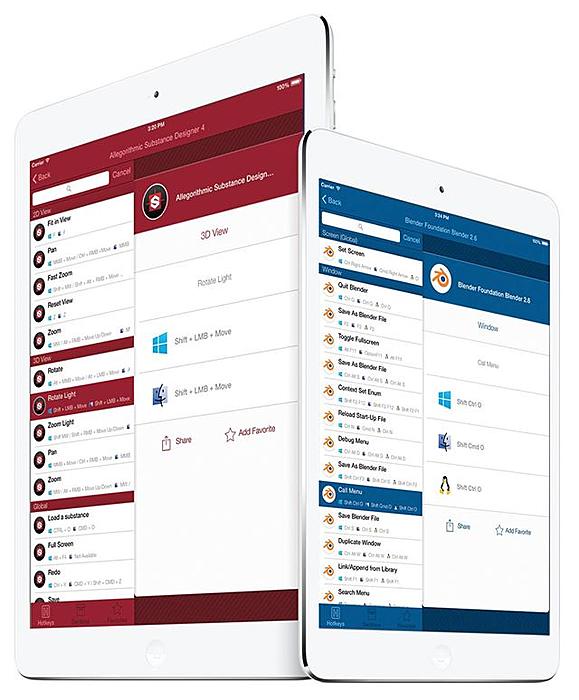
Blender hotkeys are included for free in the Lite version.
Gfx Hotkeys is a Universal Application with re-designed interface, customizations, and the full keyboard shortcut list for 79 Design & Vfx Applications! This is the ultimate tool to work fast and efficient, without searching the manual or the internet for the hotkeys you need. You can find anything you are looking for within 5 seconds, using Gfx Hotkeys powerful search feature.
Gfx Hotkeys 4.1 has been released and includes Blender hotkeys. Going with the spirit, Blender hotkeys are included for free in Gfx Hotkeys Lite.



Installed the Gfx Hotkeys Lite on iPad. Despite an iTunes App Store description indicating otherwise, Blender hotkeys show in the application as a paid-for in-app purchase. Selecting the Blender hotkeys in the application results in a pop-up a purchase dialog that crashes the app. Great idea, hope it works better for others.
Okay, I’ll contact the developers about this.
From BlenderArtists:
http://blenderartists.org/forum/showthread.php?334789-Gfx-Hotkeys-4-1-iOS-app-with-Blender-hotkeys-(free)-and-86-other-Vfx-and-Design-apps
Same problem here, but the app crashes when selecting Blender rather than showing the in-app purchase box. That’s on an iPhone 4, iOS7…
Hi Everyone,
As Bart noted there is a bug and I already issued an update.
In some people it shows as in-app purchase and in others is crashing.
I have requested an expedited review for 4.1.1 but I don’t believe it will accepted (Apple is really hard to convince), so It will take a week or so to appear.
In the meantime of course you can download Gfx Hotkeys and enjoy the other free apps until blender is app.
I apologies for the inconvenience.
Regards,
Bill
Mindbomb Apps.
kinda confused by this… is this basically the equivalent of paying a 3rd party for an index of hotkeys? even if the blender set is free, it feels like this functionality is already a spacebar tap away, with the added bonus of still being inside the application (and on the same device, for that matter!), so you can just select the tool/function directly, and make note of the hotkey for future use.
i don’t know about windows, but on most other osx applications, you can go to help>search for a spotlight style search of most functions.
and for the subtle tricky stuff, (like say you don’t know the name of the tool, just the task you want to accomplish), you can find it online pretty darn fast, especially with a launcher like alfred. certainly no slower than pulling out my iPhone, waking it, finding this app, launching it, searching for the software i’m using, then searching for the keyboard shortcut.
i guess i just fail to see what the added “efficiency” is here.
Yeah, Im all about custom shortcuts