
Review: 3D Mice with Blender 2.59

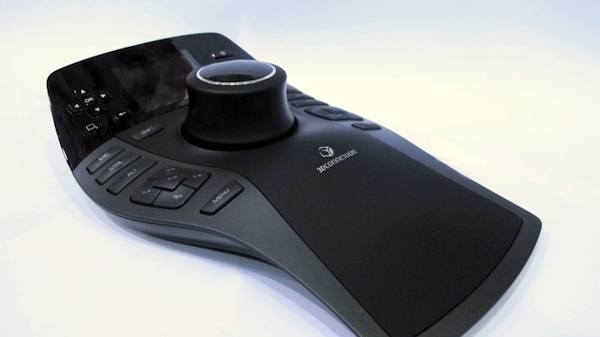
Blender Cookie reviews 3 3D mice by 3D Connexion that you can use with Blender.
Jonathan Williamson writes:Traditionally, most 3D artists use a keyboard and mouse for all their work; many also use a tablet. However, more and more people are beginning to add 3D mice to their arsenal. 3D mice offer a very natural and easy way to navigate 3D space; giving more precise control than a mouse or keyboard ever can.
Today I am reviewing three models of 3D mice offered by 3D Connexion; the Space Navigator, Space Explorer and Space Pilot Pro. Each of 3D Connexion’s models are now supported in Blender as of version 2.59.
Along with my rundown of the pros/cons of each device, below you will also find a short video overview demoing how to use a 3D mouse with Blender 2.59.
Link



For $400 I’d go for a wacom tablet any day of the week.
The 3D connexion mouse is brilliant to use. I really recommend it. It really helps speed up modelling and makes modelling more natural in hand movements. When using a 3Dconnexion mouse, it is kind of weird for a few weeks if you are used to a tablet or ordinary mouse, then it becomes completely natural. It really does speed up workflow a lot, when modelling.
The 3Dconnexion mouse comes into its own in 3D and compositing work. For ordinary activities such as browsing the internet or email, leave you ordinary mouse connected as the 3D connexion will overcomplicate it very quickly. You will very quickly find yourself using the 3Dconnexion for 3D and related applications and ordinary mouse for ordinary everyday applications. It literally will feel at times as though you are using two different computers if you use it regularly.
One thing I have noticed about using the 3D connexion mouse is that I am less likely to surf the internet, use facebook or Ebay when using the 3Dconnexion mouse and stick to 3D applications where it works naturally. It will increase your personal productivity in 3D and related work.
The home page for 3Dconnexion is at http://www.3dconnexion.eu/ where they can be bought brand new.
A brand new Space Pilot Pro is out of the reach of most Blender users.
Some suggestions on how to pay less for a 3Dconnexion mouse, depending on which part of the world you are in.
The earlier version of the SpacePilot Pro is the SpacePilot. It looks a bit different, but is very clase to being the same as the Pro version in specifications and useage. It can be bought second hand for about €100 and works just as well as the later version. Both versions of the SpacePilot are USB2 and have up to date drivers.
If buying a SpaceExplorer, be careful to buy the USB version. Do not buy the serial version, as there are no modern drivers for it.
I you are planning to sit in front of your computer for a few hours at a time or more, I would advise avoiding the Space Navigator. The lack of buttons will start to become a hinderance very quickly if modelling.
If you are in Germany, Denmark, Czech Republic, Poland, Sweden, Latvia, Lithuania, Estonia, Finland, Serbia, Austria, Slovakia, Slovenia, Croatia, France, Spain or Portugal you can shop on Ebay Germany at http://www.ebay.de for the earlier version of the space pilot for about €100 Euro. About 90% of the German Ebay sellers will happily post outside Germany, to all of europe or even the rest of the planet, if you ask them to. The earlier space pilot is very close in specifications and useage to the spacepilot pro.
In europe the space pilot can also be bought from any of these amazon websites http://www.amazon.de and http://www.amazon.fr
Italy can be found at http://www.amazon.it
If you are in the United Kingdom or Ireland you can shop for a 3dconnexion space pilot mouse on http://www.ebay.co.uk for about £100 or you can buy the latest on amazon at http://www.amazon.co.uk
In the USA they are cheapest on http://www.ebay.com and you can buy them new on ww.amazon.com
If in China, or surrounding countries a 3d connexion mouse can be got from http://www.eachnet.com http://www.amazon.cn or http://www.alibaba.com Alibaba is like Ebay and Amazon combined.
In Japan a new 3dConnexion mouse can be bought at http://www.amazon.co.jp
A 3Dconnexion mouse in Brazil can be bought second hand at http://www.mercadolivre.com.br
Canada http://www.amazon.ca or http://www.ebay.ca
If buying a 3dconnexion second hand, do not buy the earlier versions with serial connectors as they are not supported by the latest drivers. The USB versions are all supported at present by the latest drivers. You can check on the 3Dconnexion website if the version you are buying second hand, has the latest up to date drivers.
I hope someone finds that useful.
My “left hand” controller has to do more than operate just Blender and a few specialized packages – it needs to operate any software that I choose to use, and be fully customizable. Logitech’s silly decision to require software manufactuers to support the device put me right off from the first day they appeared. I’ve just ordered a Contour Design Shuttle Express, which is far cheaper than the 3D Connexion products, and can operate absolutely any application without requiring software support, just like the Griffin Powermate.
hi, how do you connect/configure the 2 controllers on Blender?
thanks
sorry i already figured its basic setup :) thanks
@ Reaction
The Contour Design Shuttle Express only works in Wondows and Mac computers.
It does have Linux drivers.
@ Reaction
I think you missed the point a little those devices are media shuttles 2d, NDOF 3dconnexion devices work in all three axii
as a navigation device in 3d space or for object manipulation.
A 3d mouse is amazingly fast for some 3d jobs and aids in sculpting and painting choosing uv unwrap seams etc.
Sure a lot of the time you need your hand on the keyboard but for some things you cant beat them.
Give it a try. The spacemouse version shouldnt brake the bank and will be lots of fun as well as put your hand on
your 3d models.
I fully understand the difference between a 3D mouse and the Contour Shuttle, but if I am going to have one controller under my left hand, I want to be able to switch to any other applications and still have my left hand doing something useful! I just wanted to make the point that although the 3D Connexions look good (and are probably great in Blender, only because it supports them), they perhaps may be less useful for daily use than the Contour Shuttle devices (and others).
Hi Reaction, John from 3Dconnexion here. Just a quick response to your comments. There was never a decision to require software manufacturers to support 3D mice. The reality is that 3D mice are not a supported by default in the O/S so applications need to integrate 3D mouse code before the 3D mouse will work. It’s not an ideal situation but it’s not of our making ;-) It’s also why we have more software engineers than hardware engineers (i.e. it’s a big overhead to encourage / work with software developers to integrate 3D mouse support). We’re proud that the majority of 3D applications now support 3D mice and the few exceptions (e.g. Modo, Zbrush) are being worked on ;-)
Regarding using the 3D mouse in “any application”, our latest driver (3DxWare 10) allows just that. It’s in beta at the moment but the bottom line is that you can map any keyboard, mouse or joystick command to the 3D mouse axes (with or without modifier keys like Ctrl, Shift etc). We developed this driver to satisfy our users number 1 demand (being able to use the 3D mouse outside their core 3D applications). I’m pretty confident that you can get a 3D mouse working just like a shuttle device, plus when you start using your 3D application, you’ll have all the beauty of simultaneous 6-degrees-of-freedom navigation! More info here: http://www.3dconnexion.com/anywhere
John,
Thanks for making that important clarification. When the new 3DxWare is finished, the Space products will, at long last, become the fully operational product I always hoped for. You might just have another customer… :-)
About Blender integration:
Why I can only use the 3DMouse with the official Blender build?
I can’t use it with any Graphicall.org builds :(
@Caronte,
Sometimes the User Preferences cause problems and so you just need to go to File > Load Factory Settings.
-Jonathan
Fancy Gadget does not improve your modelling/Texturing/Compositing skills
For me it is Keyboard ans Mouse all the way.
pixnlove you paint with a mouse? respect dude, thats old school.
but you know times move on, embrace the new tools! With a wacom and 3d mouse you can be moving the model and your mouse to the next operation at the same time instead of having to stop one to do the other.
It’s a shame 3dconnexion stopped selling the cheaper educational versions of their products. Now for a hobbyist it is just too expensive.
@pixnlove you can also paint your house with a toothbrush if you took the fancy…It pays to invest in good tools. Because while good tools won’t make you a better artist the can make you a more productive one.
I salute the way in which the company markets for Blender. Both in recognition, in code support and in getting people make cartoons / articles. Nice effort!
I’ve used a SpaceNavigator for years now in CAD and its indespensible! (I wish these guys would come out with their own mouse that has a 3D knob on the top of it to keep it all to one hand!) Soooo glad that its support is built into blender now. Kudos on a good job, folks!
@Jonathan Williamson,
No matter what I do, my 3DConnection device only works on the official Blender build :(
P.D: My system is a Mac OSX, so may be every builder forgot to compile the integration for that device?
No one have this problem on OSX?