

HDRI Tools for sIBL in Blender Internal

For those new to HDRI and Image Based Lighting, or those who use it, HDRILabs offers two very useful tools for your HDRI IBL workflow for free.
1.Picturenaut
This software can be used to generate HDRI files from your digital photography.
2. sIBL Edit
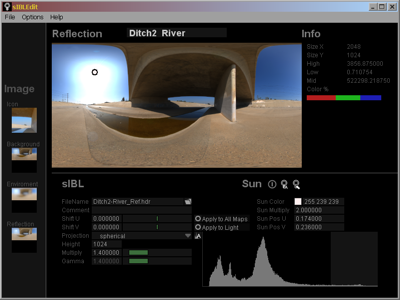
With this software you can generate the needed image files for the background, reflection and GI pass.
In addition the website also hosts a set of pre-made HDRI sets free of charge. If you are interested, they also offer through Amazon a very good book about HDRI called “The HDRI Handbook”.
As a small explanation, under smarts IBL you understand the concept of using a high res JPG image for the background, a medium res HDRI image for raytraced reflections and a blurred and low res HDRI file for the diffuse light GI calculation.
This approach delivers crisp results for the background while reducing the needed render time for HDRI based GI renderings.
This approach works with Blender as well with other modern GI based render engines such as VRay or Thea which can be used with Blender.
Comparison of generated images for Background, Reflection, and GI.

sIBL Edit Interface:
Smart IBL (sIBL):
http://www.hdrlabs.com/sibl/index.html
Smart IBL Edit Software:
http://www.hdrlabs.com/sibl/sibl-edit.html
HDRI sets for sIBL:
http://www.hdrlabs.com/sibl/archive.html
sIBL Screencast:
http://www.hdrlabs.com/sibl/downloads/sIBL-Edit_large.mov
Picturenaut (HDRI Generation Tool):
http://www.hdrlabs.com/picturenaut/index.html
The HDRI Handbook:
http://www.hdrlabs.com/book/index.html
Blender Tutorial:
Links:
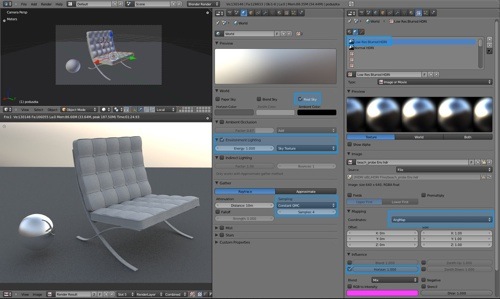
Blender Settings Screenshot JPG
Blend Demo File 1 ( World Texture Setting )
Blend Demo File 2 Background Sphere Matching

I use that (sIBLGUI) for Softimage from time to time. Great tool!
Is there a Blender exporter by now?
I use that tool for modo but for Blender. We need a tutorial.
Just a little question: Is this freeware or FLOSS?
Ooooh cool looking!
So… how do we use those tree different maps within Blender? Any tutorials or something? :) Some tricking with different render layers?
Heck, blender has so far no straightforward way of mapping a latlong map from within the world settings; the “sphere” function caps the lower half and mapping it to view or global lead to a mirrored version of the latlong map. So far I have only successfully mapped a latlong image through using a sphere mesh object, but then again, that ruins the AO.
Sorry for the rant, I just hope someone can point me in the right direction here, as I don’t really understand how latlong images easily can be uses within BI. :P
The software did look quite promising though, interesting site.
FLOSS:
http://kelsolaar.github.com/sIBL_GUI/
So… how do we use those tree different maps within Blender? Any tutorials or something? :) Some tricking with different render layers?
Heck, blender has so far no straightforward way of mapping a latlong map from within the world settings; the “sphere” function caps the lower half and mapping it to view or global lead to a mirrored version of the latlong map. So far I have only successfully mapped a latlong image through using a sphere mesh object, but then again, that ruins the AO.
Sorry for the rant, I just hope someone can point me in the right direction here, as I don’t really understand how latlong images easily can be uses within BI. :P
The software did look quite promising though, interesting.
Great site!!! just what I needed, right on time, full of information, thanks !!!
We really need a tutorial on how to do good, multi-image HDR in Blender. Is it even possible to do separate images for background, reflection, and environment without the compositor at this time? I remember trying to figure it out a while back and giving up because world reflections kept interfering with reflection maps.
None for the mac?
You need to use the sIBL images that Hdrlabs provides. They have already the various maps backgrounds needed done.
You can also build your own sIBLs provided you follow the instructions in website.
is it possible to use siblings in blender internal without a loader script?
i can set up a standard HDRI scene using the hdr images provided on the hdrlabs website but i’m not able to use the images-set provided (hdr+hd jpg+ ld jpg) as an unique tool.
is there a loader script?
is there some secret technique?
please give us some hints.
bye
this is great looking tool, but…
I have already played quite a bit with environment lighting and the biggest headache I have encountered is the lack of integration between making panographic images that are also HDR. The programs always focus on one or the other…So I use HDRshop or picturenaut to make the HDR images for EVERY stitchable shot, then I have to use a stitcher and most of them don’t take HDR files. (lightprobes get past this but because they are a single photo they are only as hi-res as your camera and that is usually not enough to prevent pixelation)
I dislike the term IBL for Image Based Lighting because I always get it confused with Irritable Bowel Lighting.
(Crickets)
I was actually just taking a break from searching for an image based lighting solution when I decided to check in with blendernation. So this is awesome for me and I plan to take it for a spin this weekend, and if anyone knows what would be a suitable focal length for photographing a 360 panorama shot please share your wisdom.
As computer’s keep getting faster IBL is going to become more standard, I’m glad to see blender is keeping up with the times.
I added a section to the post providing the requested tutorial
for those new to it.
It is a screenshot showing all the settings at a glance,
a blend file with the HDRI files included, and a screencast
movie showing how to setup Blender.
Enjoy
Claas
Great site, just what we needed… Thanks a lot.
Hi, i use LUMINANCE HDR software (V2), and it’s work like a charm !
it’s free also !
http://qtpfsgui.sourceforge.net/
enjoy !
@cekuhnen
Thanks, but where are the links? I’d be really interested in a blend file or the screencast, but apparently there aren’t any reference to them in the article. The screencast put up for download is for Lighwave 3D.
@shadowphile
It’s simple, create multiple panoramas from different exposures, then merge those exposures together into a HDR. ;)
Done this many times and the method works fine.
@cekuhnen
Where are the links? They don’t seem to have been added to the post. I would really love to take a look at that blend file!
duh sorry
I wrote the text but did not update the published version.
My fault.
It is there now.
Claas
@cekuhnen Ok, that shows us how to set up HDR lighting, but I think what those of us asking were looking for is the ability to use a separate image for the background and for the env lighting without compositing. For example, the sIBL system creates a low-res for casting light, a medium res for the background, and a high res for reflections. How can we use all 3 in Blender?
This might somehow be late but I’ll post the link anyway. I have also provided a sample blend for anyone interested in playing around with it.
http://reynantem.blogspot.com/2011/03/blender-image-based-lighting-test.html
You cannot as I stated in the video clip:
Blender does not support this and thus you need to use some composite tricks.
You can use a sphere map the JPG texture on it via sphere and set the sphere
material to shadeless and deactivate traceable – but this result will NOT look
equal the AngMap projection of the world texture.
You need to rotate the sphere by 200 degrees along the Z axis to make it match a
little but the dimension scale and deformation will not fit 100%.
This way at least you see the JPG file in the background.
For the mirror materials you then need to render those regions again with the
high res HDRI file for the world texture.
However I added another Blend file showing that problem.
Here is the link:
Blend Demo File 2
Actually in the current builds there would be a way to incooperate reflection and env lightning into one render pass:
(not sure if they keep it and how far it goes back)
env lightning:
Use Indirect lightning with _Aproximate_ Gather
Setup the enviroment lightning texture as you want it.
reflections
Add a sphere, unwrap a spherical uv map, assign the reflection texture. set diffuse and specular to 0
(and now for the trick:)
Deactivate traceable, shaddow recive, AND Cast Aproximate.
So the only thing you actually need is a way to actually composite the background
But unfortunatetly, as said in the last post about this topic:
Ang(ular) Mapping is for Mirror Ball projections only, and will produce distorted / wrong results along the x axis when used in combination with a 360×180 standard projection method.
But, basically if you want to catch the set data as quickly as possible, you would only rely on the reflection map shooted either by a mirror ball or a fisheye, and use the actual camera footage as a background.
(btw, sIBLedit uses a bluring method wich actually takes the perspective distortions for long/lat projections into account, so for those people wich do want a more accurate blur I would rather recomend its method )
anyway not wanting to be ungratefull or nitpicking / diminishing your tutorial, just providing further input
thanks for your effort
sorry, my fault:
its not aproximate,
but raytrace with adaptive qmc
Hey, noticed the sIBL mentioning.
As whocares mentions, there are millions little trapdoors with HDRI lighting and panoramas, one of them the different projection types. Here’s a quick overview:
http://www.hdrlabs.com/tutorials/index.html#What_are_the_differences_betwee
After all, the real point of Smart IBL was to take all that fuzz out, by automating the setup. But as far as I know, Blender doesn’t support the proper separation of Camera rays, Raytracing rays and GI. Would be great to see a full setup example, so we can wrap this into a one-button script template. For most other renderers such a template/script exists, here is a full list:
http://www.hdrlabs.com/cgi-bin/forum/YaBB.pl?num=1223936394
Blochi
and again forget this also, method doesn’t work in current offical blender.
I got it to work!
Terrible example here: http://ubuntuone.com/p/jEe/
put the mirror map on a sphere in the center, make it shadeless, scale it up 1000 times. set the x axis scale to -1 else the texture be mirrored as we watch the sphere from the inside. I also rotated the sphere around to match, but i can’t on top of my head remember exactly how. It’s easy to find out with some experimenting.
Put the sphere on layer 2. In render layer set layer 1 and 2 visible (Scene), but only layer 1 included (Layer). That way the sphere will be used for mirroring, but not be rendered it self.
Make another sphere just like the first but use the high-res image for texture and just keep it on layer one. Scale it a little bit larger then the first sphere so the first hide it for mirroring. As the sphere is way to far away to effect the gathering it will not effect lightning.
Set the lightning with an lowres angmap image in the world texture as described above in this threed.
Increase the camera end-clipping so it can see the outer sphere.
Done! Will render in one render. But You probably want to use another layer for the background anyway and use nodes to adjust the color after the render – but You don’t have to!
If You got a mate mirror You can turn ‘max dist’ down below 1000 under mirroring on those materials and they will use the light map for mirroring and render faster. I use that trick to create a richer specular effect on those ugly pink things in the example render.
The problem remaining is that you have* to have an angmap for lightning. That makes a importscript prety useless as almost all sIBL files contains a polar (latlong) light image.
But possibly we can write a re-projection function i python. It will be slow but it will only need to be used for the lowres lightning image so it just might work.
*) an polar image might work if lucky – the distortion may not be noticed. The worst thing is that angmap clips the corner of the image away, and polar is using them. If something important like the sun is clipped away the render will totally suck.
Update: if You want to use a sun to – might be neded for good shadows, turn ray traced shadow casting of on both spheres.
whocares: I have a fairly resent build and IL don’t work with ray trace gather at all. But if it is coming the same thing should work. An indirect lightning that falls back on an lightning map would really give us some tasty lightning.
Update on update.
It turns out turning off every option under shadow on material do *not* prevent it from casting ray-trace shadows. The fix was something else i done during experimenting with this whole thing:
Move the background sphere to layer 3 and turn on layer 3 on both scene and layer in render layers. Set on ‘this layer only’ in the sun lamp under shadow.
Now it all works with a sun lamp and all!
An import script would want to put this on different layers anyway – so it’s easy to make them different render layers to use nodes.
laH, you pointed me in the right direction, what I actually did wrong:
thats currently the best what I’ve came up with:
http://ubuntuone.com/p/jIL/
refmap:
traceable sphere, but outside camera clipping range, cast aproximate off
envmap:
traceable off sphere outside camera clipping range, cast aproximate on
bgmap:
inside world texture
Indirect Lightning on, gather aproximate
since this sIBLset is a bit drastic in colors, I had to use a small value inside the multiply color option inside the texture panels
BG mapping is still wrong, and I’ve got problems establishing a good shadowcatcher wich actually works with indirect lightning
maybe someone here can actually improve these
still, no spherical projection, and of course, as Christian Bloch mentioned, having an option to exclude objects / materials from reflection / refraction would be really godsend.
whocares: Your IL experiment are interesting. But unless your background are a angmap You just cant use world textures. You have to use a sphere! Probably in it’s own render layer and using compositor to not mess with Your other stuff. Don’t really get what You are doing. How can the envmap lit the scene? Is emit on? Maybe some layer tricks can work there to?
Anyway, I will redo my EL thing from scratch and then write something better describing it. But for now:
The turn of shadow thing don’t work – the sphere have to be on a separate layer if You need a sun.
We really want the spheres centered around the camera for correct projection.
Then I try to make a IL version to – You make me curious. But my experience with IL so far is that it not really yet up for more then some subtle effects – it do not cast shadows for start – or I might just have not figured out how to us it.
Be back /LaH
your welcome,
btw small tip: I did use different RGB multiplier values (more redish for the env map, a greenish color for reflection) for all three maps inside the texture tab to speed up my experiments.
Will also look a bit deeper into the issue.
A small tutorial for how to make a ‘three image render’ in one render pass with blender internal. Using environment lightning.
http://http://www.subcult.org/lahlab/blender/el.html
Hi~
This tutorial is very informative,
the HDRI is very useful in lighting a enviroment,
it’s best to learn this tutorial for using Blender 3D.
Let’s start~
Calvin, UNIQOOL