
Material Nodes Tutorial

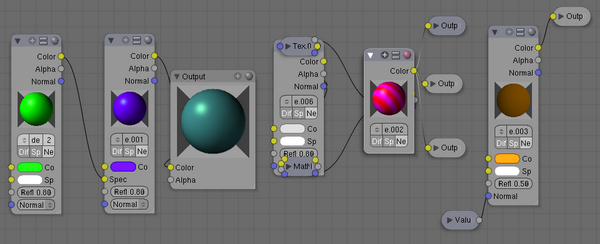 This tutorial by Eugene is an excellent overview of the new node material system. If you are just getting started with nodes or are a bit confused on how it all works then definitely try out this tutorial.
The tutorial is a good read as well. Very well written. Here is a small clip in the beginning:
In order to “get” this tutorial you should already be familiar with general material concepts and how to create materials/textures using the material panel. You should also have a general understanding of the texture coordinate systems available in Blender (e.g. Orco, UV, etc.). Also, when reading this I intend to purposely skip aspects of a node because in later sections you will see the function expanded upon. Each section builds off the previous.
I will begin by saying that the node system does not render the material pane obsolete. Many features and material settings are still only accessible through the material panel (e.g. raymirror). However with the advent of nodes, more complex and fantastic materials can be created since we now have greater control. So lets begin with a normal material (fig 1). Here we have the standard material we have added to a cube mesh. I could, as I have in the past, add color and other settings to this material and it would certainly look nice. But lets say I am just not getting what I am looking for? What if I what to control the creation more tightly or add more complexity? Here is where nodes comes in.
You can find the tutorial here.



This one is a keeper… a truely well detailed tutorial.
I am among those who wondered what all this input/output could do.
°,° great job and thanks for sharing !
Ditto ^^. Thanks for writing such a informative tutorial.
Thx! – I was just about to ask for a tut. at blenderartists – I had a hard time getting this nut cracked – but no more :)
And another tutorial that would be best to have in the manual (is anybody even aware it exists?) instead of a seperate page.
Nice work though, thanks to the author for this :)
Werner
Long live for Eugene,
He one of Gurus for me for Blender User
like it! :D
Nice, this explanes a lot, I was playing around with it, and could not figure out a way to create a key frame for the value node, I can chage the value in the Nodes panel, under shading, but can to get a IPO to start on this. Is there a way?
Finally a detailed tutorial about nodes!! i was searching for it for a long time, thank you so much
It woud be great if it wasn’t break the link