Tutorial: Texture Stencils

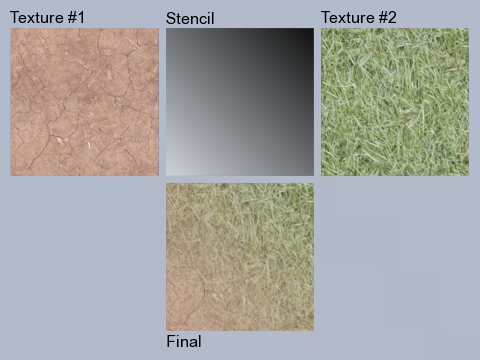 I don’t know about the rest of you but one of the things I enjoy the most about Blender is material editing. Even before nodes it was fun to layer textures and procedurals together, adding and mixing…ahhh material bliss. Recently an interesting tutorial on texture stencils has come to my attention and its well worth the look for those new and I think even experienced Blenderheads may learn a few things.
The tutorial has quite a few nice tips, for example:
Hint: if you have already inserted two textures in the first two empty slots, use the buttons to copy/paste to/from the buffer in order to sort them: select the second texture (from the top of the list), and click on the small arrow going upward. Now, select, the third space (from the top of the list), actually blank, and click on the small arrow going downward. Now select the texture from the second slot (from the top of the list) and press Clear in order to delete it.
You can find the tutorial here.
We hope to see a few examples from you all. If you need a place to host don’t forget imageshack for images and we’d be happy to host a .blend file if you come up with something you’d like to share.



Thanks for sharing…!It’s very useful
it does not work with normals and displacement information.
seems to be either a bug or a limitation in blender.
it only mixes color values with stencil!
I’ve tried to create a (very simple) tutorial of the same thing with nodes:
http://mediawiki.blender.org/index.php/Tutorials/Mixing_Materials_with_Nodes
It’s really basic and unfortunately skips some of the stuff one needs to know to really profit from it (i.e how to create better masks and map them correctly). So feel free to add more advanced examples ;)
Werner
nice! This is exactly what I am working on! Thanks :)
I think this technique has been brought up on the forums a few times…
Still, incredibly useful.
Peace
Drew
I realize this comment is kind of late, but this tutorial gave me the missing pieces i needed to solve my problem.
Thanks for the tutorial!