Step 1

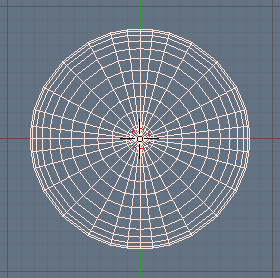
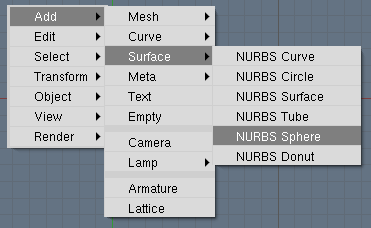
In this tutorial I will create a love-heart by using a standard NURBS sphere, and tweaking its control points. Start off with a clean blender [CTRL][X]. Delete the default cube and add a NURBS sphere to a new scene. NURBS spheres are located in the toolbox ([SPACE]or [SHIFT][A]), under ADD and then SURFACES.
Before you continue, scale up the sphere so that it fills the better part of your screen by pressing [S], moving your mouse and left-clicking when you're satisfied.

Step 2

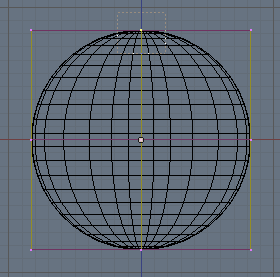
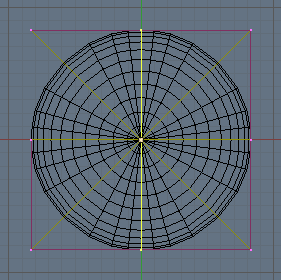
Go to frontview NumPad [1], and enter editmode by pressing [TAB]. Deselect all vertices by pressing [A]. Use border select [B] to select the middle vertices in the top-row of the controlpoints. The figure shows which area to select.
Step 3

If you switch to topview by pressing [NumPad 7], you can see that you have actually selected a couple of vertices that were hidden from your view in the frontview. Using box-select in front-view selects all vertices within the box, even when they are hidden behind each other Before going on, return to frontview by pressing NumPad [1].
Step 4

The next step is to enter grabmode [G], and move the three selected vertices slightly downwards. This will create a nice, smooth bump in the sphere. (I've switched from wireframe to Shaded view by pressing [Z]
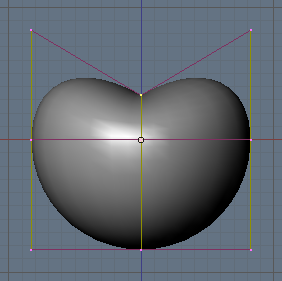

Hint: Click the middle mouse button to constrain the motion along one axis.

Step 5

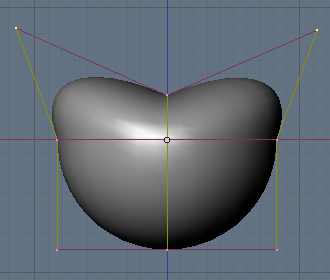
Deselect all selected vertices with [A]. (This is a step that you have to make each time in the remaining steps of this tutorial). Select the three vertices in the top- left and the three in the top-right, and scale them a bit by using the scaling mode [S] so that the top becomes a bit wider. When you are satisfied with it, use the grabber [G] to move the vertices up a bit.
Step 6

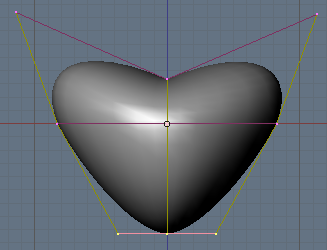
Now I will to taper the bottom of the heart. Box-select all the vertices at the bottom [B] and scale them down:
Step 7

The heart is starting to look good, but the bottom is still a bit blunt. Make it more pointy by box-selecting [B] the middle vertices at the bottom and using the grabber [G]to move them downward.
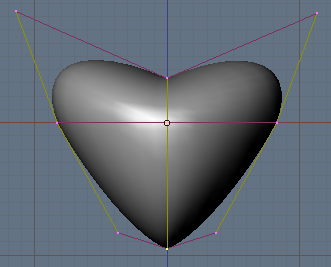
Step 8

Now, in the frontview our heart looks just fine, but when you switch to sideview NumPad [3], you will see that you have drawn a mighty fat heart!
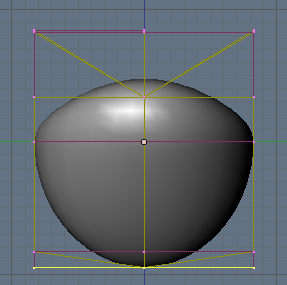
Step 9

Select all vertices (press [A] twice), and scale everything in the x-dimen- sion. To do this, enter scaling mode, move your mouse horizontally and then press the MiddleButton. This will lock the scaling to only one dimension.
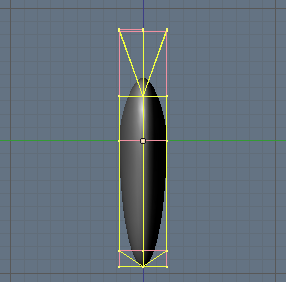
Step 10

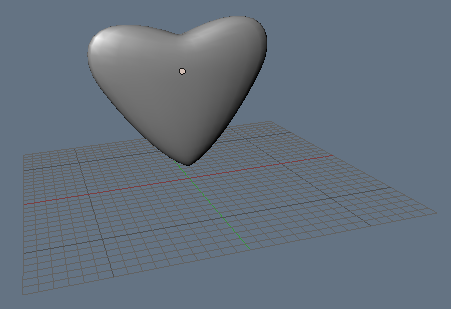
Result after scaling

70 Responses to “Creating a Heart in 10 Steps”  

  1. 1 Jakub Steiner Edit Link

    A classic. Thank you.

  2. 2 A. McMahon Edit Link

    Could use a little work. Try using proprtional vertex editing when you do your scaling [o key] (if it's possible to use proportional vertex editng with a NURBS object.). Other than that its a pretty good tutorial. Explore a bit to find different ways to do it (like a lattice).

  3. 3 No Trouble Today! Edit Link

    This is the first blender tutorial I have EVER finished (no really, I always get stuck :-). It was simple, taught be a ton about NURBS, and now I am trying to create a bird with the same techniques. You are so helpful, thanks for sharing your knowledge.

  4. 4 Chris Edit Link

    Great tutorial for beginning designers. A very fun one too. Also the first one i've ever finished. Highly reccomened.

  5. 5 Kotosho Edit Link

    A very nice tutorial, thanks for making and publishing it.

    Just in time for Valentine's Day too!!!

    kotosho

  6. 6 SaddieN Edit Link

    Very, very helpful! The first one that I could follow. Thanx.

  7. 7 talus Edit Link

    I really think this tutorial make blender appear to be easy to use . So all i have to say is I'm waiting to read more tutorials like this .

  8. 8 Kate Edit Link

    At first i was confused about the last part then after experimenting i finally got it! Thanks so much! Great tutorial for beginners like me ;)
    Make more tutorials! They are fun.

    -Kate

  9. 9 Chris.O Edit Link

    Thanx for the tute!!

    Gr8 for a noob like me. The only tutorial iv actually managed 2 complete. NURBS r gr8!

    Thanks again!

  10. 10 TDL Edit Link

    instead of clicking middle mouse button while scaling/rotating/grabbing, you can also press the x,y or z key to lock the action to one dimension. I found that method easier to use because if you hold the middle mouse button too long, it will change the lock again ;)

  11. 11 John Edit Link

    Great Tutorial !!! Easiest blender tutorial, and its the only one I've ver finished, thank you!!

  12. 12 Ariankh Edit Link

    I've tried to make one, but can't figure how to do it :P

    Thanks a lot ^^

  13. 13 Tom Edit Link

    Great! Very good! I started with this one and now I'm getting something! Thanks! Tom

  14. 14 CME_OFFSHORE Edit Link

    humm, we did the same thing a while back, did it with subsurfaces thought (catmull-clark-freak here), if enough ppl are interested, we will provide a tutorial on it,
    til then you can check out the output here:

    http://maxwildcat.50megs.com/my_blender/we-LUV-CME.jpg

    -CMEOFFSHORE

    "Don't wake me up, I'm working!"

  15. 15 CME_OFFSHORE Edit Link

    Appologies for the above link …
    this one should get your there for sure

    http://www.geocities.com/maxwildcat/blender/we-LUV-CME.jpg

    -CMEOFFSHORE

    "#DOH"

  16. 16 CME_OFFSHORE Edit Link

    looking at your tutorial inspired me, but instead of using a sphere, i used a nurb circle, gave it a 2d heart shape. i simply dupliframed a circle around it and gave it a blue-halo type of material to make this … its somewhat 2d (the rotated circle gives it some volume)

    http://www.geocities.com/maxwildcat/blender/luv_light.jpg

    thanks for the boost and keep up the good work,

    CMEOFFSHORE

  17. 17 Thanks a ton Edit Link

    Wow, thanks alot, i really liked this one, effortless and fun, i wish all blender tutorials where like this!

  18. 18 Gus Edit Link

    Cool my first Blender tutorial the first one that I finished, thank you.

  19. 19 Dimka Edit Link

    Thanks, that was easy ;)

  20. 20 john Edit Link

    Yes, a great tutorial! I wish you had the time to do the complete set of functions (yeah, right?) - I feel like I'd have blender down in a week with this approach.

  21. 21 Greg Loutsenko Edit Link

    you can do a heart with sphere mesh and lattice.

  22. 22 grinningtiki220 Edit Link

    Great tutorial, the only one that did not cause me to mash my keyboard repeatedly with my face.
    Thank You

  23. 23 DreamMaker Edit Link

    This is the first tutorial that i have tried in "BLENDER". So it's really cool.

    Thanks For Bublishing this…..!

  24. 24 Mister Noname Edit Link

    A big THANKS this is the first blender tutorial that i could follow with out problems

  25. 25 neyo Edit Link

    YO THAT IS COOL & EASY TO UNDERSTAND

  26. 26 Yaaya Edit Link

    This is a nice tutorial to learn to get along with the program… Thanks!

  27. 27 Damion Edit Link

    WOW that was great i got it the first time threw i woulnt have been able to do that in a million years withough really good instructions. but now that i understand that it has opened a world of new things i can make by myself. I wish i could fined more of your tutorials!

  28. 28 gaston Vonck Edit Link

    thanks, i ame happy allways to learn and blender is big program and not so easy

    Good stuf

  29. 29 vapourmile Edit Link

    This is the first 3D Blender tutorial I have completed all the way through. It is a very nice, gentle introduction that also revealed to me how nice Blender is to use: So much easier than I expected! Thanks for making it all look so possible.

  30. 30 Mr. Scorpio Edit Link

    Thanks!!! These really helped!

  31. 31 PugWizz Edit Link

    great tutorial but my nurbs sphere stays in a box and none of my number pad keys do what they should. ^^

  32. 32 Daller Edit Link

    Thank you! - This was simply awesome!

  33. 33 stume618 Edit Link

    THANK YOU. Very helpful , my first finished tutorial.

  34. 34 Anonymusius Edit Link

    @Pugwizz try putting num lock on

    neat tutorial, but I'm more a subsurf guy. Have to learn the controls of nurbs before I'm going ot use them.

  35. 35 Amar Edit Link

    Well done, majorly inefficient though. Try using a Poly cube, SSD, and Loopcuts, you will have way better results much faster, and it will render faster.

  36. 36 The amazing antelope man Edit Link

    Cheers, dude, this is my first ever tutorial, and i gotta say you made it easy. kudos to you

  37. 37 TyPod Edit Link

    I am new to Blender, and I've never done 3D Animation before. I feel kinda bad that I cant even complete this one, I get stuck because I don't know how to selct verticies. Can anybody lead me along on this one, I'm really interested in 3D Animation and I can't seem to get on the right track.

    Thanks,
    TyPod

  38. 38 Yaglon Edit Link

    You have to press b then click and drag to draw a box to select the verticles, I hope that this helps you. Also this tutorial helped me so much so thanks for making it.

  39. 39 Truth Edit Link

    The 7th step I cannot perform. When I grab the upper right corner one, it enjoys to infuriate me by also pulling all three bottom verticies as well. I only box the one, but the four come…

  40. 40 Truth Edit Link

    Sorry. Solved it. It honestly took me an hour+ to just do the ten simple steps… Good way to break the beginners in, though, thanks.

  41. 41 11mb Edit Link

    Hmm i c only step 1 to 3?

  42. 42 yankse Edit Link

    is this a joke? where is the whole tutorial?

  43. 43 Bart Edit Link

    @yankse: oops! I had installed a new plugin that ate some of the HTML. Everything's back to normal now.

  44. 44 josh ashe Edit Link

    great tutorial but i dont no how to scale

    i did 1 to 8 steps in like 5 mins but i cant do step 9

    whats the key to scale????

    thanks

  45. 45 josh ashe Edit Link

    oooo im a retard lol nvm i just worked it out

    well great Tutorial and i will hope to see more tutorials like yours.

  46. 46 jordan thomas Edit Link

    its good to do but need more tips lol :P

  47. 47 Spock Edit Link

    This is the first blender tutorial I have EVER finished (no really, I always get stuck :-). It was simple, taught be a ton about NURBS, and now I am trying to create a bird with the same techniques. You are so helpful, thanks for sharing your knowledge.

    I´m so happy that a copied and pasted the same answer as "No Trouble Today!" issued.

    Probably this tutorial helped me to decide going on using Blender.

  48. 48 flags! Edit Link

    I finally got the heart made and it was cool until I went to the side view. Instead of being fat, it looked like a heart laying down with one of the corners flipped over. So what caused that? Also you say push the A 2 times and move horizontal. Can't do that either.

  49. 49 Connor Little Edit Link

    Thanks!!
    The tutorial is great Cheers…
    I was delayed slightly at the start as my Sphere was not wireframe, so that puzzled me unitl i worked out how to change it from wirefram and solid with [Z].
    But overall, a very well put together tutorial, my first and indead NOT my last…
    Brill!!!!
    Ta…

  50. 50 Sree Edit Link

    I cannot to the step 4 - I cannot press the vertices. Please help me understand this.

  51. 51 Sree Edit Link

    I am not able to get the top of the object squished - step 4. Please help me understand this.

  52. 52 Tay Edit Link

    i cant do step 9…i press middle mouse button and it doesnt work…any hints? :(

  53. 53 ED Edit Link

    ^^Use the x,y and z keys on your keyboard to lock the scaling.

  54. 54 Mina Edit Link

    very very very helpful, also the first tutorial I've been able to complete!

  55. 55 Graham Edit Link

    Does this work for version 2.44?

  56. 56 Nintenfreak Edit Link

    Very nice tut, though adding something like saying how to color it would be helpful for beginners, anyways, very nice tut, the first I could follow.

  57. 57 Neil Edit Link

    Hi, Great tuturial, im a noob and desperatly want to get to grips so i can stat making my tanks for C&C but i need help with the this tut as when i try to add a NURBS Sphere the Blender program cuts out, also when i tried a differnt NURBS shape it came up as not responding and a dont send think, Please help my version is 2.44, (NURBS circle works fine)

  58. 58 Neil Edit Link

    Hi, Great tuturial, im a noob and desperatly want to get to grips so i can stat making my tanks for C&C but i need help with the this tut as when i try to add a NURBS Sphere the Blender program cuts out, also when i tried a differnt NURBS shape it came up as not responding and a dont send think, Please help my version is 2.44, (NURBS circle works fine)

  59. 59 shaun Edit Link

    hi, does this work for version 2.41? i can not get where i can grab the vertices, and pull down the middle into the bump. i am good until this point. this pic just below step 2 shows a box around the top middle vertice, but when i press A, and then B and select the top middle vertice, there is no box. what am i doing wrong?

  60. 60 TakeAim Edit Link

    A good firsrt tutorial for then a begginer gives a basic understanding on what Blender can do

  61. 61 Peter Edit Link

    thanks this was very helpful.

  62. 62 NYCKnowledge Edit Link

    Puuuuuuuurty…niiiiice did you give it to your girl? Nah, but really good job. You made it really simple for every one to follow. Thanks!

  63. 63 The dude Edit Link

    very nice good for new users

  64. 64 The dude Edit Link

    try givingit a nice backround

  65. 65 Mitra Theja Edit Link

    Great tutorial. And an easy one to complete for beginers like me.

  66. 66 DrkJstr Edit Link

    I made a heart for my gf out of a cylinder in much the same way. Good tutorial!

  67. 67 twowizdom Edit Link

    cool the first tutorial that i fully understand and finished!
    lol….im such a noob…hahaha

    tnx for the help!

    ^_^

  68. 68 Phil Edit Link

    hi, its so great how it is explained here. i got one problem though i just cant get the square on the top. meaning = Use border select [B] to select the middle vertices in the top-row of the controlpoints. The figure shows which area to select.

    do i have 2 hold G an pull with right mouse klick? hope it's not a stupid question, but i'm new 2 blender. everything else works fine, just don't get a heart shape, as i just dunno how 2 use G.cuz only one side moves down which doesn't help 2 get a heart shape. can someone help me please?

    thx phil

  69. 69 weiz0 Edit Link

    sick dude!! great work…it would be a lot better for us noobs..if you put some tutorials on adding texture and lighting stuff.
    Thx a lot.

  70. 70 hey Edit Link

    hi! the tutorial was good, but it does'nt works, when i try it. but thx.

Leave a Reply


My Sponsors