About Blender

Blender is the open source software for 3D modeling, animation, rendering, post-production, interactive creation and playback. Available for all major operating systems under the GNU Public License.

You can download Blender free of charge on www.blender.org. On the Blender site you will also find a gallery with cool Blender art.

Introduction

In this tutorial, we'll be playing around with curves and procedural objects a bit.

Starting off with only a handfull of shapes, we will make an animation of a ride through an abandoned mine. The technique used will allow you to make changes to the shape of the path easily and not have to worry about recreating stuff like the motion from scratch.

Also, I will try to include some relaxing statements here so after reading, Ton will be ready for work again! ;-)

Hit it!

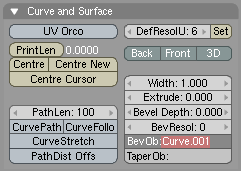
In the side view, add a Bezier curve. Go to the EditButtons screen, and select the button '3D'. This will allow you to move the vertices 'out of the plane', or make the curve truly 3 dimensional.

With the curve in editmode (TAB KEY- the vertices should be visible), add some points to the curve with CTRL-LeftMouse. When finished, you should have something like this:

Now, we'll attach the camera to the path. First, select the camera. Hold the shift button and select the path. Make the path the parent of the camera with CTRL-P.Next, select the path and go to the AnimButtons screen. Now, when you select the CurvePath button, the camera will move along the path. (Animate with ALT-A).Note:Depending on how your curve has been drawn, the camera can be displaced when you select CurvePath. Just drag it back in place - that should do the trick.This is nice, but not enough - we want the camera to look in the right direction, too! Fortunately, there's a button for this, too: CurveFollow. (Make sure the cam's up vector points the right way!)Note:For some reason, the camera will rotate 90 degrees when you select this button. As in the note above, just correct this motion and you should be fine.

Creating the rails

The rails will be creating by applying a bevel object to the path. In front view, add another curve and create the shape for a rail - something like this:

Hint: you can close a curve by pressing [C] while in editmode.Scale the shape down, and duplicate it. Join the curves together by selecting them both, and pressing CTRL-J.In the bottom-right of the screen, you can read the object's name. It's probably something like OB:Curve.001 (it is for me, anyway). Now select the main path, go to the EditButtons screen and enter the object name you just found in the BevObj: field.

bevelobject

If all goes well, you're now looking at some cool rails. Chances are, though, that the rails are 90 degrees rotates relative to the rails shapes you just drew:

To correct this, select the rails shapes, enter edit mode, select all vertice (AKEY), and rotate them 90 degrees (RKEY, next hold down CTRL while dragging the mouse. CTRL will restrict the rotation angles to multiples of 5 degrees).By now, we should all be happy campers and have a model like this:

Procedural Objects

Now, the fun part starts. We'll use procedural objects to create some of the woodwork you find in mines. We'll start off with the ties; these are the wooden blocks that connect the rails.
Start off by creating a block, a bit wider than the two rails.

Make the rails the parent of the block. (Select the block, hold down the shift key and select the rails. Select CTRL-P). Now, when you animate, you'll notice the block is following the rails, too. Select the block, and go to the animButtons screen. Select the button called 'DupliFrames'. This option will create a 'virtual copy' of the block for each frame of the animation.There are a bit too many copies right now. Increase the value of 'DupOff' until your rails looks good to you. (I used a value of 2).
Now, create a shape like this:
and give it some depth (set the extrude parameter if you used a curve, or use the extrude command when you've created a mesh). Again, place the shape on the beginning of the rails, make the rails the parent of this shape, and set DupliFrames. Fiddle around with the DupOff value untill you're satisfied.
For lighting, create a spotlight, place it just above the camera and parent it to the camera. (Make sure it points forward ;-). This will simulate a light being mounted on your mine cart. However, because the lamp's direction will follow your viewing direction exactly, the lighting will look too artificial.Create an empty, and place it a bit in front of the camera. Parent it to the rails. Select the lamp (first!) and then the empty. Select CTRL-T (Make Track) to make the light follow the empty. When you do this, the direction of the spotlight will probably be screwed up again. Correct this by rotating the light untill it points to the empty.Select the empty, go to the AnimButtons screen and set TimeOffset to a small negative value (like -3). This will cause the empty to run 'ahead of the light' (in time).The direction of the light is now uncoupled from that of the camera and the resulting lighting will look much better.
Finally, I've created a rock wall by making another extrusion along the path. Each path can only have ony bevel object however, so you need to duplicate the rails path first (use shift-D, NOT alt-D!), create a rock wall outline and extrude it.
Finally, after adding some decent textures and lighting, here's the result:


147 Responses to “A Ride Through the Mines”  

  1. 1 ishwar Edit Link

    Hi,

    i found this tut very useful

    thanx alot !

    PS can you move a point in a NURBS curve in thru the z-axis ?

    whenever i try, the point moves in x and y but not the z

  2. 2 bart Edit Link

    Hi Ashwar,

    NURBS curves are 2D by default. You can switch them to 3D though in the EditButtons Window (F9). In the 'Curves and Surfaces' tab, select '3D'. Alternatively, you can use Bezier curves.

    B@rt

  3. 3 White Knight Edit Link

    i did what it sayd but the curvefollow botton dosent work any ideas

  4. 4 bart Edit Link

    HI White Knight, I just checked in Blender 2.40 and it still works ok. Just be sure that you have the curve selected and then switch to the Edit Buttons (F9). The option CurveFollow should be there and it should work fine. If it doesn't, please email the file to me and I'll take a look. (Contact me with the contact form at the top of the page first to get my email address).

    B@rt

  5. 5 Alec Edit Link

    Great, simple intro to some really powerful features! Thanks very much for the tutorial.

  6. 6 Daniel Edit Link

    Hi,

    Your tutorials are really great but I had a problem with this one:
    I can't add a point to the curve at the beginning. Ctrl left click simply doesn't work. I'm in editmode, I can see the vertices but I can't add any points.
    Please help me!

  7. 7 Jacob Edit Link

    What's a Bevel object? Here at Morgan High School we've discovered a "Bevel" option in the "Specials" menu, but it, in no way, works towards the goal of this tutorial. I have one curve, and I shaped a cube to the shape of a rail segment, but now I don't know what's going on.

  8. 8 bart Edit Link

    Hi Jacob,

    I've added some extra information above. For starters, be sure that you create the outline of the rails from a curve, not from a mesh.

    Cheers,

    Bart

  9. 9 Jacob Edit Link

    Ok, thanks for the help. I'm basically done, but I might do some more to touch it up, but this is a rough render of my mine track:
    http://i48.photobucket.com/albums/f232/Cob_Studios/3D Animation/MineTrack.jpg

  10. 10 newbie Edit Link

    i might have done something wrong but when i type in Curve.001 the curve has the shape of the rail i made but its a jummbled mess,nothing like what i made.at parts of the track it it gets all scrunchy, black and crummpled.am i doing something wrong?

  11. 11 eb264 Edit Link

    yeah, daniels right, CTRL-Left click doesnt work for me either. any ideas?

  12. 12 Brian Edit Link

    You guys having trouble with CTRL-LftClick to add vertices, in order to add vertices that way you have to have only one vert selected, and it must be an end vert.

    If you have none selected, or if you have a vert that is in-between two other verts, nothing will happen, or if you have an end vert and another selected, nothing.

    ONE end vert only.

  13. 13 Richard Edit Link

    newbie: I had exactly the same trouble with my rails. Turns out, if I typed in Curve.001 as the bevel object whilst my path was in Object mode the rails went all scrunchy as you observe. I found that if my path was in Edit mode when I typed in the Curve.001 bit, it all worked fine.

  14. 14 eb264 Edit Link

    when u have to connect the two rail parts together, CTRL-J doesn't work. any ideas?

  15. 15 eb264 Edit Link

    sorry. figured out the problem.

  16. 16 eb264 Edit Link

    Whats an empty?

  17. 17 Richard Edit Link

    An empty is an object that can be used to manipulate other things. It can be positioned, scaled or animated just like any other object, but it is entirely invisible in the final render. It can be used to track cameras, scale or orient textures, or alter just about any feature which can map to another object. You`ll find it in the root of the "Add" menu.

  18. 18 Matt Edit Link

    Hey, i cannot find the ‘DupliFrames’ option. Where is it? (i have downloaded the latest version of blender)

  19. 19 Jesse Edit Link

    not to be a tool, but the wooden boards between the rails are called rail ties.

  20. 20 bart Edit Link

    @Jesse: thanks! You're the first one to comment on that remark in, oh, 8 years? I've updated the text! :)

  21. 21 Nelsiny Edit Link

    Wasup everybody,

    I dont know why but I am not very good at this. I have the 2.4 version and I still cant figure out how to make the rails/ I mean I cant do the first step of the Tut. I dont know if somebody can help even more, I steps are very good and what not but I need a little more help. If anybody can help Thanks alot I would like to done some nice things to the Caves and all that.

  22. 22 dnx Edit Link

    hi,

    out of some reason my rails wont show up in the render? what up?

  23. 23 eb264 Edit Link

    this actually works now. it worked before the empty but i dont think the empty did anything. thanks for the tut. works great.

  24. 24 Caleb Edit Link

    Nice tut! I am in the process of creating a rollercoaster. I knew how to do everything but make the ties. OK now to my problems. I believe that both problems are related. First problem, the camera goes way to fast. Second problem, the rails are to far apart! HELP ME!

  25. 25 Ryan Edit Link

    I have a problem…. I've made the rails and the tie (and i made a parent to follow the rail). It will follow the rail in the animation but in your picture, you have all the ties at once. What's my problem?

  26. 26 AS Edit Link

    Well, as usual I am having my troubles! I have gotten to the step where it is time to "BevOb" the rails onto the curve. Now when I do this, I get something kind of funny. Firstly, the track I have created is all black, yet no material is applied. Secondly, it is sort of twisted up at the ends, and there's little mutations and stuff on it. Now I noticed that both Newbie and Richard appear to have experienced a similar issue. Richard offered a solution–apply the BevOp in edit mode rather than object mode. However, I have tried this operation in both of the two modes, and each in turn produced identically problematic rails. So now I am lost. Would it help if I emailed you the .blend file B@rt? If so, at what step should the file be when I send it?

    Thanks,
    AS

  27. 27 Ryan Edit Link

    Ok… well I realized the problem was the dupliframes. I turned that on but I'm having the problem of the objects following the path not being positioned correctly. Ties are sometimes too far below the rail and sometimes the cave-brace things are IN the rail. What can I do to fix this?

  28. 28 Paul Edit Link

    B@rt,

    Thanks for this fun and useful tutorial. I found it pretty straight forward after going through all the preceeding ones. Figuring out which views to use while editing the rail curve was a good exercise too. I had to redo the curve a couple times before I got it looking good. I don't understand the relationship between the length of the intial curve and the number of frames it takes to traverse it yet, but I'll figure it out eventually.

    Regards,
    Paul

  29. 29 Jonnyappleseed Edit Link

    Caleb,
    If you are femilare with the IPO editor, you can fix the problem by extending the length of the curve in the ipo window.

  30. 30 laughing cheese Edit Link

    Hi there!

    These are great tutorials, but I'm having trouble making them work with 2.41! (Sorry, you probably get that a lot…)

    You start out by saying "in the side view". Which view is the side view in? And Blender never starts in two windows :confused:

  31. 31 bart Edit Link

    @laughing cheese: press NUMPAD+3 (with numlock turned on) to switch the 3d view to sideview. Press NUMPAD+4 for top viev, NUMPAD+1 for front view

  32. 32 laughing cheese Edit Link

    Alrighty! I'll give a shot!

    Thanks very much!

  33. 33 laughing cheese Edit Link

    Oh…….I was thinking of what viewports; So their both 3D windows?

  34. 34 shane Edit Link

    ok im a noob at this stuff and i dont no what every thing means right now.. im stuck where it says.. animbuttons, and the curve path button… where are these at and what do they look like?

  35. 35 shane Edit Link

    ok so far i only got to the animation part… when i tried to put that /_\ thingy onto the rails it never works.. all i get is to rods… what am i doing wrong???

  36. 36 Thord Johansson Edit Link

    Help! Can I download this somewhere? Someone who is finished and would like to send the finished file to me, in some kind of exported format that I can show without Blender???? I have Blender, but that shouldn't be necessary should it?

  37. 37 ahhhhhhhh Edit Link

    coooool hahaha…

  38. 38 sasa Edit Link

    heyy everybody~

    nice tutorials, but i wonder how can u make two windows (*first pic) , coz i can nv manage to do it…i asked my fds, but they cudnt figure it out too~ XPP
    and seriously~ blender is not my stuff, lol….so mani buttons!! (*scream)

  39. 39 anonymus Edit Link

    Hi, I'm kind of new to this, could someone tell me how to make a rock wall outline out of a path?

  40. 40 Thord Johansson Edit Link

    I'm kinda serious here.
    Help! Can I download this somewhere? Someone who is finished and would like to send the finished file to me, in some kind of exported format that I can show without Blender???? I have Blender, but that shouldn’t be necessary should it?

  41. 41 bart Edit Link

    @Thord: the whole point of the tutorial is that you have to do it yourself :) Go ahead, it won't take you more than a few hours.

  42. 42 anonymus Edit Link

    Hello, could someone answer my question?

  43. 43 anonymus Edit Link

    Ok, I figured out how to do it.

  44. 44 ARF Edit Link

    DETTER PROGRAME ER DET BESTE JEG HAR SETT I HELE VRDEN

  45. 45 Duncatty Edit Link

    The camra is going to fast, how do i change that?

  46. 46 Danny K Edit Link

    Hello

    It was a great tutorial and I had a lot of fun.
    but I had one setback (almost every tutorial bears one)- in render mode the rails (the path) did not appear!! why?? why?!! wwwwwwwhy????!!!!!

  47. 47 Thord Johansson Edit Link

    @ ARF: Ja, men jag är ju nybörjare - jag vet inte :D

    I hope you understand swedish.

  48. 48 Danny K Edit Link

    no, I dont understand swedish, you heartless viking.

  49. 49 Thord Johansson Edit Link

    >:(

    WE HAVE HEARTS! >:( >:( >:(

  50. 50 Antipeopleperson Edit Link

    Ok a great tutorial…. i got everything done and it wasn't to hard. But i want to extend on to the mine to make it alot longer and a bit more fun that just a few twists and what not. So is there a way to add on to it with out making a whole new mine?

  51. 51 snowboard Edit Link
  52. 52 Amateur free vidieo Edit Link
  53. 53 Hooty Edit Link

    im just a beginner using blender and while i was creating my own picture after the picture got bigger and bigger i wasn't able to slelect some of the parts of the picture anymore and after a while they dissapeared. Wow im really stumped on this and i can't figure out why, my guess is that the picture is just getting too big i guess but like i said im a noob to this and i would appreciate any feedback please.

  54. 54 My Name Edit Link

    How can I slow the camera down? I read something about the ipo editor, but HOW!?!?!?

  55. 55 difool Edit Link

    @my Name: In the edit menu there's a tiny gray field where it says "path length" Normally there should be set a value of 100. If You increase this value, the camera will slow down eventually.

    As for myself, i have the same problem as dnx and Danny K. The rails won't show in the final render. Any ideas?

  56. 56 Happy Blending Edit Link

    Oh my GOD! Thank You!

    You got the solution for my problem!
    Im working on a rollercoaster… The Mesh is ready and UV-Skinned
    (cause it's gonna be a special 1 with Jet Engine and Afterburner LOL, should be fun to ride with…)

    But the point was that i actually didn't know, how to create those damn Coaster-Tracks!
    I've been searching for a long time now… …and this WORKS !!!!!

    THANK YOU MAN
    Best Regards

  57. 57 TheBeast9 Edit Link

    Hey, This looks awsome so far, but one problem, after making the first rail part, and creating its other-side-counterpart, joining them, and renaming it as "Rail" I select the pat, and put in "Rail" on the BevOb: but nothing changes…. I tried this without the name changed, in edit mode, in object mode, and even joining both the rails in edit mode instead of object mode. What have I done wrong?

  58. 58 Anna Edit Link

    I have a nice rails with all the woodwork, but when I animate it, the rail ties and the other thing still move along with the camera. What am I doing wrong?

  59. 59 Consolidated Edit Link

    I was wondering if there was a way to change the number of frames it takes for the camera to track its way around the line. 'Cause I wanted to make a large scale one, and 100 frames is just a little too quick. And cutting the frames/second just kills it.
    Any help?

  60. 60 Consolidated Edit Link

    Wait, never mind, I just read 'My Name' and 'Difool's convo.
    Sorry bout that.

  61. 61 skejoe Edit Link

    Hi :)

    Very useful tutorial but i've got into a problem.. I'm making a rollercoaster, and what is a rollercoaster without a loop ? :P So i've made a loop on my path, but when my camera is going at the loop it's going on the outerside of the loop, not staying inside as i want it to.. Is there any solution to this problem?

    Thanks
    Sebastian Skejø

  62. 62 SnakesonaPlane! Edit Link

    Hey… thanks for this tuorial! As all the others here, I have a problem. I've been going through the tutorial and when I get to making the ties(/the "Dupliframes" part) it doesn't work… I'm in the "Anim settings" window and I pressed down the "Dupliframes" tab, but nothing happened. I think my problem is that I'm not using a "procedural object". I only think that because I don't exactly know what they are. All I know is that it's not a "Mesh", a "Lattice", or a "Curve". (At least they don't work like the tutorial said they should. I think I'm using Blender 2.37, but I'm not really sure how to find the version number… Anyway, if someone could help me with that, I'd be very appreciative. Thanks.

  63. 63 Anna Edit Link

    @SnakesonaPlane: Did you make the rails parent of the ties?

    I still have the same problem as above. Do I have to make the original tie invisible or something like that? I could upload the .blend file on my webspace if someone wants to see it. Please help.

  64. 64 SnakesonaPlane! Edit Link

    @Anna, I did make the rails the parent of the ties. (selected the rails, held "Shift" and selected the rails, pressed "ctrl p" selected the option of "Follow path" set to "curve follow", and then pressed "DupliFrames"- nothing happened…) thanks for the effort though! You know, it actually looks as though we have the same problem ( I may be wrong)..

  65. 65 Anna Edit Link

    No, DupliFrames works fine here. I think I used the 'Normal Parent' option, maybe that will work for you too.

    My problem is that the original tie still follows the path, although DupliFrames also works. I'll make a screenshot.

    http://www.hetleesbeest.nl/zooi/blendermijn.JPG

    The red arrow points to the thing that follows the path. The rest is DupliFrames stuff.

  66. 66 Anna Edit Link

    No, DupliFrames works fine here. I think I used the 'Normal Parent' option, maybe that will work for you too.

    My problem is that the original tie still follows the path, although DupliFrames also works. I'll make a screenshot.

    (Seems like I can't place a link here… let's try this. Just type http://www. in front of it.)

    hetleesbeest.nl/zooi/blendermijn.JPG

    The red arrow points to the thing that follows the path. The rest is DupliFrames stuff.

  67. 67 Anna Edit Link

    No, DupliFrames works fine here. I think I used the 'Normal Parent' option, maybe that will work for you too.

    My problem is that the original tie still follows the path, although DupliFrames also works. I'll make a screenshot.

    (It doesn't seem to work to post an URL here… Maybe this works. Change the -'s into .'s)
    www-hetleesbeest-nl/zooi/blendermijn.JPG

    The red arrow points to the thing that follows the path. The rest is DupliFrames stuff.

  68. 68 AS Edit Link

    I cant figure this tutorial out. Ive tried it many times and run into the same problem each time; the BevOb. B@rt, could you please try going through the tutorial in the new version of Blender? This and the other tutorials are (sadly) becoming hopeleslly out of date :-(. Amazing how fast Blender keeps changing, but its confusing for us out here! Thanks for your time ;-)

    AS

  69. 69 Drac0 Edit Link

    Ok, so I got up to the part where you make the sahpe for the rail, but im not exactly sure how to go about making the curve into the actual rail. Thanks to anyone that helps.

  70. 70 Scott Edit Link

    I'm hoping it's not just me, but I had a heck of a time finding the dupliframs button, or the animbutton. Took me like an hour of searching on google before I figure out that you press F7 to get to the screen. I was assuming it was under F10, and had maybe been removed from Blender 2.42 and replaced with Sequence Arrays or some such. Hopefully that helps someone other then me.

    Peace
    SJ

  71. 71 SnakesonaPlane! Edit Link

    I just figured it out! Thanks a bunch, Anna! Because my thanks comes in bunches… just like bananas… And you think I'm joking.

  72. 72 Mike Edit Link

    GREat! i even made another animation it took a bezier curve and i just made it a circle and i typed in curve and used "follow path"and Alt+A and whoa it was awsome just the cube part of Dumpli frames part!

  73. 73 Fallen_Demon Edit Link

    I fractaled the supports by 10 or 20 if I remember properly. That on top of a cloud bump map worked really well

  74. 74 !dj_-of-_D00M! Edit Link

    dood cant you make a underwater city tut that would be awesome

  75. 75 Odie Edit Link

    Hi,
    I don't understand what you mean with 'join the curves' at the rails. So I tried to extrude the cuve and then make it follow with dupliframes. But it didn't work…..

  76. 76 dj2j Edit Link

    thanks for the tutorial,
    but where is the curvepath button?? i`am using blender 2.42
    can somebody please tell me where it is

  77. 77 anonymous Edit Link

    anonymous, i am having issues with the ties i know where both animation buttons are but when i click on them it is the same and there are no "drop off" buttons why HELP!

  78. 78 anonymous Edit Link

    FOR ALL U NUBBINS ITS IN THE OBJECT BUTTONS SECOND OVER :) it took me 23 somting minutes to figure it out NICE TUT

  79. 79 pieman Edit Link

    @snakesonaplane or ne1 who knows how, please tell me how to use dupliframes.wenever i try to use it, the button goes down, but nothing happens to the ties.

  80. 80 Jetto Edit Link

    This a very intersting tutorial. Thanks.
    I want to control the speed of the camera along the path. I read that this have to be done from the IPO window. But after many try I haven't been able to edit anything in that window. I think there is a black line at speed 1.0 with rails selected and path in the IPO header choise but I can't select the line.

    I'm lokking for help on this, thanks.

  81. 81 Ben Edit Link

    I'm about to go insane…..

    Everything looks fine in the 3d windows, but when I render it out the rails aren't visible!

    Someone PLEASE help me with this.

  82. 82 Ben Edit Link

    I solved my own problem…well, a guy on a forum did. Turn off "dupliframes" on the curve.

  83. 83 josh Edit Link

    when i go to render window it's not animated!?
    please help me.

  84. 84 Mark Edit Link

    Hey, thanks for this tutorial! I'm a complete noob in Blender (d/l'ed it this week) and I got my "ride through the mines" up and running with about 5 hours work, including putting in my own (rather nasty) textures.

    All I need to do now is work out how to convert the rendered .avi file to put it on my 3G cellphone… ;)

    First frame if you're interested: http://img.photobucket.com/albums/v726/markfiend/mines_frame1.jpg

  85. 85 Barek Edit Link

    Very nice tutorial, it helped me out a lot. Blender is such a sweet program.

  86. 86 jonathan Edit Link

    ok im just having trubble getting 3d meshes to curve. like i hava a tube and its gunna be a power wire to a computer but i cant figure o