
Tutorial, Texturing a Head with GLSL

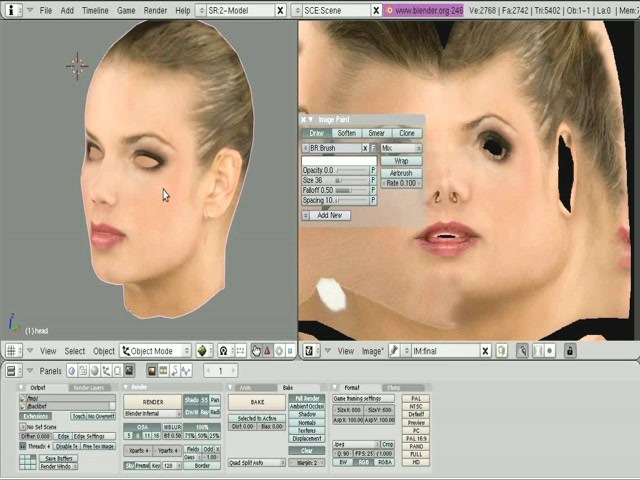 Lile Hanson has created an excellent tutorial on using the new GLSL preview feature. He shows you how to combine different layers, by painting them onto your model in Texture Paint mode using the paint brush. This is similar to masking two photos in Photoshop. I’ve been wanting this feature for a long time and it’s great to see it implemented in Blender.
“Here is a 35 minutes Blender video tutorial about using the new GLSL preview features of the Apricot builds, applied to texturing a head, in a way that could be called multi layered projection painting.
We are going to see the steps to interactively blend together three projections of reference photography into a final texture. This assumes that you already are comfortable with blender, mostly with UV mapping, materials and texture channels. You will need a recent blender apricot version.”
Download video: Avi version, mirror ( 190 Mo ), Ogg version , mirror ( 122 Mo )
http://www.bentha.org/blender/tuto/blender-tutorials.html
Blender Tutorial, texturing a head with GLSL preview from lile hansen on Vimeo.




Huge feature…! i would like to do that too..
but i first have to learn how to model a head.. :))
Good work Lile, and blender devs, too.
This is awesome! Now if I just had the skill to do it. :)
Awesome! Very well done, congratulations and thank you very much Lile!
I really enjoyed watching that. Thanks, Lile!
good job Lile.. :)
thanks
now that was an awsome tutorial, i would love to see more tuts from lile.
Really informative tutorial, Lile – thanks heaps for sharing.
Can’t help but think that there’s way too much to-ing and fro-ing between various panels to get at the various features – quite jarring and you are bound to go astray somewhere. It would be great to have a much more streamlined workflow for this kind of texturing task. In fact, Lile mentions something about this at the end of the tutorial.
Thank you Lile. Very interesting feature and usefull tutorial.
Thank you very much for this. It was good and i could understand it without problems. Don’t worry about your english!
GLSL rocks”
Very nice tutorial on a subject that rocks! Can’t wait for that feature!
Nice tutorial. I cannot help but wonder, if the stencils (or suggestions to be tweaked by the artist) could be generated from the normals.
Stencils ftw…
Lile, this was a great tutorial. I will have to watch it several times before I can do it, but the results are beautiful. I really have been struggling with getting good textures on my head models, and this was a great technique. Thank you for sharing it with all of us.
thank you thank you thank you thank yout hank you thank you thank you thank you thank you thank yout hank you thank you thank you thank you thank you thank yout hank you thank you thank you thank you thank you thank yout hank you thank you thank you thank you thank you thank yout hank you thank you thank you thank you thank you thank yout hank you thank you thank you thank you thank you thank yout hank you thank you thank you thank you thank you thank yout hank you thank you thank you thank you thank you thank yout hank you thank you thank you thank you thank you thank yout hank you thank you thank you thank you thank you thank yout hank you thank you thank you thank you thank you thank yout hank you thank you thank you thank you thank you thank yout hank you thank you thank you thank you thank you thank yout hank you thank you thank you thank you thank you thank yout hank you thank you thank you thank you thank you thank yout hank you thank you thank you thank you thank you thank yout hank you thank you thank you thank you thank you thank yout hank you thank you thank you thank you thank you thank yout hank you thank you thank you thank you thank you thank yout hank you thank you thank you thank you thank you thank yout hank you thank you thank you thank you thank you thank yout hank you thank you
:)
Thanks for this wonderful tutorial.
I’m just wondering, wouldn’t it be possible to do this without GLSL? Instead you could use a preview window, to see the material. Of course that wouldn’t be so easy without GLSL ;)
Huge thanks! This was very informative. And also thanks for providing in ogg-format!!
Thanks! Two questions.
1. Can we get the beginning model and the textures pls. So we can follow the video tut? One of the problems with free vid tuts is not having the same reference to work from so you it’s hard to tell where you went wrong etc.
2. Is it possible to bake this into one map? I think using the glsl to paint blend is a good idea.. but having it run in the game engine like that.. when you could have just one map would waste resources.
Great stuff, thanx!!!
@Kirado
Make a new UV map and assign a new image to it. Then go to the Bake panel under Scene(F10). Select Texture, and click “Bake”. The texture should be baked into a new image.
Excellent tutorial! Well done!!!!!
BTW the author of this tutorial is absolutely right, it would be really great if it were a bit more intuitive to set up. I know that some more experienced blender users wouldn’t have much trouble setting it up, but even then it’s kind of awkward to use multiple stencils. And I learned a lot about projections and stuff thanks a lot author of this wonderful tutorial You Rock!!!
ty !!
@yoff : I tried from normals, it sort of works, but it would need the projections to be really perfect, wich is far from beeing the case. I have thought this in a way to interactively create something plausible, more than exact.
@Kirado : 1 ) unfortunately , I won’t share the model, as it is involved in a commercial project, nor the base images, which are fully copyrighted…2) yes, the idea of the whole tutorial is to bake everything in the end in one single image,so that it can be used real time in game engines.. I didn’t finish the work, on purpose, or it would be too long for a tutorial. You would patch the nostril, ears, under the neck, and so on… until covering the whole head. Once you are happy, like Artisten said, create a new image, set active layer to UVmap, and bake your final result :)
Your English may not be perfect, but it is perfectly understandable, as is this tutorial. Many thanks!
just watched it and i liked it, i wish there would be more (i like uv tuts).
thanks a lot, i know im gona use this technique later on. :)
Well that weas great totorial.
Layers and blendingmodes in the image editor that wodd realy be greate.
@Lile.. hey thanks for answering my questions.
Amaaaaaazing tutorial, your english is not bad the my is worst =P
You really take the lessons to the exactly point of view from a new designer, thanks man!!!
Tim you rulez!!!
Regards from Argentina!!!
My mistake…. too leazy to read and the real thanks are for Lile… =P
LILE rulez!!!
This is definitely one of the greater tutorials I’ve seen, thanks Lile and of course many thanks to the developers.
If only apricot was a yearly event XP
thats so cool , you really inspired me thanks lile