
Tutorial – Destroying a Mesh with External Particles

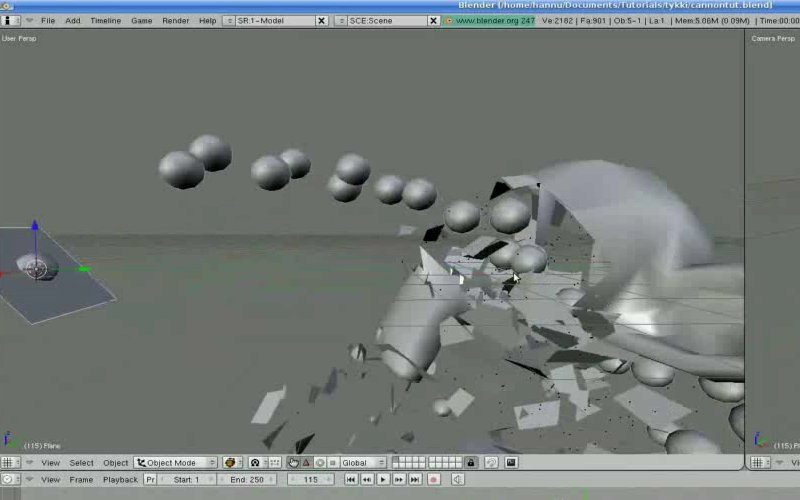
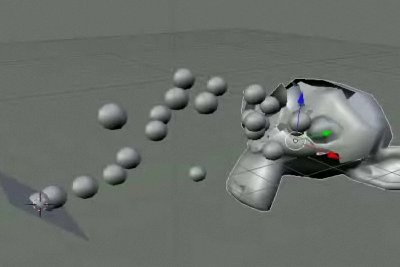 A new video tutorial by Hannu Hoffren (hhoffren) demonstrates how the latest (2.46-2.47) particle engine can be used in combination with the Explosion modifier to create some very interesting effects, mainly for the destruction of a mesh.
Theres a thread about it on Blenderartists.org and the main tutorial video can be seen in HD on Vimeo from this link – http://vimeo.com/1800944
Its a very nice tutorial for those of us who have been looking for some information on the new particle engine in Blender, and the application of the new explosion modifier, or those of us who just enjoy using Suzanne as target practice.


Very good
yes, indeed! high res vid makes it even better!
Btw, how do you handle placement of the particle object? If it’s not on 0,0,0 it gets displaced that distance from the emitter. Do you use a layer for every particle object and place them at 0,0,0 or is there another way? Is that a bug or a feature? :)
Great job.
you are now a Master!
Master hhoffren: that can happen also in the Game Engine?
Thanks.
Yes, Great tutorial ! Thanks !
Intereseting since i’m not working very much with particles.. thanks for this video!
This is great people. i think this is something i’ll try out. thanks to the creator.
Oneday they gonna hear all of us and see our art? right?
Keep working
This is a great tutorial. I have followed some step by step tutorials on the explode modifier, but I did not understand why I was doing some of the things the tutorial said to do. This one was very clear and explained a lot of what the settings are actually doing. You are a great teacher. Thank you Hannu!
poor Suzanne :(
Absolutly brill tut, thanks!
Saved it to memory!
thanks a lot man, this is a legendary quality vid tutorial right up there with the Greybeard and Spaghetti Moon only you’re is in HD so you can actually see the entire screen at once which is awesome
will watch out for anymore you want to make
cool. hope to watch vid sometime…
-b
http://minosafilms.wordpress.com/
http://artislight.deviantART.com/
http://morevnaproject.org/
Jose Sanchez: This is a a feature, but I do see the need for a “use object center” option and will be adding it soon :) but untill that just set the objects to global origin (0,0,0).
And oh yea, the “possible baking bug” described in the tutorial is not actually a bug. It’s just that after the cannonball particles are baked their collisions are not calculated dynamically anymore, so the reactor particles don’t know that there are any collisions by the target particles. To get the dynamic collisions (which create the events that reactor particles can react to) you need to re-calculate the target particles too.
A very nice tutorial on all other accounts! :)
Oh man.. I just came back from a small one day trip and what do I see. This news here on BlenderNation and so many nice comments in both here and Blender Artists. What a way to end the long day. Thank you all, very much!
Jahka! Glad to hear your word on this (these?) one too. Before I made any of these, I did my best on researching the details I was going to explain. That cache thing was something unexpected while recording and I decided to leave it in the video, since someone else might have the same problem. Sorry about the word “bug” though. :) I’ll try to add a correction in the video description as soon as I can, maybe even in to the video itself. I’m very glad to hear that you are still working on the system. Wonderful stuff you’ve coded there already!
Now I’m off to shower, have a nice weekend you all!
Oh man.. I just came back from a small one day trip and what do I see. This news here on BlenderNation and so many nice comments in both here and Blender Artists. What a way to end the long day. Thank you all, very much!
Jahka! Glad to hear your word on this (these?) one too. Before I made any of these, I did my best on researching the details I was going to explain. That cache thing was something unexpected while recording and I decided to leave it in the video, since someone else might have the same problem. Sorry about the word “bug” though. :) I’ll try to add a correction in the video description as soon as I can, maybe even in to the video itself. I’m very glad to hear that you are still working on the system. Wonderful stuff you’ve coded there already!
Now I’m off to shower, have a nice weekend you all!
ps. I hope this comment comes through once and only once. I’ve been having some difficulties with the spam blocker here.
Oh man.. I just came back from a small one day trip and what do I see. This news here on BlenderNation and so many nice comments in both here and Blender Artists. What a way to end the long day. Thank you all very much, especially you Alex for publishing this!
Jahka! Glad to hear your word on this (these?) one too. Before I made any of these, I did my best on researching the details I was going to explain. That cache thing was something unexpected while recording and I decided to leave it in the video, since someone else might have the same problem. Sorry about the word “bug” though. :) I’ll try to add a correction in the video description as soon as I can, maybe even in to the video itself. I’m very glad to hear that you are still working on the system. Wonderful stuff you’ve coded there already!
Now I’m off to shower, have a nice weekend you all!
ps. I hope this comment comes through, and only once. I’ve been having some difficulties with the spam blocker here lately.
Very nice tutorial, thanks!
It wonder if it is possible to destroy an object only into its unconnected parts.
Great would be a feature which allows demolition only along seams.
carlinhos, I haven’t tried it yet, but weight painting seems to be possible. http://wiki.blender.org/index.php/Manual/Explode_Modifier
great tutorial!
what to do if I want to make a reverse Version? I mean,
the Balls should explose after the contact with Susane?!
zivko, for cannon you need to have two psystems, first one is the same normal emitter system with “die on hit” enabled and another one is a reactor system.
That was super helpful.
I’ve been wanting to learn how that works.
Thanks Hannu.