
Tool to Display Blender Keystrokes in Video Tutorials

 Video tutorials are great but, it’s very difficult for authors to articulate every keystroke and mouse-click, along with performing everything else. Even when it can be done, it tends to make for longer tutorials because the author has to slow down.
Well, here’s a tool for video tutorial authors that may prove to be quite helpful.
Using the Windows open-source utility called AutoHotkey, Salvatore Agostino Romeo has created a compiled script that displays every keystroke and mouse-click that’s performed.
He writes:
…I noted there are many tutorials to see, but in almost all you don’t know what the
author is doing with keyboard and mouse. So I made a little program (about 200KB)
to help tutorial writers: osdHotkey. It is a standalone program: just run
it (no-install). It is open-source too.
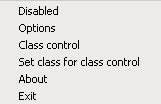
Salvatore provides the source code, documentation, and a link to the scripting tool used to create it (AutoHotkey). You can also change the foreground and background colors, the size of the window, and you can use it to capture keystrokes for applications other than Blender.
You can check it out, here.


wow, what a great idea!
Fantastic!
Salvatore thank you!
-PiPi
ok so the binary on the site is an exe for Windows but it runs fine in Wine :)
Awesomenesssssss.
Lord be praised (and author of the tool too.) I needed this for eons.
Now this is very nice. :D I wonder what we Mac users will do about this… :P But ayway, we should be seeing some snazzy video tutorials come from this.
thanks you, this is very useful!
Awesome!
Oh mean, I was just looking at some head modelling tuts .. and I was thinking that this would really help out, as I had no idea what the person was pushing.
Excellent! I hope tutorial authors take to using this!
Jacob Randal: It’s not quite the same, but Mac users can use the ‘Keyboard Viewer’ applet, in the language settings.
I’ve been looking for something like this for a long time. So well done, Salvatore!
I really hope someone makes a similar utility for the mac.
–Colin
omfg just what i was looking for, damn i’ve even considered coding something like that myself.
thank you thank you thank you
Hey thanks Salvatore this is a great tool.
for Mac users:
KeyCastr ( http://stephendeken.net/software/keycastr/ )
just perfect for Blender video tutorials!
Sweet! Thanks, Klangfreund. :)
All what I always looking for and never expect that exist !
This little tool will be ideal , cause till now I was always in obligation to just write some shortcut list above my video , without can’t explain when I use it.
Now, my tutorial will be more exact.
Thanks Salvatore !
Nice. Also thanks to Klangfreund for supporting the Mac guys.
I am planning to make some DVD tutorials, this comes just in time!
Great!
And what about something like that for Linux?
Ah thats very cool! Thank you very much! :)
Very nice :) is it possible to add some sort of font selection dialog in options? At least to change the font size?
Thanks a lot. This i svery useful. A step fowards for all tutorials!
As tutorials mean a lot for the blender community (I really like the video tut’s on blender.org!), I thinks this script is great progress!
Couln’t this be built into Blender itself? So it appears just as the properties dialog (NKEY) does?
This will make it easier to make tutorials, and it can be used no matter what operating system you use!
Hi,
if you want to use similar appliction at Linux, then you can use Key-status. This app was originaly created by Daniel G. Taylor: http://programmer-art.org/, but it isn’t available at his site. You can find it at my site:
http://www.kai.tul.cz/~hnidek/
Jiri
“Couln’t this be built into Blender itself?”
I’ve been discussing this with Ton long ago.
Blender could be creating a text file with timecoded device events (mouse and keystrokes) to be used as subtitle track in video dvd’s… But editing would be a problem.
So it blender should also be storing the screendumps,… It became a SOC project but was never finished.
Now it seems that video-dvd is not the best way to do tutorials. dvd-rom can fit much more hours of screen capture. The issue stays if you would want to be able to turn the keyevents overdraw off on playback. If not, this tool is perfect. Or yes, blender could draw little icons on screen in a “tutorial record” mode. If yes, then flash might be a good playback format to look at. flash can read external xml files and has no problem drawing over video.
This is a great tool, but I wonder what will happen when Blender developers put in customizable hotkeys…
thanks to all for the appreciations. If you are interested, version 1.6beta is available with font selector, transparency and other enhancements
Awesome tool and great idea! One of those, why didn’t anyone think of this before type great tools!!
Wow, this tool is great!!!
Well done Salvatore !
Thanks a lot for sharing this very usefull tool !
I have to say that this has made my life so much easier as a tutorial writer now. Having keep in mind and remember to say which hot keys are being used breaks your flow so much you can forget what you were doing (oooh so many times). This overlay tool is so useful, so big thanks to Salvatore for writing this one up.
BIG THX !!!
thanks a lot Salvatore. I’m doing a short intro to houdini for a few co-students tomorrow and this will certainly come in handy.
Many Thanks to Salvatore for creating this wonderful tool! I am now using it in conjunction with Hypercam’s own Keystroke display feature. The OSD works great, but there are some key combinations it does not show very well which is why I use it together with Hypercam’s keystroke display tool.
Here’s a tutorial I created on Youtube using this tool.
http://www.youtube.com/watch?v=jGtBQRayRoM
It’s also called a KEYLOGGER…. you can get these tools for yourself, which most are flagged as viral
oh my f****** god thanks a lot!!!