
Sweblend Material Library vol.1

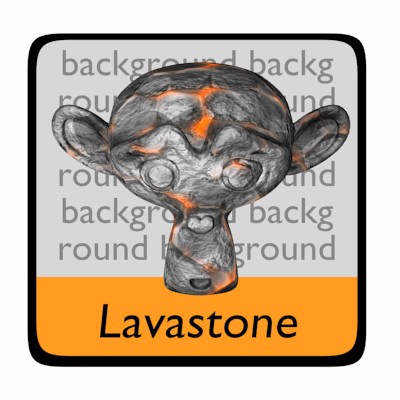 Markus Kothe has released a material library of node free procedural materials.
The material library includes: a Default material with no specularity (good to use when just starting a texture), Zink, Plastic, Leather, Mystic ice, Shiny, Chrome, Lavastone, Stone, Jeans, Steel, Phong, Wood, Glass and Crystal. In total a collection of 15 procedural materials.
My favorites are the Lavastone and Jeans. A very nice collection. Hopefully this is volume one of many. Despite not being node based they are still very useful. Give them a try and let us know what you think.



Very nice indeed. Especially as I still have quite come to terms with the whole Node system yet. :P
In fact I have a use for the glass and crystal materials in an upcoming project I am doing, so the timing is great.
hey kothe, nice to see your contrabuting to the comminuty, i could definatly use some of these, thanks a bunch man. hope you get the time to produce some more :),
dan
phong and crystal look pretty nice!
i too love the phong… could these be ported to the library plugin?
Wow those are awesome! Defaintly gonna use these.
I wish someone would make a clay material…
The Crystal material is described as looking like “perl.”
for some reason I find that very amusing.
Maybe they should make another one that looks like Ruby.
hi and by the way it is possible to extract procedure map from blender.
Sweetstuff
Thanks man!!!
thank you! :)
Is it possible to download the materials, I can’t seem to find a link?
nice, shame about it not using nodes though, i wub nodes -_-
Can anyone who is familiar on this field, show us beginners on how to make use of this resource please…
Material libraries such as this one are accessed through the append function.
While in your file (whatever you are making) you press Shift F1, then browse to where you have Sweblend Material Library saved. Now when you click on it you will see a list:
Camera
Curve
Image
Lamp
Material
Mesh
Object
Scene
Text
Texture
VFont
World
These can all be appended (brought into your new file), but we are going for Materials at this time, so click on Materials and then choose which material you would like.
Right mouse button to select and Middle mouse button to confirm (load). Now you will find the materials you appended (imported) in your Material panel ready to use.
If you want more information on all the uses for append/Linked libraries check out the wiki:
http://mediawiki.blender.org/index.php/Manual/Using_Linked_Libraries
@kotikoti: Open Blender then File –> Append or Link (Shift F1)
You can browse .blend files and add material to your own file.
Nice video about datablocks:
http://showmedo.com/videos/video?name=blenderMoyes-040-capture-datablocks&fromSeriesID=31
Where on the website can you download the blender files with the materials, can someone please help?
Eggselent!
@IAN ROSS:
You’ll find it at the bottom of the page, and if you don’t find it there;
http://swemat01.sweblend.se/swemat01.rar
Thanks to you all, it’s nice that you like it, and I promise you that next library will be better, cooler, more advanced, and everything you’ve ever asked for ;)
Sorry but it saves the file as .rar,this does not seem to work in blender?
Can anyone advise?
Would it not be possible to add these to the blender libriary script by miriano? (sp?)
I very much appreciate such collections as yours, since they save time and are a perfect starting point for further tweaking! Just one small thing: zinc is not a yellow metal, but rather silver. Maybe you mean brass?
Markus, is it possible for you to save the material library as a blender file?
&IAN ROSS
You have to extract the .blend file from the rar archive. WinRAR works well, I use 7-zip.
To actually use the materials, open up your blender project and hit shift+F1, navigate to the material library and open it. Select the material section and then you can choose a material (or many if you right click for some or Ctrl A for all).
Thanks Markus – nice library
Ben, thankyou for your help the problem is now resolved.
http://blenderartists.org/forum/showthread.php?t=87087
Nice work, thanx! :)
Also, thank you, Sandra, for your explanation :)