
Realtime Stone with detail maps in Blender

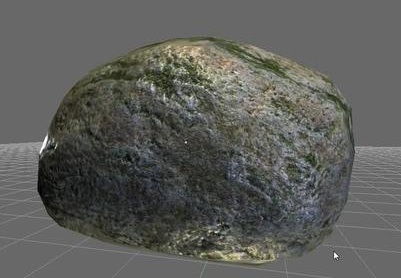 This 45 minute video tutorial by Pelle Johnsen takes a simple stone to carefully illustrate the process of applying several UV maps to a real-time object.
Show creation of a ‘realtime’ stone in Blender using the standard color and normal maps as well as detail maps for color and nomals. The whole process is covered including:
- photo texture preparation in gimp
- tilable texture painting in blender
- modeling and basic sculpting
- uv unwrapping
- projection painting to fix texture seams
- material and detail color map
- sculpting and displacement mapping
- normal map baking
- detail normal map
Link




Fantastic tutorial! There are a lot of techniques i have never seen before. Especially the kind of creating the detail maps. Very impressive, thanks a lot.
sweet
very nice! Although I knew of the clone brush, I never thought of using it to make tileable textures, it really puts the old way of doing it in photoshop to shame :)
I really want to see the rest of it, but for me it stops at 7:11 on hd and on sd it just wont work. Probably a *billion* people watching at the same time, will try again later. Thanks man, you rock!
if you gonna use it on a comercial way ( large scale of obj)then u should add a material node => camera data => deph => and edit this to the detail maps (256×256 is not much but it will help on large scales)
Thanks for the tutorial!
Yeah thanks for the tut!
The stone is stunning.
Thanks for the tutorial Pelle Johnsen! Good one, especially for the first tutorial. Hope to see more from you :)
@ DeMoN (& others interested):
There are sites like ClipNabber (good one, supports HD download from vimeo) to get download link for the videos on a different video sites. There are also some add-ons for firefox to do the same, like Video DownloadHelper or UnPlug.
Personally I use the Video DownloadHelper firefox add-on all the time to get videos like this to myself.
Great tutorial! :) Just learned a lot of stuff I knew nothing about. Thanks for sharing your technique, Pelle!
Hi all,
thanks for all the positive feedback :)
@DeMoN: must be some vimeo problem .. hope you will be able to see the full tut soon. I’m pretty new to vimeo, but I really wanted to share this in HD. I hope it is working for most people.
Big thanks (of course) to the blender foundation and Dr. Roosendaal :) for making this possible at all by providing such a good open and free software package.
-Pelle
Thank you very much, Pelle.
Very interesting tutorial.
Watched this yesterday. Really good tutorial. You say in the video you haven’t used Blender much yet but it doesn’t show.
congratulations man thats one of the best blender tutorials i’ve seen, and the subject is very usefull as well… i wish you all the best in the 3D world and want to extend a sincere thanks from brasil. great job dude. you really helped
Great tut and amazing stone. Waiting for your next fantastic tutorial :)
Thank you for the beautiful tutorial. It seems like 10 tutorials rolled into one.
have you try NDO a plugins for photoshop?it can generate uv map.