
Modifier/Paint/UV Features In Latest CVS Build

 Daniel Salazar (ZanQdo) of GraphicAll has posted a sweet Windows build of the latest CVS. You have to check this out.
*Please note that builds from the CVS are not considered final builds and should be used for feature testing only.
A summary from the build page:
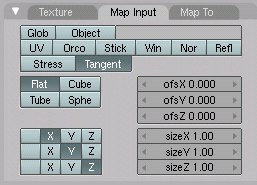
- Tangent vectors now can also be derived from orcos (No UV needed)
- Normalmaps now properly support tangent space as well (Patch provided by Alfredo de Greef). A full log of these changes can be found here.
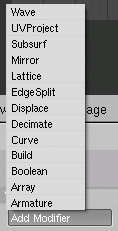
- Upgraded Modifier Stack in BF CVS
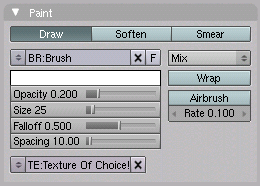
- Texture paint in 3d view is VERY fast now, just be sure to use order of 2 images and turn off mipmaps in the prefs, “Soften” and “Smear” brushes are also suported, and textures can be used as alphamaps.
- There are also some neat little UV options in the UV/Image editor:

ZanQdo also has two demo videos on the build page if you would like to see the array modifier work with the curve modifier and adding deforming modifiers over constructive modifiers. Looks like I’ll be addicted to the CVS builds again!


Love the speedups in paintmode. Now, if only some of the paint-related bugs would be fixed… =)
I’m still new so I’m not exactly sure what this all means, but it seems quite useful =)
What speedups now?
Blender still don’t support tablet pressure :(
http://members.fortunecity.de/pytablet/
This is only a start on what could, yes, be much more. It would just require you control one variable with another. Heck, I’m curious if you could control those new python number field thingies and get this working without having to get anyone to help you.
Arg.. I was wrong. Getting the output from pyTablet is really really easy.. The only problem is that buttons arn’t driveable like IPOs are. In other words, you can’t bind the value of “size” for the brush to “Pen_GetPressure()[0]” no matter how hard I try. And even if it did work, all functions are calculated once instead of in realtime… But the ability is there!
woohoo, finally Zbrush normal maps! Great!
this is great! exactly the type of news I love seeing!
I LOVE the displacement modifier!!!! On the first look, it’s a better reimplementation of TerryNoise! http://blenderartists.org/forum/showthread?t=37470 The only missing thing are lambda noise functions. But maybe I write a texture plugin which you could use as a replacement. When I have time. So I won’t. (damn)
If you could use a material, and not only a texture, as source, with the help of nodes you would have InnerWorld http://innerworld.sourceforge.net/ functionallity!!!
made a short movie showing the coolness of the displacement mesh modifier when useing global coordinates.
blenderartists posting: http://blenderartists.org/forum/showthread.php?p=702782
direct download from deviantart: http://www.deviantart.com/download/39382508/
Ack! I didn’t mention the limit rot/scale/loc constraints that were added. Of course, I posted about them already: http://www.blendernation.com/2006/07/17/transform-limiting-constraints-test-build/
@displacement modifier:
xyz-offsets and scales would be very cool. This is very simple to implement (offset == +, scale == *) but would be a great help.
Tablet support is planned as part of a GHOST refactoring. Hopefully it makes it into the 2.43 or 2.5 (whatever they decide to label the next version).
Actually tablet suport is allready added for linux and osx, for painting tools, only win is still missing
where is the build page with those videos about the modifiers?
Ok, I found it.
these kind of cvs news are nice, but it would be much more helpful for people if you also provided a little information what these features actually are, instead of just showing image of the button.. :)
.b
Wow! This is amazing! I can’t even do this in ZBrush.
Burre, please report those paint related bugs. I can’t fix them otherwise.
Tablet support should follow soon, Matt already coded it, but I’m still waiting for that tablet I ordered to test it.
@basse
Good idea… I keep assuming that eveyone knows what these features are since I have been watching or anticipating features like this for some time. Is there any feature in particular that you don’t understand what it does?
Very Nice additions – I tested the Paint – indeed much faster… Took me a moment to recall what “order of 2 images” meant – I presume that means 2, 4, 8, 16, 32, 64, 128, 512, 1024, etc… pixel dimensions…
@Mike
I can’t remember from Siggraph whether you prefer Mike or Michael :). You’re right about the order of 2. I’m glad you mentioned it!
hello, have I understand right???? blander can now bake normal map on UVs????
have done a normal map test, love it!!! many thanks to the programmer! Displacement still doesnt work as i would expect but with TS normal maps there is now just a sweet workaround to get details in. Thank you!
if anyone is interested to see the test files (shameless plug): http://www.pixolator.com/zbc/showthread.php?t=37875
eugene: well for example i have no idea what EdgeSplit and UvProject modifiers do.
.b
Check the videos… Wow!!
Hi guys, so it will be possible to create normal maps directly in blender. Do someone have a walkthrough to explain how to create a normal map in blender only. I’ve tried many things with vertex col and texture backer, but it don’t work (always a blank normal texture).
By the way, awesome job, especially for the speeding up of the painting.
Kenjy
kenjy,
you could also use melody by nvidia, which is free, to generate normal maps
@basse
See these:
http://mediawiki.blender.org/index.php/BlenderDev/EdgeSplitModifier
http://mediawiki.blender.org/index.php/BlenderDev/UVProjectModifier