
Blender2.5 Tour VI

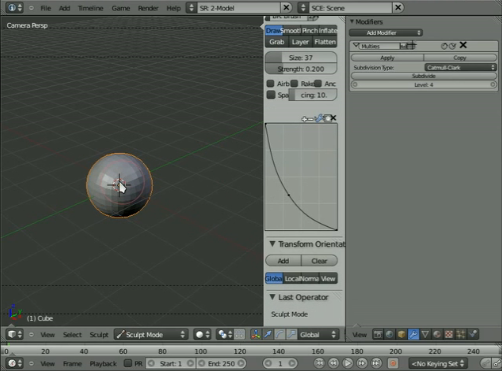 Curious about how the current builds of Blender 2.5 look? Mfoxdogg has published a number of video tours. Remember: 2.5 is still in early development – it’s not even nearly finished or available for download yet, and many things can still change.
Hey all, its that time again, time for blender2.5 Tour #6, Horray!!!
Covered in this tour:
- new buttons and layouts
- resposivness during rendering and animation playback
- scripting, both UI and normal Py scripting
- new drivers system
- resizable subregions
Check out the other 5 videos on his Vimeo page.


WOW, looks amazing!!! So, the volumetrics by farsthary are going to be built in? Even the smoke thing by him?
Thats f***ing awesome! It ashames me that i can only do so little to support the development of Blender. Thanks to the Blender team for the continuing effort!
It looks great! this is amazing.
I have 2 questions:
what happened to the material and texture preview?
Would it be possible to change all the text created in the python files to be calls to a dict with dicts, each one with the names of labels, so someone could make easy translations of the interface?
something like this:
row.column().itemR(world, label_data[selected_language][“hotizon_color”])
instead of:
row.column().itemR(world, “hotizon_color”)
so somewhere there’s:
selected_language = “english”
and:
label_data[“english”][“hotizon_color”] = “hotizon_color”
label_data[“spanish”][“hotizon_color”] = “Color del horizonte”
it could make making translations of blender easy.
i think that the clock thing should be integrate it in Blender :D
what do you think ?
I don’t think there is anything I’m looking forward too more than the 2.5 release of blender.
Fantastic work everyone.
are there plans for a interactive picking sessions, rather than having to type everything into boxes?
It would also be great if when your setting a driver once the driving object was targeted it’s expose a list of valid values on the driver.
the future is amazing
THIS IS SO EXCITING!!
robert: yes, you’ll be able to drag and drop objects into those fields. Doesn’t work yet though.
I thought the current version was great… but the future version is stunning!
I can’t wait to see this version released and on a screen near me!
Nice examples and thanks for the update! Really looking forward to this!
Nice, but I’d like more tools for game graphics artists
@GDer, these are tools for game graphics artists. Interface and workflow improvements help everybody.
Ohhh, it makes me droll!
blender become more awesome everyday! it looks very professional!
(even i don’t know how professional tools look like, but it’s still really cool!)
@_bob
Previews are not done yet, probably ;P
I can’t wait to 2.5 :D
Awsome!!!!Congrats for your really nice work!
wow, 2.5 is looking great! will we finally get an exit pop-up dialog asking, “Would you like to save your file before you exit?”
?
=)
This open source program is going to break the GPL barrier !
that’s a good ideal flash design for 2.49 introduction of the 2.50 release.
Looks professional , and way better than 2.4 version.
I like more the look and the way it`s works and that it is a big change and more users will turn Blender 3D from XSI, 3D Studio , Cinema 4D ….. looks more intuitive than Zbrush and Mudbox.
That`s nice!
And for free ? That`s a good hand of help for poor people around the world that don`t have real chance to do something in this life with theyr talent due the bad support in theyr country.
Waiting to see Durian and the effects of it!
And the ones that have money , please donate cause this worth it!
Thanks to Mfoxdogg for making this really good tour! It’s amazing to see how Blender is progressing recently, not only technically, but also concerning the UI, which is really nice to look at now and will hopefully help invalidating criticisms of a bad user experience. Oh, and that editing-while-animating functionality is just awesome!
One thing though: It’s only a preview of 2.5, but that “Update dependencies” button Mfoxdogg accidentally forgot to press after instating a driver would be nice to get rid of, wouldn’t it? ;-)
P.S.: Does anybody know which country/region Mfoxdogg comes from? (I’m asking because of the accent)
This is looking incredible! It’s time like these that I wish I was a developer so I could contribute… *high five* to all the great devs!
@01mf02: he’s from Australia
Thank you Mfoxdogg, taking the time to share this.
I watched it in .ogv two days ago :)
Can you get a video of those animated nodes?
Nitpick: Technically, 2.5 sources are available for download from SVN. They’re definitely not finished or ready for prime-time, but they’re there if you’re interested.
That said, wow. Can’t wait for 2.5!
Looks good! I still don’t see a visual indication of radiobutton groups, however. And still no good visual indication if a radiobutton is depressed or not. You would have to guess that the light-colored button means depressed.
The Python scripting is cool. I’m looking forward to customization scripts of the UI for specific purposes. You could make a UI which taylors to Maya or Truespace converts, for example.
This is going to be amazing I liked everything I saw; I don’t know where to start! Finally they have integrated python scripts! This is going to be the biggest release yet.
Nice Nice ,very professional …
new icons and all .
Hi!
I love Blender as it is now. I will love more version 2.5. It looks so great, astonishing!
I am not a pro user, I just started to learn Blender for a month. I come from Maya.
Is it possible to have the camera one is navigating the scene through move as one navigates the scene?
In blender 2.49 if I navigate the scene, the view jumps to “user’s perspecitve” and the camera remains where it was and I have to manually move it around. Would be easier if the camera would move the same with the user’s perspective.
My English….
Hope you understand me.
Anyway, congratulations for the great job you and all the other people are doing.
God help us all!
Honestly,
Christian I. Ionescu
^^ you could try Shift+F when looking through the camera this allows you to pan around and zoom(using mouse wheel).
hope it helps,
EW
@Regele you could try Shift+F when looking through the camera this allows you to pan around and zoom(using mouse wheel).
hope it helps,
EW
incredible !!
oh crap …
Why it’s look like 3ds max … why ?? :(
For God’s sake !!
Why it couldn’t look like Lightwave or XSI, anything but not 3DS CRAPX ;(
Editable animating meshes! <3 <3 <3
Umm… If its not available then how do i have it?!I dint see half those features in the build i have… So exited!
@siatek
You are looking like 3ds max :P (geez)
yes i’m ;)
nice.
ok ok i will love blener still but i will modelling with closed eyes ;)
Would there be support for Cyrillic or any other non Latin characters in 2.5?
wow, just wow, for an early WIP it really makes an impression, but the python UI and seamless custom script integration left me speechless :-O
damn you time, for passing so slowly…
Wewiw! I’m exited! can’t wait for 2.5 will be release.^^’
Lookin good :)
OMG! When is the releaseeeeeeeeeeeeeeee!!!!!!
Seems there is still no feature to edit vertex normals. Thus it’s still not enough to replace max\maya for a serious game production pipeline.
@EagleWing: shift+F is not what I am looking for. I ment one should be allowed to navigate with the camera using the normal commands, like alt+MMC etc. It is somehow unnatural that the view is moving but the camera you are looking through does not.
Regele, what I you can do is navigate the normal way, and when you are happy with your view’s position – press SHIFT+NUM0 and the camera will stick to your current view.
Astonishing results so far, thanks for the tour.
Really can’t wait to try the finished product, and I’m incredibly excited about the future of Blender.
Can’t wait…
It looks very professional! Nice GUI. I hope there will be photon mapping : if true, then Blender will be the killer app for rendering too!
@Regele IONESCU yea i know what you mean this was something i really struggled to get used to with blender. the closest alternative is to switch to a persp view then use your normal navigation to get your persp cam into the correct place and hit crtl-alt-NUM0 this will switch your active camera with the current position of your perspective camera. shift-f is used as a fly-by mode ie. once in a persp view hit shift-f then use w to move cam forward, a and d to move cam left and right and move your mouse to rotate the cam kind of like in a fps type game like quake :-) hope that helps
Thanks for the video. I love the modern look. Reminds me of a very cool version of Star Trek computer screens in the nineties. :)
Perhaps the integration of a direct command interface (I don’t know how this is called – a tool like Enso or Ubiquity for Firefox that suggests and autocompletes commands) could accelerate the interaction even more. I can’t wait for the release!
*drool mode ON*
DUDE!!!! THIS IS SOOOO AWESOME!
Did I see more then 4 point faces in there? that took long enough :P
Hey has anyone else tried ctrl+0 to move the the camera in 2.5? It seem to bey WAY more accurate than it was in the older versions.
Which revision is this? In case anyone is too eager to get it and build it.
I noticed in the multires modifier the interface doesn’t tell how meny levels of resulutions the mesh has. It would be nice if the level slider had a progress bar.
How hard would it be to use the GUI code outside blender? Is it going to be like the ghost (or whatever that old UI library was called)?
THANK GOD BLENDER IS FREE.
it’s still ugly. look at 3ds max interface.
The new GUI seems better than old. I hope Blender 2.5 will have user-friendly interface. :)
nope,
the 3ds Max’s interface is probably the worst there is. Although it may have a more familiar to other applications, it is very slow to work with, cluttered with tools that duplicate them selfs and is highly inefficient. Especially for modeling
@_bob there are several i18n libraries for python you could use. Using gettext you would write something like:
row.column().itemR(world, _(“hotizon_color”))
This would lookup the appropriate translation for the current locale of the passed string.
One GUI issue that seems to still be there…is an issue that’s meant I never layed out my buttons window verticaly, and that’s the “header” bar that you only have the option of putting at the bottom, top… or off. If the buttons window is to be vertical, than maybe we should have an option to place that bar vertically at the side (left or right) of that window? That way we wouldn’t need to Alt+LMB on it to slide it around. That’s it…. minor, but kinda anoying.
Anyway…it still looks amazing, I can’t wait for this release.
M