
Blender Patch: Glass Buttons

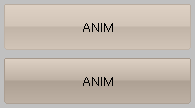 Here’s some more great news from the French developers: Snark, from the French community BlenderClan has coded in a new set of buttons for the Blender GUI.
Here are some testbuilds:
Blender’s GUI is getting eye-candy, don’t you think?


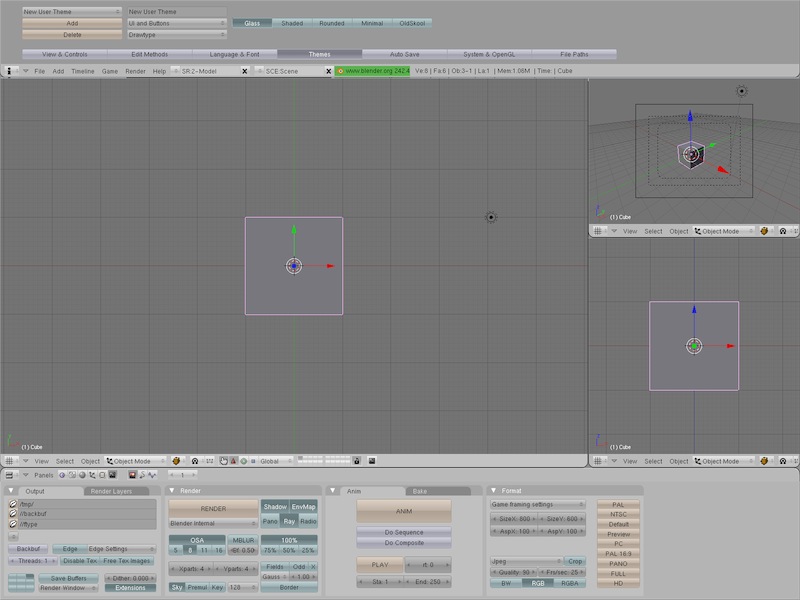

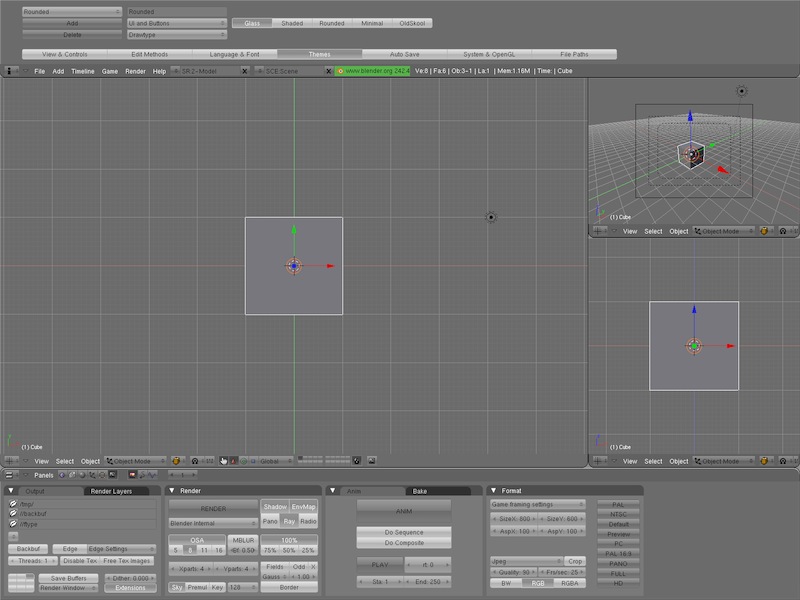
Love those screenshots – Gotta go download it now :)
Really – the interface just keeps looking and working better and better
Wow I’m liking this mod alot.
Shiny, cap’n. :)
I love it… My only problem is the buttons have no strong outline, nor can it be adjusted by The outline option in ‘UI and Buttons’, but otherwise it’s very nice…
I like it! Looks…snazzy… lol.
I’m sure I will be a lot faster on blender now.
Nice, but it crashes with 3DS Max Display Mode. Darn this interface!
Hello,
I’ve downloaded http://blary.jason.free.fr/download/blenderGlass_x86.7z
To even run this version I have to install openal and alut packages on my Ubuntu. Also additional sym was needed –> link ln -s libgettextlib-0.15.so libgettextlib-0.16.1.so
After I finally managed to run it, I don’t see nice new buttons, should I do something special to enable it? Any one tried it out?
Thanks.
.::PiPi::.
Same prob here (tried the windows build right now).
Where are the new buttons? They look interesting on the pics though …
Ah yes, works now.
I found this on the site of the build at graphicall.org:
fabry writes:
To activate the theme: User Preference Window > Themes > Add > UI & Buttons (choose from dropdown list) > Drawtype (from dropdown list) > Glass.
Looks interesting. Not sure if I will use it.
Looking pretty cool, especially in combination with the colours in the Rounded theme and Jimmac’s icon set.
I’ve got a screenshot here: http://anecdote.org.uk/media/screenshot_glass.jpg
Not sure if I’m actually going to use it, as it’s a bit distracting – like using all the ace Xgl effects in Linux whilst trying to edit a video or something!
Looks damn slick!
just downloading them
glassy lock mmmm
Beautifull & exellent little patch : it give more pleasure to work.
Here is a screenshot with my custom blue colors :
http://img376.imageshack.us/img376/8537/blenderglassbuttonscreeqb6.jpg
Sexy GUI :-) I have to test a all black GUI with…
joeri: You’re invited to my house for a race. I just got new shoes and I am soooo fast now.
Any chance that this’ll be in 2.44? :-)
— J.P.
Wow! Great job. Its like having a brand new set of themes. Excellent work. \^_^/
THIS is the type of UI improvement I like! Very nice! Now it fits with my general KDE theme!
Great mod!
any chance to download the themes as well?
…meh.
They’re out of place in the blender UI.
Where can I find Snark theme?
http://www.blendernation.com/wp-content/uploads/2007/04/glassblenderf2-1.jpg
@David Revoy–ooohhh…I really like that blue :)
Thank to all for your comments ! ^_^
@brzyy :
You can find my theme here http://blary.jason.free.fr/download/Snark_theme.py
What, no mac build? p-shaw
@fritzman: thanks! Somehow, the blendernation wasn’t accessible almost all day here, thus I couldn’t check it earlier ;)
Thanks again!
.::PiPi::.
How do you install the buttons?
@Fil: you need to install blender from the links above (depending on the OS you use). Then as fritzman wrote, you have to enable it by selecting the Drawtype to glass. You can see the settings from this image —> http://blender.blog.siol.net/files/2007/04/blender_gumbi_21.png
.::PiPi::.
I hope mac build at 2.44 :( please, it looks great.
@David: any chance you could share that nice blue theme? I like it.
.::PiPi::.
Love this glassy button look.
BTW: Anyone else lose their Tube mesh primitive in the Add menu?
For the K stuff form KDE.
We can call this compilation, KBlender o Klender.
XD
(BTW: Anyone else lose their Tube mesh primitive in the Add menu?) . . . in this patch build for Windows, I mean.
Strange . . . I couldn’t login to edit my first reply.
Message at the bottom says I’m the author of this entry. Why didn’t anyone tell me that I’m Bart?!
(BTW: Anyone else lose their Tube mesh primitive in the Add menu?) . . . Never mind. Just discovered that this build includes Cylinder primitive creation with the option to cap the ends or not. Love it!
Yes, right, no tube here as well …
Thanks PiPi and wolfmanyoda !
I decide to share my blue theme Hereva:
a preview with glass :
http://img376.imageshack.us/img376/8537/blenderglassbuttonscreeqb6.jpg
The link to download blue theme Hereva:
http://www.davidrevoy.com/tutorial.php
( Watch on the goodies section at the bottom of the page )
OMG Awesome.
This is really cool…
Can’t say I’m a huge fan… The line through the middle of the text does impact on readability, especially with lots of buttons side by side you get these repeated striated patterns across the buttons window that dominate.
Finally got it to work… For you Ubuntuists (and maybe for Linux users in general), you have to navigate to /usr/lib and type “sudo link libgettextlib-0.15.so libgettextlib-0.16.1.so” in order to use it.
Very cool! This matches the default polyester theme in Kubuntu Feisty. Oh, and the page tells me that I’m the author of this entry too. I guess I’m also Bart!
Thanks David, I’ve tried a few times to put together a nice theme but they all came out crappy.
Your theme looks great and now my Blender is smiling.
I am having really big problems. Ok when i downloaded the build for windows there was only one thing in the folder. I moved it to my blender installation folder and double clicked it. It opened up blender. I can change the style to glass but when I installing the snark theme by downloading the python script and moving it into the script folder on my blender installation directory. I opened the new blender and tried to run the script but blender keeps crashing. When I open the old blender.exe file and try to run the script it works but the glass theme isn’t there all i get is the colors. I need help please. This is a really cool theme but I can’t get it to work.
Sorry for double posting but it wouldn’t let me edit my post…..I fixed the problem though.
This is a great new addition to Blender’s otherwise-a-bit-bland GUI. I am still hoping that someday someone will code in some Aqua-style buttons, though.
I keep getting a pop up in Windows:
The ordinal 33 could not be located in the dynamic link library zlib.dll
Any suggestions?
Good one to make permanent in the next release!
Hey David still working on that car xD
Craines28761, I had the same issue with the Snark colors Python script (Blender crashing on Windows OS). How did you fix it???
its not really something thats necessary but i think it makes blender look a bit more proffessional for sure. It’s nice when you’re doing the same thing for hours and hours to have the program look good.
I’ve dowloaded the glass-patched Windows exe from graphicall.org and the Window.Theme.Get() command crashes the blender.
Try this simple script:
#!BPY
“”” Registration info for Blender menus:
Name: ‘Material Works test’
Blender: 241
Group: ‘Materials’
Tooltip: ”
“””
import Blender
from Blender import *
themes = Window.Theme.Get()
Thanks so much PiPi and Frizman!! :)
Yes, bruxy, you’re right.
That’s another bug …
It’s a shame, the new buttons are very nice, but it seems the build brings some problems … :(
Looks good. I hope that this gets included into the main branch.
Yes, the build has some problems with Python, but I’ve only seen them on the Windows version. However, on the Linux version, it seems to handle Python even better. When a script has an error, it doesn’t exit the script! It just says theres an error and that it may not work correctly. I find that very usefull so that I don’t have to go back and press Alt+P or go through menus to find a script.
Do they affect performance? Is there any way that could be hacked into a standard UI plugin?
Hey, It looks like the python issue in the Windows build is inherited from the CVS. I’ve done another build with another CVS and it seems to work…
http://blender.chaloupkovi.cz/builds.html
(Sorry, only Windows SSE2 build)
Hey Bruxy!
thanks for the patch, it works really fine here!
Now if only there were rounded + glass buttons… that’s what I’d love to see, myself. Unfortunately, I don’t yet know enough to contribute anything to such a project…