
Audio Analysis Script, With Tutorial

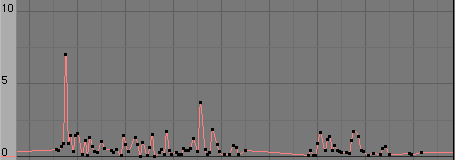 Dave Jarvis has released version 1.0.0 of his Audio Analysis script. This script will read a .wav file and map the amplitude to several types of IPO curves. It’s a great tool for synchronising certain effects (like thunder and lighting, explosions etc) in your animation with the audio.
When I tried the script the Analysis step didn’t seem to work 100% – it spits out some errors and then aborts. I have a feeling that it’s due to the type of .wav files that I tried to process.If I may suggest some improvements, it would be cool to add spectrum analysis options so that you could use certain frequency ranges to drive certain parts of your animation (like using the bass for one part and the high tones for others). I also found that entering the .wav filename by hand was a bit cumbersome. Maybe there’s a way to use Blender’s file select window for this?
Note: If you’re a Mac user, use the following command to move stuff into your Blender scripts directory:
cd
mv * /Applications/Blender/Blender.app/Contents/MacOS/.blender/scripts/



Now, this could be used to make mancandy cringe in pain when the music gets too loud! THAT would be cool. :D
You might want to take a look at http://www.blender.org/documentation/243PythonDoc/Window-module.html#FileSelector to fix that file selection problem of yours.
hmm, i can’t get it to run, i get this: “ImportError: no module named wave”
@Dave: NOW you’re talking! :)
W00t !
Pynodes !
I was a little worried it wouldn’t end up in the official release,
hey ! hang on. What’s the status of Jahka’s particle patch now ?
No mention of it in the roadmap.
hmpf.
is there any way to make a wave form into an animated texture or better yet, make an animated curve?
thanks i was struggling with it
:O Awesommmmeeee. This is the next best thing to having midi-controller support.
This is one of the few audio tutorials/devices that I have
run across, during my study of The Blender 3D audio-visual
experience. Are there any more?
Hi, folks.
Thanks for your comments. I have updated the tool; made it simpler to load files, and changed the default values to show results on any compatible wav file.
I don’t know of any other tool to do audio analysis. However, if you look for it, there is a lip synch tool — I don’t know what state it is in.
Dave
this i like
I have done a test with Dave’s BAA script myself and posted the results up here…
http://blog.global6.net/julesd/index.php?/archives/95-Blender-Audio-Analysis.html
Thanks Dave, Genius work!
J
Quote: “If I may suggest some improvements, it would be cool to add spectrum analysis options so that you could use certain frequency ranges to drive certain parts of your animation (like using the bass for one part and the high tones for others).”
This indeed would be cool, but requires a lot more complex coding than simple level treshold triggering that it has now. The coder would need to implement some form of Fast Fourier Transform algorithm to analyze the spectrum. And it would be a task to do with Python (or any other programming language for that matter). A neat side product for that would be to have the code for equalizing audio almost there as well.
Nowadays, Blender’s audio capabilities are modest to say the least. I don’t know if there is even a need to improve them drastically (apart from the fact there is a group of Blenderheads out there who would like to have Blender as their do-it-all application).
If it will be the way things should go, I’d strongly suggest implementing something that supports the existing standards for audio. Namely Midi, Direct-X, ASIO and ReWire to name a few. That way we all could have professional quality audio tools available as plugins if we need them.
And the new glory days of Blender as audio sequencer. =)
All that said, I’m ok doing my music and sound editing the way I do it now.
It is strange, but when I try this script, it gives me “unknown Format” with 2 different numbers.
On the first wav file it gives the number 2, but on the second, it gives the number 85. It are two different wav files. I don’t know if there is anything I can do about that? The files are saved in C:\Blender (my Blender directory :). I use Windows XP. Is there anybody else having this problem? I tried it on another wav file, but that worked good :S…
Thanks in advance….
Quote: “If I may suggest some improvements, it would be cool to add spectrum analysis options so that you could use certain frequency ranges to drive certain parts of your animation (like using the bass for one part and the high tones for others).”
Probably the way around this is to use an audio app to make various copies of your sound file with various frequency ranges cut out or included.
Quote : Joat
If it will be the way things should go, I’d strongly suggest implementing something that supports the existing standards for audio. Namely Midi, Direct-X, ASIO and ReWire to name a few. That way we all could have professional quality audio tools available as plugins if we need them.
its a bit above blender to be using midi direct-x etc for the use of creating music… Blender is an animation tool, so the use of audio should be limited to assisting animation. implimenting audio reative animation like this script, or midi reactive animation is a better scope for blenders audio tools.
i havent had a chance to try out the script yet, i tried something similar to this a while ago, so im quite interested in it.
cheers
I tried in 4 blenders, one on linux and three on windows, but it doesn’t run…It appears in misc option, but show an error when selected -> Python script error: check console
Lucio, what does the console say?
you will need a full python install for it to work.
Hi,
Let me address some of the comments made.
1. FFT. The main reason I created the tool was to get a reasonably realistic Thunder/Lightning curve. I know there is interest in doing IPO curves based on frequency; I will have to learn how the FFT API works. There is a lot more needed for the tool to be really functional.
2. File Formats. If I’m not mistaken, just about every file format can be converted into an uncompressed, lossless WAV file. It strikes me that a simple solution would be to convert the audio files into WAV format in advance.
3. Creating Music. Not with this tool. ;-) Its purpose is to analyse, not create. Many music creating tools already exist.
4. Error Messages. As another person mentioned, you do need the latest version of Python and Blender. I’m not sure about the types of WAV files that can be analysed; all that I have tried have worked for me. If someone can post a non-working WAV file, I will investigate further.
There are a few features I would like to add to the tool: frequency analysis and isolating frequencies/amplitude using an interactive view of the waveform. Of course, if someone would like to help … :-)
Hi, Levon and Dave.
Where can I get full python installer? python.org? I installed it now, but the problem remain.
The console says:
Traceback (most recent call last):
File “”, line 43, in ?
File “C:\Program Files\Blender Foundation\Blender\.blender\scripts\AudioAnalysis.py”, line 1, in?
import sys, wave, audioop
ImportError: No module named wave
Hi,
If the wave module is not part of your Blender installation, you will probably have to recompile Blender … or find a version of Blender that has it built in. You may have some luck here: http://www.blenderbuilds.com/
I compiled my own version.
I think I’m not able to know if my blender has a wave module
(I know only that I get to load wav files in sequence and play it).
I use the last releases of blender.org download page, and think that I’m not
able to recompile Blender yet…I think I can wait for these versions
to accept AudioAnalysis Script. Thank you very much!
Lucio, the Wave modual is a python libary, so i think you might not have your python installed correctly. check the python 101 thread on blenderartists
Hey all I’m excited to get this tool to work but have come across a snafu! I’m running blender-2.43-linux-glibc232-py24-i386 on, fc5 downloaded from blender.org and python is as follows…
# python
Python 2.4.4 (#1, Apr 10 2007, 20:48:31)
[GCC 4.1.1 20070105 (Red Hat 4.1.1-51)] on linux2
I can get other scripts to work but when I attempt to run the AudioAnalysis Script I get the following error from console.
# ./blender
guessing ‘./blender’ == ‘/opt/blender-2.43-linux-glibc232-py24-i386/./blender’
Compiled with Python version 2.4.
Checking for installed Python… got it!
Traceback (most recent call last):
File “”, line 44, in ?
File “/opt/blender-2.43-linux-glibc232-py24-i386/.blender/scripts/IpoPlotter.py”, line 1, in ?
import sys, random, string, Blender
File “/usr/lib/python2.4/random.py”, line 68, in ?
import _random
ImportError: /usr/lib/python2.4/lib-dynload/_randommodule.so: undefined symbol: _PyArg_NoKeywords
Oddly it doesn’t mention the AudioAnalysis script but rather the IpoPlotter.py ??? If I have to compile Blender with gcc-4 can anybody suggest a good site to d/l from and/or any hints I’m still a noob with Linux :D
And finally, when I enter “ldd blender”, it spits this out…
linux-gate.so.1 => (0x00e91000)
libjpeg.so.62 => /usr/lib/libjpeg.so.62 (0x4c070000)
libz.so.1 => /usr/lib/libz.so.1 (0x4b5f6000)
libSDL-1.2.so.0 => /usr/lib/libSDL-1.2.so.0 (0x4c888000)
libpthread.so.0 => /lib/libpthread.so.0 (0x4b897000)
libGL.so.1 => /usr/lib/libGL.so.1 (0x419e7000)
libGLU.so.1 => /usr/lib/libGLU.so.1 (0x41a88000)
libX11.so.6 => /usr/lib/libX11.so.6 (0x4b6ac000)
libXi.so.6 => /usr/lib/libXi.so.6 (0x4b9ad000)
libutil.so.1 => /lib/libutil.so.1 (0x4c452000)
libc.so.6 => /lib/libc.so.6 (0x4b494000)
libm.so.6 => /lib/libm.so.6 (0x4b5c9000)
libdl.so.2 => /lib/libdl.so.2 (0x4b5f0000)
libstdc++.so.5 => /usr/lib/libstdc++.so.5 (0x006da000)
libgcc_s.so.1 => /lib/libgcc_s.so.1 (0x4c094000)
libXext.so.6 => /usr/lib/libXext.so.6 (0x4b7ec000)
/lib/ld-linux.so.2 (0x4b477000)
libGLcore.so.1 => /usr/lib/libGLcore.so.1 (0x41000000)
libnvidia-tls.so.1 => /usr/lib/tls/libnvidia-tls.so.1 (0x419e3000)
libstdc++.so.6 => /usr/lib/libstdc++.so.6 (0x4c1f7000)
libXau.so.6 => /usr/lib/libXau.so.6 (0x4b60b000)
libXdmcp.so.6 => /usr/lib/libXdmcp.so.6 (0x4b610000)
Great Script!… Joat – audicity can be used to generate various files for spectrum specific purposes. Dave – I have found no where that really talks about frame rate and time sync. I have had a few issues getting the animation to sync with the audio. How does the script interpret frame rates and time in blender?
I’m in the same situation as entplex – I would like to use this script to create some ScaleZ object ipos to create a basic Bars-like visualization with Blender, but have no ideas how I would accurately sync the audio with the ipos that are being created. Does anyone know how to do this?
Late to the party, but I was getting that wave module couldn’t load error on the console. Fixed by copying C:\Python26\Lib\wave.py over into the blender scripts area where the analisis scripts reside. Then restarting Blender. Not 100% sure if that was it or not, but it works now even if I remove the wave.py file out of that folder a wave.pvc file shows up, delete and it shows back up again. Anywho, time to see if anything else doesn’t work on it now.
how to save it