
Animation ‘Onion’ Script

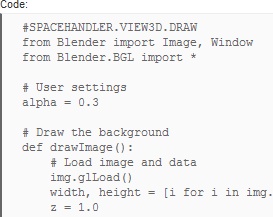 Similar to the ghosting feature found with Armatures, this script makes several ghosted layers of an animation. Its explained best as ‘a method to have some sort of ghost image of an animation at keyframes defined by the user’
There is a video demonstration on Vimeo here, which shows the basic usage of the script (click image below)
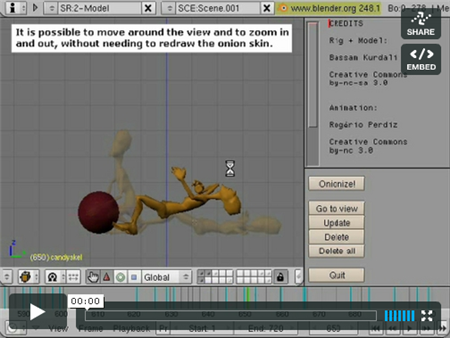
(Note that onion skinning has been sped up since this video was made)
Theres 2 scripts to download, and instructions on their usage can be found below.
Script 1 – GUI
Script 2 – Spacehandler
Instructions (by Bart Crouch on BA):
“1 – go to python text-editor
2 – text –> open –> # select the spacehandler script on your harddisk
3 – text –> open –> # select the gui script on your harddisk
4 – go to the 3d view and press CTRL+UParrow (to enlarge the window)
5 – View –> Space Handlers Script –> Draw: onionskin_spacehandle
6 – CTRL+DOWNarrow (to get the window back to its normal size)
7 – go to the text editor and press ALT+P
Steps 4 and 6 are only necessary to be able to see the option in step 3, because it often happens that it falls off screen otherwise.”
You can see the small thread on Blenderartists.org, which follows the development of the script, with pictures, video, instructions and the scripts for download. Plus you can leave comments and ask any questions.

Such an amazing and useful script. It’s not the fastest, but it gets the job done and fills a gap in my animation workflow. I suggest adding it to your arsenal if you animate at all. Thanks Bart Crouch for the excellent work.
Thanks! This could be added to 2.5, by default, would be cool!
Very neat script. Similar feature to what a lot of us stop-motion animators use.
– Leo
yeah this is a nice addition, i rember having that in the disney animation studio progam for the amiga was such a handy feature, does anybody know if that program ever got caried over to windos?
Could you have it update automatically, like auto record? That’d probably take full integration. And by probably I mean definitely. Perhaps you should work with the ghosting abilities and add on to them, ghosting a model and making “pinned” ghosts of certain frames. That would actually sound like more work, but I bet the end result would be worth it. Maybe a number to insert how many ghosts you want to see, every 5 frames or so and have it figured automatically instead of clicking onionize! (even though it feels fun to say…)
That looks great!
But it would be even much more useful if you could change the view angle without updating every time. Because if you are fiddling with a certain pose between two onionframes on some little detail it would be very restricting to just be able to work on it viewing from one angle.
I hope it also makes it into Blender by default, seems very useful to me.
MD
Awesome work! I never thought that could be done by scripts.
Hi, I’m also very surprised of what can be done with Python. As I’m not a programmer at all, it looks like magics !
Congratulations and a big thank you to Bart Crouch for this awesome feature !
Amazing ang useful script! Good work!
this script might add on the next version of Blender.
Thanks all for the nice words and I’m glad you’re finding this little script useful.
Icono: Making things automatic would need a huge improvement in the speed of the script, or it wouldn’t be workable. The bad news is that in the Python implementation I can’t make it faster (there is a very time-consuming step when the script needs to create a blender image, pixel by pixel) and I don’t have a clue when it comes to Blender’s source code.
MD: Not needing to update when you change the view angle would indeed be very nice, but is impossible in the way it’s currently implemented. What the script basically does is that it takes a screenshot and displays it on top of the 3D-view. When you zoom or move the view, it can simply move or zoom the screenshot as well, but when you change the view angle the illusion breaks.
To all who’d like to see this included in Blender itself (instead of a script), I agree it would be a nice addition. Unfortunately I can’t code in C and I’m not familiar with the Blender source, so somebody else will have to do it.
Thanks again for all the nice comments,
Bart
Pure awesomeness!
Very good
that’s sooooo cool!
my only gripe with this is that updating the onion skin is slow, and that you can’t rotate the view and still view the onion skin
ghost frames in blender can be seen while rotating the view, the only problem is ghost frames display the frames around the current one, not a user-defined frame number. so a little tweaking in the engine might get Bart Crouch’s idea integrated much more smoothly
Nice, but an old hat!
I wonder why Blender has no new things that no one else has!
Always some kind of copying.
And I am a little sad about that!!
You must be kidding me, blender does have unique and innovative features for rigging that i have not seen in other software.
anomalous_underdog: Blender’s default way to display ghostframes is around the current frame, but it also has an option to display ghostframes on keyframes. Not ideal, but it might help you. (you can find it in the visualisations tab in the edit buttons window)
@Loolarge: be honest, you didn’t really work with other software, did you?!
JohnnyB, i have worked a few years with Maya and XSI in production before and only started blender a few months ago. I guess you are simply not as enthusiastic about blender as i am. What new features do you have in mind?
Are blender Good or No ?
i have Cinema4D.