

Getting Point Clouds into Blender

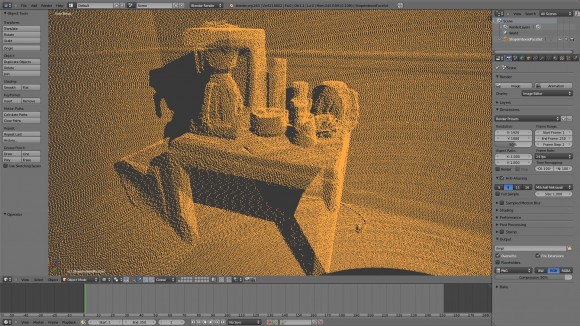
Christian Storay describes the process of point cloud reduction after 3D scanning an object. Even if you don’t have a scanner (which I assume most of you don’t), it’s interesting to see how he worked around the issue of working with huge datasets.
Christian writes:I have created a method and a corresponding instructional video demonstrating how to get point clouds generated by the Faro LiDAR scanner into Blender. This method does not rely on any unsupported plugins that may break later, and it is likely to work with Leica scanners as well. However, it uses a very simple program that is Windows only – but it is so simple anyone could make something in its place for other platforms.
Point clouds are very dense and typically have a very large file size. Even at the lowest setting, your scanner is likely to produce enough data to overwhelm even the 64bit version of Blender. What’s needed after scanning your environment is a way to reduce the amount of data in the scan without losing so much data that the scan itself has become useless. The software provided by Faro does not offer that capability at this time. So what I had to do was make a very simple text line removing program that is intended to run on the very simple ASCII XYZ format. Every line in an XYZ file represents a three dimensional point. So if you need to have this solution on something other than Windows, simply make a program that can delete lines in a proportionally-even manner. My program asks for a percentage the user desires to keep out of the total data of the original file.
You can download the XYZ Point Reducer program from my website.
After that, all you need to do is import the XYZ into MeshLab, then export to the venerable VRML format (WRL).
The instructional video uses annotations in place of audio, so be sure to turn that on if you’ve turned it off in the past. You can watch it here:
I was thinking about workflow and it occurred to me that it may not be all that terribly useful unless you borrowed the scanner but still somehow don’t have enough money for Revit. If you have Revit, you’re going to want to model the scene in that, then import it into Blender for the small details and better rendering controls.
In my case, I work for a business that has one, and I was asked to be more thoughtful about my software choices, the time I was spending on it, and etc. We’re very new to the technology, so I have room to mess around with it to get more familiar, however it’s plain as day that I should have been using Revit, then maybe finish it up in Blender or Max if I chose to take it that far. This method might be useful for exact positioning of the picture frames, small things, and furniture should one decide to model that in Blender. But it’s not really necessary.




I don’t use point-cloud data, but it’s interesting technology to see nonetheless.
What you usually need to do with point clouds is step through the data and replace the points with simple geometry. Good filtering software will try to detect simple geometric shapes in the data before importing into your application and do that substitution for you.
For those who want to work with pointclouds but don’t have immediate access to a Faro, Riegl, Velodyne, … scanner you can use BlenSor (www.blensor.org) to simulate the data.
It can write PCD files which is also text (and line) based, so the above mentioned technique should work too if you make sure the few lines of the file header remain intact.
Thanks for the replies. A little update: You probably don’t need my “point reducing” program. There is a setting in Faro’s Scene software where you can filter out points via “rows and columns”. I’m not sure how this works yet, but I’ll post a new video when I can.
The ‘rows and columns’ bit basically does what you’ve done: takes every nth point and exports it. If you set it to 1, 1 then it will export the full rez scan.
I wrote a simple .xyz imported for Blender but can’t find documentation of Faro’s binary .xyz format which would be useful as it cuts down on the file size a fair bit.
Would love to see better performance and point cloud management within Blender!