

Alien Invasion 2

Beniamino Della Torre is back with the second part of his epic ‘Alien Invasion’ trailer! Read on to learn more about him and his project.

Can you tell us a little bit about yourself? What is your background?
Ok, I’m 37 years old and I live in Fossano, a small town in Italy. I work in graphic and advertising by myself, in a little studio, with my wife and 2 friends. Some year ago I started using Blender for a typography experiment (you can see it here) and after this I’m using Blender more and more, for various purposes. But two years ago, I started a challenge with myself: I wanted to simulate an alien invasion with starship and aerial fight and explosions as real as possible, using only Blender.
Now you should know that I can’t model a glass… I’m not able in modeling at all, and so in texturing, rigging, animating. Two years ago I didn’t even know how to start my experiment, because VFX and CGI were new words for me. But luckly, on YouTube you can find whatever you look for, expecially if it is inherent the open source world. So, I began watching tons of reels and following tutorials, learning each days something new. Frustration was always with me, because learning Blender is very hard… but I never gave up! And in this way I’ve learnt about different techniques: camera tracking, camera mapping, panoramas stitching, lighting and, at the end, Blender nodes (The result of my first efforts is this first trailer).
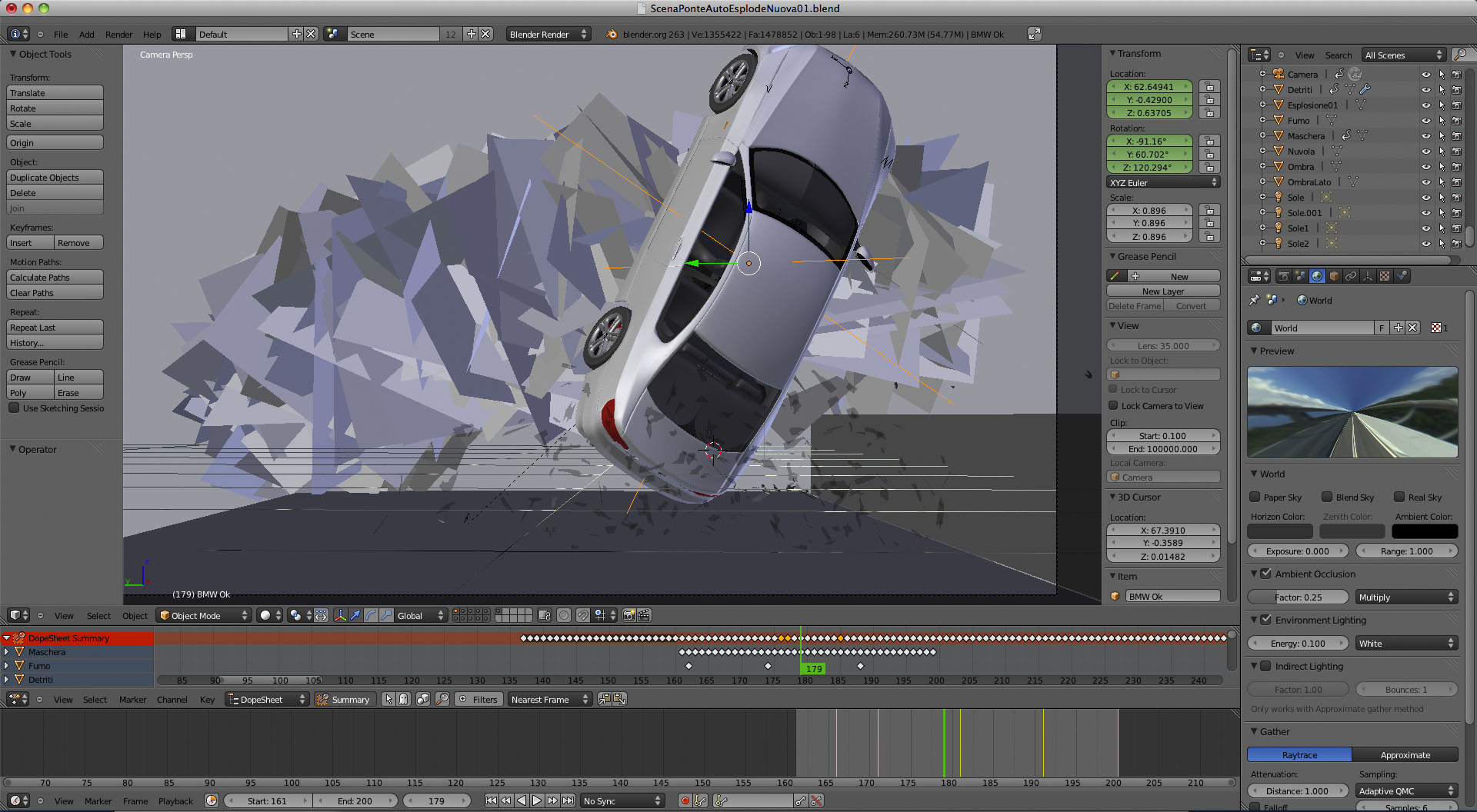
What are your plans for ‘Alien Invasion’? Is it an exercise in animation or do you plan to make a longer movie?
Sincerely I have no money and no time to work more on this project. Here, I mean in my country, there’s no the movie culture you can find in Los Angeles, so the skills I’ve reached don’t help me earning much money. I’m thinking about a short movie, but not about aliens and without all that CGI.
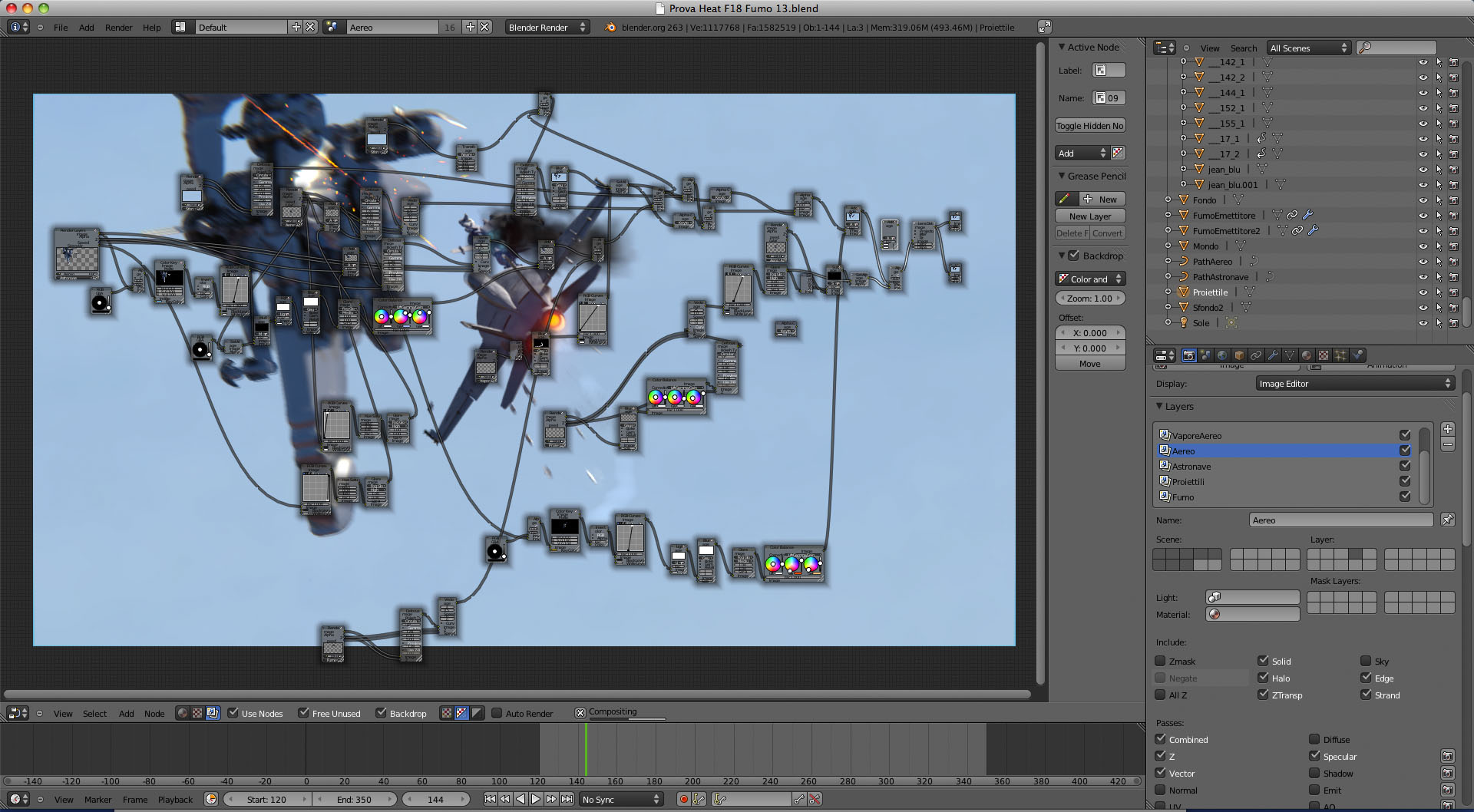
Can you tell us about your production pipeline? Which tools to you use?
As you can understand, my tools are very low budget. I use a Panasonic HDC-X800 camera at 1920×1080 (unfortunately this camera works only in 50p, so I have to process all footage in Apple Compressor, to bring it at 1280×720 25p). I chose to work in 720p just to have a faster rendering time. I use an iMac i5 2.5 Ghz with 4 Gb RAM.
As I am a self-taught person my way to work can be considered wrong by someone. But now I’ll try to explain how I work: all the scene is worked inside Blender, and I use essentially three different techniques:
- Real video footage mixed with CGI. In this case I use the Blender motion tracker (instead of Icarus, that is too old). The only important thing is to create the tracking point manually. It took me about 6 hours to track the highway scene manually, because the tracker lost every point! Then I light the scene balancing one Lamp (Point lamp, because I really don’t like the Sun. So I use a Point modifying the falloff curve as a horizontal line) with ambient occlusion (I use a very low occlusion value, just to bring up the shadows subjects). After this, the work is all done moving object on layers and working a lot with nodes (mixing every original video frame with CGI).
- Fake world created by a panorama stitched with the open source Hugin and mapped on a sphere. In this case I don’t have to synch the action to a pre-existent camera movement, so it’s everything easier. I can compose the scene and then simulate the movement of the camera as I like. Then I work on layers and with nodes again.
- Camera mapped world: I re-create the 3D world using low poly polygons and mapping them with sticky UV based on the camera position. This situation is quite similar the preceding, with a little but important difference: In the fake world inside the sphere you can only rotate the camera, that must be in the centre of the sphere, while in the camera mapped world you can also make little traslation of the camera in the space.
In all cases, after a long tweak phase, i proceed rendering frame by frame in PNG RGB format, before merging every frame into a sequence with Quicktime or other applications (even Blender can do it).
For the lens flares effect you can see, I used a plugin called mflare for Apple Motion. There’s a script I found on BlenderArtists that helps you bring your Blender 3D asset in Apple Motion, so you can generate 3D flares synchronized with your scene.
In the end, I edit all the scenes in Apple Final Cut, just because I’m familiar with it. Here I do some color correction too, if necessary.
This time, I’ve tried a new experiment: editing while composing the music track (I’d love to compose music, 15 years ago) in Apple Logic. In this way you can reach a very good result.
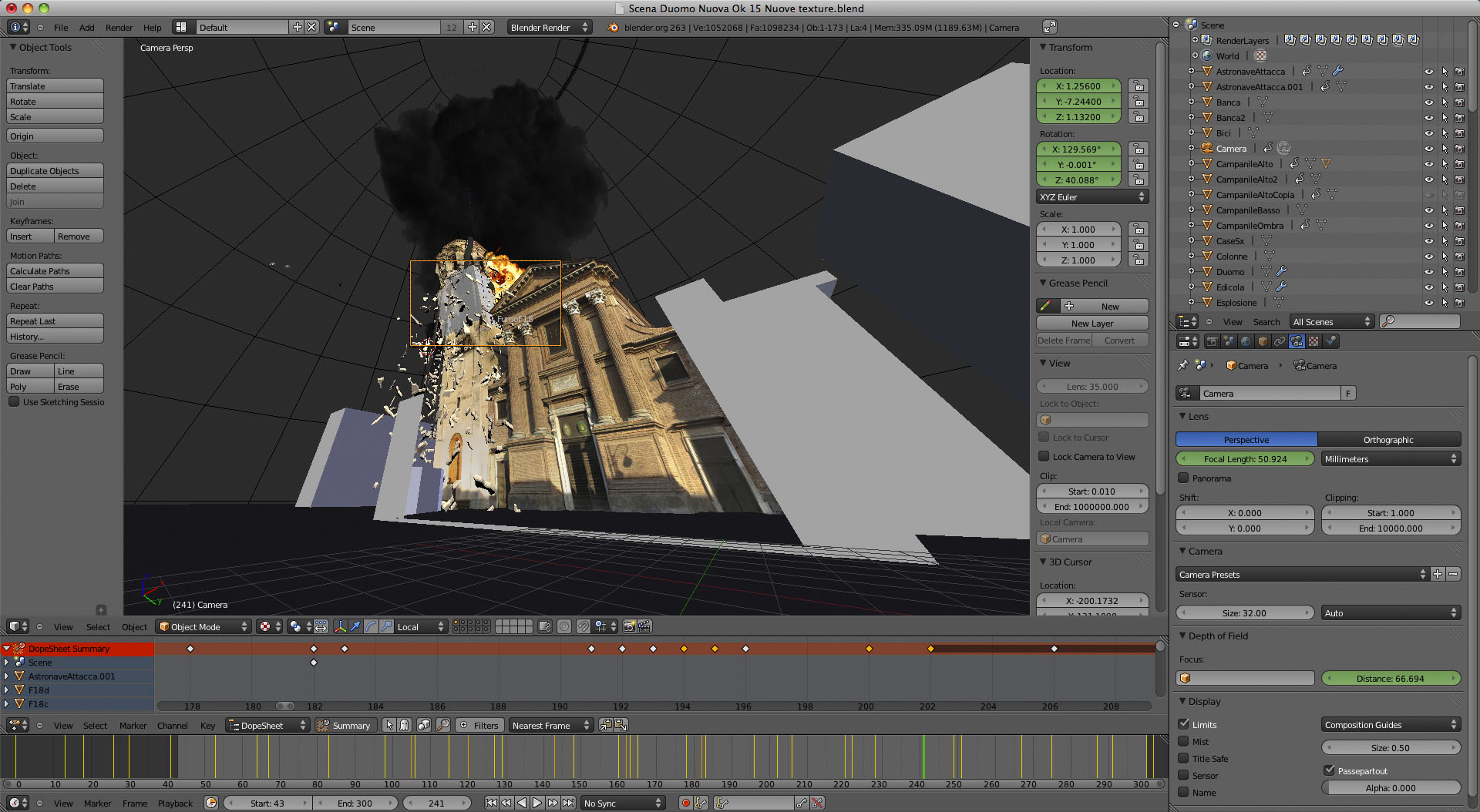
Can you some Blender screenshots or images of spaceship models?
Abut he models, I’m really not able to model… it should sound like a pradox, bit it’s real. In the credits I mention Pinarci for the ships models and Mike Pan for the BMW.
PS: I should tell tons of things more… but time is short, so I make a short list of what is passing now through my head:
- I’ve never used game engine for this scenes
- no bullet physic, only particles physic
- all the explosions are video textures with alpha channel on planes (they are from video copilot action essentials)
Anything else?
I’d like to talk about a very important thing. Blender is an open source application, so everybody can use it without spending money. Nobody is getting reach programming and selling Blender, because the open source world offers a new vision of a possible better future world in which there’s less money profit and more human equality. I’m glad to everybody involved in Blender for the opportunity it gave me, because I think that without Blender I’ll never get near the 3D VFX and CGI world. And I’ll also like to thanks people like you, like the one on Blendernation, Blenderartists, and other Blender sites that give for free their knowledge to everybody!
Thanks Beniamino!
Links

Coolness, man! Nice story! And man, that work’s pretty good for someone who didn’t even know what VFX and CGI were two years ago! The great things that the freedom of Blender and the power of the Internet make possible!
Thank you, now I need some holyday!
Epic! Great job ppl!
hey that is cooler than cool (subzero cool).
in some cases the physic doesn’t look correct to me…
e.g: if a the jet flying and is hit, it will not “stop” as much in the air and fall down in this way – or the camera position need a better position. in the fight, the fighters should move more ballistic – remember, every body has its mass – my too… :P
Thank you, you’re completely right! I’ve had a lot of troubles with that scene, and my conclusion is just like you said!
About physics: you’re right generally… but sometimes (and it’s not seldom) fighters spread out in air. It happens in cases of heavy damage. (almost) Any modern flying vehicle is “hard framed”. The plane contains of different force elements. The main are longitudinal and transverse. They’re assembled in so called “force construction”. It’s a “skeleton” of any vehicle.
Being damaged in flight such a construction can get a rotative moment. Plus don’t forget about air-dynamic forces which are VERY high with this speed and that the plane is very light (relative to these forces). After a heavy damage any plane or helicopter can get an unwanted air-dynamic torque also. So a plane can fall down almost like a leaf (only visually of course), like a cannon ball (that you expected as I got), get some really crazy zig-zag trajectory or fall apart like a firework. All depends on a case.
Camera-shake OVERKILL!!! Fantastic and painstaking work utterly ruined :(
Handheld cameras tend to shake somewhat… ESPECIALLY when you’re in the middle of a war or an alien invasion.
Yes, i thought my camera was shaking like the Ridley Scott ones in Black Hawk Down under the flying bullets! :-)
really cool vid. Like the Audio as well. well done.
Respect! This is really impressive considering that you’re self taught! Great job!
@Beniamino, it’s a great movie especially thinking about you made it alone. A lot of work! The music is cool and very well fused with video.
Looks amazing, was fun to watch, amazing work!
Grazie for the vid! Your story just make me get back to my work with Blender, and keep learning as much as I can. Buona Fortuna!
Hey,
Don´t be so modest. You´ve done a real good job there. Congrats!
By the way, I share your point of view about Blender and open source as well.
Thank you, the future of the world depends also on our points of view!!!
lavoro meraviglioso! attenzione a rendere bene le manovre degli aerei con i movimenti dei timoni e dei flap delle ali, non so se ho visto bene, ma mi pare che non siano molto evidenti
great work indeed!
Grazie del suggerimento… ho mosso i flap delle ali, ma non sapevo bene con quale inclinazione gestirli, e non sono andato oltre i 20°. Mentre per quelli di coda, il modello non li aveva, e le mie skill nella modellazione sono meno di zero!!!
–
I’ve moved the wings flaps, but I didn’t know the real way to do it, so I’ve just rotated them of 20° max. The model didn’t had the rear flaps, so they are static (’cause I didn’t have time to learn how to model them). Thanks!!!
Very VERY nice work indeed!! Can’t wait to see more from you!
That’s what Blender is all about. Great job Beniamino!
Great Video. Lots of action and Excitement!At: 1:32 to 1:36 in Video, how did you make the building crumble like that? Was it modelled in Blender and did you use Fracture Modifier or Physics etc. Please explain!
Thank you. In the scene you like I’ve just used 3 particles generator, generated from 3 different cubes hidden in the bell tower. Then I’ve used an explode modifier + a solidify modifier + a bevel modifier, to create the rock debris. In this way I’ve used the particles physic instead of the game engine (that I hate)! The bell tower then in divided in two different solid that I’ve moved manually, using keyframes. I hope my english is comprehensible?!
One thing more: I didn’t used fracture plugin because the bel tower had too much faces, and I didn’t wanted the game engine too!
I gotta say , one , fantastic piece of fine action you got . I love it.
If you need a clean up job done , for the sake of the beautiful city and all fellow human beings there , you can count me in .
Thank you Mehmet. Without your fantastic spaceship models, this trailer couldn’t exist, really!!!
How did you get the “night vision” effect? very nice.
The night vision is made with nodes. It’s quite easy. Here I’ve uploaded you a jpeg.
You can see a red dot under the three important nodes!
http://www.dellatorrerivoira.com/upload/node.jpg
Amazing… Beautiful… I never thought that something like this would be reachable with Blender and without and huge team… but your result and hard work thought me one better… Very inspiring! I think I should continue to write my own Sci-Fi novel :)
What can i say but awesome. I want more!
veramente e fatta benissima, vi lascio un altro filmato che si asomiglia, mi sembra non e fatta in blender, pero communque e bella! http://www.youtube.com/watch?v=-dadPWhEhVk
Great Work. You’ve come a long way in two years.
Beautifully done! My only complaint is that some of the explosions don’t fit in quite right, especially the one that flips the car. (Not reflected in the car, maybe?)
You’re right… this is a mistake… I wanted to reduce the render time and the nodes pipeline.
Why not make it a professional DVD tutorial and earn money ? iam sure most of us would buy it! good work man! i can feel the passion :)
Complimenti ed auguri, Beniamino! E grazie anche della bella intervista. Con gente come te c’è speranza per questa Italia.
My compliments, Beniamino, and I wish you best! I feel grateful for the nice text, too. Italy has hope with people like you.
Grazie mille, questo commento mi era sfuggito, ma mi lusinga!
Thank you, I see your comment right now, and I’m so grateful!
HD Cameras with bad reception!
Touchè! I know this kind of distortion is now not real, but it’s evocative, and I think reaches the point.
Beautifully done for a one-man team! Yes, there are a few glitches, but your trailer clearly conveys a sense of excitement and thrill. You got real talent! Maybe you can do some short films (less than 5 minutes) or some fake tv adverts, so you can further experiment with CG and really become pro (in the sense of earning money from it).
In the next 2/3 days I’ll upload the CGI scenes I’ve got on my hard disk, without the editing. So you’ll see more details about their features!
Awesome work! I am like you, new to all this 3D tech and to Blender, so I am inspired to do better art for my self-published book covers. I didn’t spot any glitches, though I learned a lot through the comments and your answers. As just a viewer, I found the trailer very exciting and I didn’t want to miss a moment! Looking forward to more of your work! Thanks much!
Thank you… I’m not sure I’ve understood! Are you going to publish some book?
I wish to be 46, in 20 years… I can’t even imagine what I will create then with Blender.