
Blender Add-On: Selection Sets Version 0.2

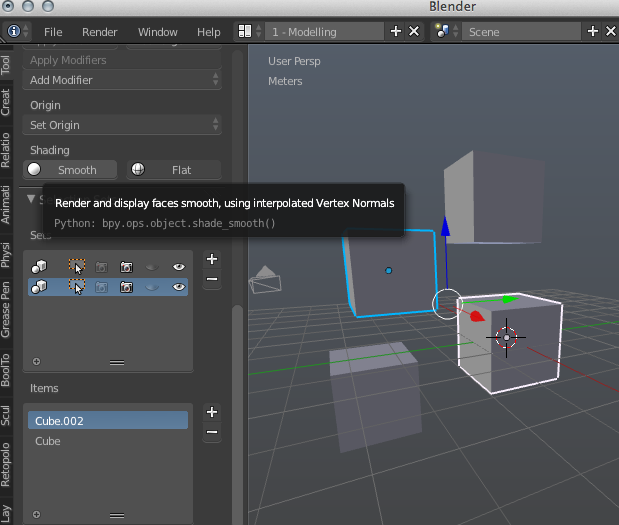
This new add-on by Johnny Matthews stores selections of objects, making it super easy to restore them later.
It’s been a while since I’ve created a blender add-on, but some discussion on the #blendercoders channel prompted me to dig back into Python and create this: Selection Sets.
It is a quick way to create ad-hoc groups of items that can be reselected easily. Simply select some items and choose the plus button to add a new set. The items in the set are then displayed below.
Click the Cursor select button to select the objects in the selected group. To add more items to a group, select the group, then select more objects, then click the + in the lower list. You can also remove objects from a group in the lower list. This is a very early release (hence version 0.1) but I feel like it is already useful when Blender groups are too heavy handed.




It would be great if Johnny (or any one) could explain exactly how Selection Sets differ from Blender groups? When I first moved from CorelDraw to Blender, I automatically hit Ctrl+G and grouped my objects in Blender… but found they didn’t ‘stick’ together at all… discovered that Parenting was what I really wanted… and never used groups again.
its a “simple” gui based grouping (1 button adding to active group) and the possibility to use groups+ungrouped without needing a 2nd outliner.
They are a bit “lighter weight” than groups and for a few simple function like hide/unhide, render/no render, hopefully a little faster to use. I plan on adding a button that would let you convert a set to a group.
I like the idea a lot. a few suggestions that could improve it:
1) remove two eye icons and camera icons – make it work just like in outliner (one icon which is changing and showing the actual state)
2) add a deselect button next to selection button
Hope you find these suggestions useful :)
Cheers!