

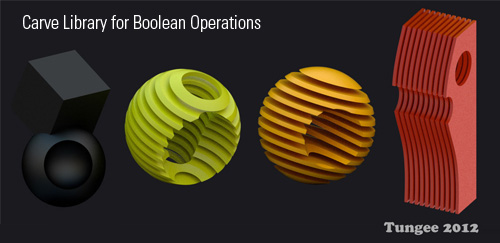
All product designers and architects will love this one. The new Carve library finally is making its way into trunk and bringing to us much faster boolean operations. Now interactive cut section animation and non-destructive modeling are doable in Blender. The code is very stable, does not crash as much as the current boolean code and is very fast.
The material system is now also supporting a boolean material. To do this the boolean material (pink) has to be added as a second material to the monkey. As you can see this works during render time as well as shaded view.
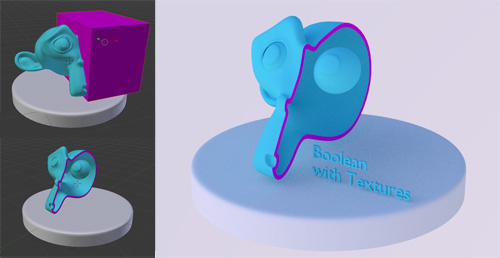
To learn more about it, I uploaded a test file here: http://www.pasteall.org/blend/11296
There are plenty of builds for OS X and Windows now available at www.GraphicAll.org.
35 Comments
Thank you !! I will try it.
The link to http://www.graphicall.org/ is broken. :)
it's because he forgot the http:// so browsers automatically parse it as a link on blendernation :P
yep my fault - I need to put that http:// in - will do that now.
that now links to pasteall :)
Yes! Great work - thank you....
Cool stuff, this will be very helpful
Linux builds? Some one? Any body?
It’s somewhat easier to do your own builds on Linux than on other platforms. On Debian derivatives (e.g. Ubuntu, Mint), a simple “apt-get build-dep blender” ensures that you have all the necessary dependencies to do the build.
Architect jumping with joy, thanks!! :)
EXCELLENT!!!!!!! :D
Great!! Cant wait!!
Thanks, Devs! These news are great!
^____^
Awesome :D
The new booleans are great. The only problem is that the calculations are a bit slow. I only wish that there had been a function included so that when one tries to move, rotate or scale one of the objects involved in the modifier that the calculation update be temporarily suspended until the change has been effected.
good idea
Ignatz
I agree on that one with you - I am not sure if they kept it this way because you need this refresh for frame by frame animation.
Still this is much better than the old solution.
This, is seriously cool. Only possible question I have might be, "how work Control R?", (Or perhaps, "In the process of intersecting a boolean with the object a boolean appear, no understand!!!!") ((All kidding aside though, this looks awesome.))
Ah ah, really fantastic ;)
Specially boolean material.
claasThey could simply make it a checkbox option to recalculate only after move,scale... is complete
ccherrett
I very much agree with you to turn on off constant evaluation when moved during modeling.
which exists nicely by using the eye icon on the boolean modifier to turn off its visibility...
Uhm so you want to have to turn a feature insivible - visible instead of evaluate only afte move?
Thats a big architect-like from me!
HELLO EVERYBODY !! ;-)
It's possible to implement, this carve boolean into the one brick of the game engine... !?? To cut and re-cut monster, doors, cars, space ships, fingers, hands, heads and more a lot of another things... !???
A BIG THANKS TO ALL AND FOR DEVELOPPERS !! ;-))
I'm not getting how the boolean material is applied. Are there any resources or instructions on how to work this spiffy tool? (I'm going to find this VERY handy for the mechanical assembly animations I've been doing! Customers love to be able to see inside to see how the inner workings look...)
I was missing this too, but it says above in the article: "To do this the boolean material (pink) has to be added as a second material to the monkey"
superb!
thx a lot!
INCRE... wait for it... DIBLE!!!
Amazing, I've been waiting for this! I wanted to boolean an pattern on a ring for 3D Printing, but Blender would always crash. NOW IT WORKS :D:D
YES! 100% boner right now.
i made a test animation based on the .blend file:
http://www.youtube.com/watch?v=9ojBxcM1cKw
Nice..
yes, yes, yes.........
Bridesmaid Dresses: Spring/Summer 2014 Styles From Top Designers (PHOTOS)
Does anyone has the document, i found little information about the library.