
Useful Yafaray settings and tips

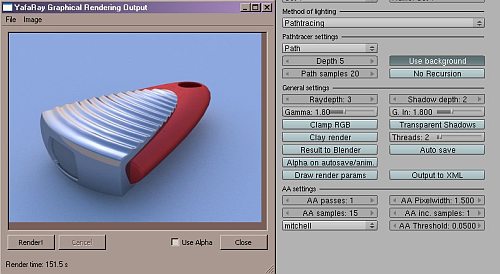 Studiorola has published a few quick tips on improving the quality of your Yafaray renders.
In my opinion, one of the most useable of the free biased Global Illumination renderer is Yafaray. You can now choose to use Yafaray, either with Blender 3D or Truespace. However, Yafaray does not comes with default settings that make good renderings.
For this article, we will focus on some Yafaray settings that aid in giving reasonable results. This screenshots below pertain to Yafaray for Blender 2.4X.
Link



Its a bit short,
p.s. I cringe everytime yafaray is called a biased renderer, actually it can be a bit misleading to call most modern ray tracers unbiased or biased. for yafaray its biased when using photon mapping but is unbiased when using path tracing and this is a setting you can change in most ray tracers I believe.
It is possible to use Yafray to bake textures?
And it is possible to achieve results like the old radiosity thing?
Thanks!
I’ve written a Yafaray render plugin for DeleD some month ago.
http://www.delgine.com/forum/viewtopic.php?t=4147
Currently is does not support much material options tho.
I wonder if Yafray will be integrated in the final 2.50 version.
These were all…rather basic things
Those tips are really just basic. You can get a true insight into the methods of render settings in the Yafaray documentation on the website. Alternatively in the Yafaray forum.
@carlinhos Integration process can be observed in GSoC thread.
@carlinhos: “I wonder if Yafray will be integrated in the final 2.50 version….”
Yes. Yafaray-Blender 2.5 Integration is one of the GSOC projects
http://www.yafaray.org/node/384
:D
Hallellujah!!!,
an useful tutorial not devoted to 2.50!!!
I can’t believe!!!
Regards,
Raimon
the settings are not only basic but somewhat incorrect.
Just a high AA in one pass does not make use of Yafarays new
AA approach.
It is the trick to have low and fast AA sample and than additional
passes to clean up the rest of the noise step by step.
Mesh lights for caustics are not very efficient either.
claas is entirely correct, the first tip is not true
Increasing the number of AA Samples is an inefficient way to improve the quality of your render as every pixel is sampled many times. To remove noise/jagged edges it is a better usage of render time to increase the number of passes and decrease the threshold.
If you don’t decrease the threshold very few pixels were be re-sampled and the image will remain noisy, but decrease it to >0.01 and the adaptive nature of the render will give you a smooth, fast image.